<?xml version="1.0" encoding="utf-8"?><feed xmlns="http://www.w3.org/2005/Atom" ><generator uri="https://jekyllrb.com/" version="3.10.0">Jekyll</generator><link href="https://brokenco.de//feed/by_tag/azure.xml" rel="self" type="application/atom+xml" /><link href="https://brokenco.de//" rel="alternate" type="text/html" /><updated>2026-10-31T17:58:32+00:00</updated><id>https://brokenco.de//feed/by_tag/azure.xml</id><title type="html">rtyler</title><subtitle>a moderately technical blog</subtitle><author><name>R. Tyler Croy</name></author><entry><title type="html">Building an Azure Function to send IRC notifications with Rust</title><link href="https://brokenco.de//2020/07/19/azure-functions-with-irc.html" rel="alternate" type="text/html" title="Building an Azure Function to send IRC notifications with Rust" /><published>2020-07-19T00:00:00+00:00</published><updated>2020-07-19T00:00:00+00:00</updated><id>https://brokenco.de//2020/07/19/azure-functions-with-irc</id><content type="html" xml:base="https://brokenco.de//2020/07/19/azure-functions-with-irc.html"><![CDATA[<p>Delivering a simple payload to IRC is an ideal use-case for Function-based
cloud computing. Last year when GitHub discontinued their service for pushing
notifications into IRC channels, I had a perfect situation to couch-hack with a
library I had recently discovered: <a href="https://github.com/peterhuene/azure-functions-rs/">Azure Functions for
Rust</a></p>

<p>Functions-as-a-Service are a technology which I constantly kick myself for
liking as much as I do. Functions, Lambdas, or whatever you wish to call them
are a novel reinvention of <a href="https://en.wikipedia.org/wiki/FastCGI">FastCGI</a>,
and lots of fun to mock, but like its predecessors: when appropriately used,
Functions can be incredibly useful. I personally think Functions work well as
low-throughput “glue”. Binding simple services or components together which
don’t warrant an “always-on” application means Functions can make good
technical and financial sense.</p>

<p>I wrote <a href="https://github.com/rtyler/irc-push-function">this simple function</a> a
few months ago, before I actually knew what I was doing with Rust. In the span
of an evening I was able to cobble something together which would read incoming
JSON and write information into a <a href="https://freenode.net">Freenode</a> channel:</p>

<div class="language-rust highlighter-rouge"><div class="highlight"><pre class="highlight"><code><span class="nd">#[func]</span>
<span class="k">pub</span> <span class="k">fn</span> <span class="nf">webhook</span><span class="p">(</span><span class="n">req</span><span class="p">:</span> <span class="n">HttpRequest</span><span class="p">)</span> <span class="k">-&gt;</span> <span class="n">HttpResponse</span> <span class="p">{</span>
    <span class="k">if</span> <span class="k">let</span> <span class="nf">Ok</span><span class="p">(</span><span class="n">event</span><span class="p">)</span> <span class="o">=</span> <span class="n">req</span><span class="nf">.body</span><span class="p">()</span><span class="py">.as_json</span><span class="p">::</span><span class="o">&lt;</span><span class="n">PushEvent</span><span class="o">&gt;</span><span class="p">()</span> <span class="p">{</span>
        <span class="nd">info!</span><span class="p">(</span><span class="s">"Parsed push event from {}"</span><span class="p">,</span> <span class="n">event</span><span class="py">.sender.login</span><span class="p">);</span>
        <span class="nf">dispatch_to_irc</span><span class="p">(</span><span class="n">event</span><span class="p">);</span>
        <span class="k">return</span> <span class="s">"Messages dispatched to IRC"</span><span class="nf">.into</span><span class="p">();</span>
    <span class="p">}</span>
    <span class="k">else</span> <span class="p">{</span>
        <span class="k">return</span> <span class="s">"Failed to parse event"</span><span class="nf">.into</span><span class="p">();</span>
    <span class="p">}</span>
<span class="p">}</span>
</code></pre></div></div>

<p>(<a href="https://github.com/rtyler/irc-push-function/blob/master/src/functions/webhook.rs">it’s really simple, I swear</a>)</p>

<p>I ended up learning more during this exercise about the Azure Functions Runtime
For Linux, than Rust itself. Traditional Azure Functions run inside a Windows
context, which aside from being totally hilarious, is incredibly limiting for
people wanting to do anything serious that isn’t built around C#. The Azure
Functions for Linux support is exactly how I wish <em>all</em> Functions-as-a-Service
providers operated: just build the thing into a Docker container. While the
<a href="https://github.com/rtyler/irc-push-function/blob/master/Dockerfile">Dockerfile</a>
is a bit esoteric, the end result is a conventional container which can be
shipped off to a registry from a CI process, just like practically everything
else in my world.</p>

<p>Overall the “irc-push-function” I developed is simple enough, runs without a
hitch, and hasn’t cost much of anything the entire time it has been running.
If you’re already running workloads in Azure, I certainly recommend trying out
<a href="https://github.com/peterhuene/azure-functions-rs/">azure-functions-rs</a>.</p>]]></content><author><name>R. Tyler Croy</name></author><category term="rust" /><category term="azure" /><category term="github" /><summary type="html"><![CDATA[Delivering a simple payload to IRC is an ideal use-case for Function-based cloud computing. Last year when GitHub discontinued their service for pushing notifications into IRC channels, I had a perfect situation to couch-hack with a library I had recently discovered: Azure Functions for Rust]]></summary></entry><entry><title type="html">Publishing to Azure Event Hubs from Rust</title><link href="https://brokenco.de//2019/04/04/azure-eventhubs-rust.html" rel="alternate" type="text/html" title="Publishing to Azure Event Hubs from Rust" /><published>2019-04-04T00:00:00+00:00</published><updated>2019-04-04T00:00:00+00:00</updated><id>https://brokenco.de//2019/04/04/azure-eventhubs-rust</id><content type="html" xml:base="https://brokenco.de//2019/04/04/azure-eventhubs-rust.html"><![CDATA[<p>Turn back now, this blog post is so niche that it’s statistically impossible
for you to find this useful. Last night I was thinking about building a little
app which needed to deal with an event stream, and started poking around the
Azure Event Hubs documentation. I noticed that they <em>apparently</em> can now <a href="https://docs.microsoft.com/en-us/azure/event-hubs/event-hubs-quickstart-kafka-enabled-event-hubs">speak
Kafka</a>
which means I can use my existing Kafka library tooling, nice! Since I was
already working with Kafka and Rust for another little project, I took a quick
detour and tried to see if I could publish to an Event Hub over Kafka, from
Rust. As luck would have it, I can!</p>

<p>The one quirk with Azure Event Hubs compared to how most people use Kafka was
the SASL/TLS authentication and encryption, was a bit tricky to use with the
<a href="https://crates.io/crates/rdkafka">rdkafka</a> crate, which built on top of the
fantastic <a href="https://github.com/edenhill/librdkafka">librdkafka</a>. SASL/TLS is
seems to have become the de facto standard for running Kafka-as-a-Service like
AWS MSK or Confluent Cloud, so it is wonderful to figure out how to use the
rdkafka crate in this environment.</p>

<p>The relevant code from <a href="https://gist.github.com/rtyler/3d5b0ed5858f4ae1c2694d1b1b711a31">my
gist</a> which
demonstrates this functionality is the <code class="language-plaintext highlighter-rouge">ClientConfig</code> for the producer:</p>

<div class="language-rust highlighter-rouge"><div class="highlight"><pre class="highlight"><code><span class="cm">/*
 * NOTE: `connection` is the full connection string for the Event Hub
 */</span>
<span class="k">let</span> <span class="n">producer</span><span class="p">:</span> <span class="n">FutureProducer</span> <span class="o">=</span> <span class="nn">ClientConfig</span><span class="p">::</span><span class="nf">new</span><span class="p">()</span>
    <span class="nf">.set</span><span class="p">(</span><span class="s">"bootstrap.servers"</span><span class="p">,</span> <span class="o">&amp;</span><span class="n">brokers</span><span class="p">)</span>
    <span class="nf">.set</span><span class="p">(</span><span class="s">"produce.offset.report"</span><span class="p">,</span> <span class="s">"true"</span><span class="p">)</span>
    <span class="nf">.set</span><span class="p">(</span><span class="s">"message.timeout.ms"</span><span class="p">,</span> <span class="s">"5000"</span><span class="p">)</span>
    <span class="nf">.set</span><span class="p">(</span><span class="s">"security.protocol"</span><span class="p">,</span> <span class="s">"sasl_ssl"</span><span class="p">)</span>
    <span class="cm">/*
        * The following setting -must- be set for librdkafka, but doesn't seem to do anything
        * worthwhile,. Since we're not relying on kerberos, let's just give it some junk :)
        */</span>
    <span class="nf">.set</span><span class="p">(</span><span class="s">"sasl.kerberos.kinit.cmd"</span><span class="p">,</span> <span class="s">"echo 'who wants kerberos?!'"</span><span class="p">)</span>
    <span class="cm">/*
        * Another unused setting which is required to be present
        */</span>
    <span class="nf">.set</span><span class="p">(</span><span class="s">"sasl.kerberos.keytab"</span><span class="p">,</span> <span class="s">"keytab"</span><span class="p">)</span>
    <span class="nf">.set</span><span class="p">(</span><span class="s">"sasl.mechanisms"</span><span class="p">,</span> <span class="s">"PLAIN"</span><span class="p">)</span>
    <span class="cm">/*
        * The username that Azure Event Hubs uses for Kafka is really this
        */</span>
    <span class="nf">.set</span><span class="p">(</span><span class="s">"sasl.username"</span><span class="p">,</span> <span class="s">"$ConnectionString"</span><span class="p">)</span>
    <span class="cm">/*
        * NOTE: Depending on your system, you may need to change this to adifferent location
        */</span>
    <span class="nf">.set</span><span class="p">(</span><span class="s">"ssl.ca.location"</span><span class="p">,</span> <span class="s">"/etc/ssl/ca-bundle.pem"</span><span class="p">)</span>
    <span class="nf">.set</span><span class="p">(</span><span class="s">"sasl.password"</span><span class="p">,</span> <span class="o">&amp;</span><span class="n">connection</span><span class="p">)</span>
    <span class="nf">.create</span><span class="p">()</span>
<span class="nf">.expect</span><span class="p">(</span><span class="s">"Producer creation error"</span><span class="p">);</span> 
</code></pre></div></div>

<p>With those settings in place, any of the existing Rust rdkafka examples should
work just fine, though I haven’t tested the consumer API just yet.</p>

<p>I should also note that the Azure Event Hubs “Standard” tier supports enabling
the Kafka protocol, but their “Basic” tier does not, which is too bad. The
“Basic” tier is cheaply priced enough to make it reasonable for a
hobby-project’s event stream.</p>

<hr />

<p>I’m looking forward to playing a bit more with Rust and Kafka in the future for
a myriad of reasons. The most compelling of which are “serverless”
environments, such as that provided by the <a href="https://github.com/awslabs/aws-lambda-rust-runtime">AWS Lambda Rust
runtime</a>. The pricing of
AWS Lambda encourages fast (pricing per 100ms) and small (pricing per MB of
memory) makes it an ideal candidate for Rust.</p>

<p>Whether you’re considering Azure Event Hubs, or any other SASL/TLS-based Kafka
interface, now you know how to use it from Rust!</p>]]></content><author><name>R. Tyler Croy</name></author><category term="rust" /><category term="kafka" /><category term="azure" /><summary type="html"><![CDATA[Turn back now, this blog post is so niche that it’s statistically impossible for you to find this useful. Last night I was thinking about building a little app which needed to deal with an event stream, and started poking around the Azure Event Hubs documentation. I noticed that they apparently can now speak Kafka which means I can use my existing Kafka library tooling, nice! Since I was already working with Kafka and Rust for another little project, I took a quick detour and tried to see if I could publish to an Event Hub over Kafka, from Rust. As luck would have it, I can!]]></summary></entry><entry><title type="html">Making a local service public, with Azure Container Instances</title><link href="https://brokenco.de//2019/03/26/local-tunnel-with-azure-containers.html" rel="alternate" type="text/html" title="Making a local service public, with Azure Container Instances" /><published>2019-03-26T00:00:00+00:00</published><updated>2019-03-26T00:00:00+00:00</updated><id>https://brokenco.de//2019/03/26/local-tunnel-with-azure-containers</id><content type="html" xml:base="https://brokenco.de//2019/03/26/local-tunnel-with-azure-containers.html"><![CDATA[<p>Whether I’m sharing a locally developed service with a member of our globally
distributed team, or I need to integrate some cloud-based service with local
development, I frequently find the need to expose a local TCP service to the
public internet. In the past I have tried to use tools such as
<a href="https://localtunnel.github.io/www/">localtunnel</a> or
<a href="https://smee.io">smee.io</a>, and in both cases I found them lacking; I simply
want <em>this</em> TCP port open to the world! Yesterday afternoon I spent some time
hacking on the first version of my own little solution:
<a href="https://github.com/rtyler/aci-tunnel">aci-tunnel</a>.</p>

<p>aci-tunnel relies on the <a href="https://docs.microsoft.com/en-us/cli/azure/install-azure-cli?view=azure-cli-latest">Azure
CLI</a>
and will provision an ephemeral <a href="https://docs.microsoft.com/en-us/azure/container-instances/">Azure Container
Instance</a>, to
which an SSH reverse port forwarding tunnel is opened. The screencast below
shows an example of using <code class="language-plaintext highlighter-rouge">aci-tunnel</code> to expose a locally running Jenkins
environment:</p>

<center>
<script id="asciicast-236487" src="https://asciinema.org/a/236487.js" async=""></script>
</center>

<h2 id="the-details">The Details</h2>

<p>There are two components to <code class="language-plaintext highlighter-rouge">aci-tunnel</code>, the first is the <a href="https://hub.docker.com/r/rtyler/aci-tunnel">custom
container</a> which is deployed into
Azure. The container is a fairly simple derivative of <a href="https://alpinelinux.org/">Alpine
Linux</a> with the <code class="language-plaintext highlighter-rouge">openssh-server</code> package installed.
The daemon is also configured with <code class="language-plaintext highlighter-rouge">GatewayPorts yes</code> to enable binding a
reverse port forward onto <code class="language-plaintext highlighter-rouge">0.0.0.0</code> in the container. For added security
whenever <code class="language-plaintext highlighter-rouge">aci-tunnel</code> launches, it passes along the user’s <code class="language-plaintext highlighter-rouge">~/.ssh/id_rsa.pub</code>
along to the instance which is dropped into the container as an
<code class="language-plaintext highlighter-rouge">authorized_keys</code> file. This ensures that only the user that launches
<code class="language-plaintext highlighter-rouge">aci-tunnel</code> can access the container.</p>

<p>The container is launched with the ports 22, and whatever the user specifies,
open to the public into Azure Container Instances.</p>

<p>On the local side, the <code class="language-plaintext highlighter-rouge">aci-tunnel</code> script creates the SSH tunnel with the
right arguments to construct the reverse port forwarding enabled.</p>

<p>Once the highly sophisticated tunnel keep-alive command has been interrupted,
terminating the SSH tunnel, <code class="language-plaintext highlighter-rouge">aci-tunnel</code> then destroys the container in Azure.</p>

<hr />

<p>Wholly controlling my own tunnel infrastructure works quite well. In my early
experimentation I was able to share a local service while sitting on public
transit wifi, which was a bit slow but still allowed the HTTP and other TCP
requests to transit the link properly.</p>]]></content><author><name>R. Tyler Croy</name></author><category term="opensource" /><category term="azure" /><summary type="html"><![CDATA[Whether I’m sharing a locally developed service with a member of our globally distributed team, or I need to integrate some cloud-based service with local development, I frequently find the need to expose a local TCP service to the public internet. In the past I have tried to use tools such as localtunnel or smee.io, and in both cases I found them lacking; I simply want this TCP port open to the world! Yesterday afternoon I spent some time hacking on the first version of my own little solution: aci-tunnel.]]></summary></entry><entry><title type="html">Provision a personal Kubernetes in 3 minutes on Azure</title><link href="https://brokenco.de//2018/01/08/personal-kubernetes.html" rel="alternate" type="text/html" title="Provision a personal Kubernetes in 3 minutes on Azure" /><published>2018-01-08T00:00:00+00:00</published><updated>2018-01-08T00:00:00+00:00</updated><id>https://brokenco.de//2018/01/08/personal-kubernetes</id><content type="html" xml:base="https://brokenco.de//2018/01/08/personal-kubernetes.html"><![CDATA[<p>At my previous company one frequent request made by developers was along the
lines of “I want to be able to run a development stack on my machine.” Frankly,
I never understood this desire, and still don’t. While I would agree that my
laptop is underpowered, running a stack of JVMs and other applications, in
addition to a web browser, would bring most machines to a crawl. An ideal
alternative, is to simply operate a personal Kubernetes environment in a public
cloud. Fortunately, that is now a genuinely <strong>simple</strong> task.</p>

<p>Last year the team at Microsoft working on Azure introduced “AKS”, a managed
<a href="https://kubernetes.io">Kubernetes</a> environment. They also introduced <a href="https://azure.microsoft.com/en-us/features/cloud-shell/">Cloud
Shell</a> which allows
for a quick shell in the Azure portal for running authenticated commands. What
they didn’t talk too much about, was that Cloud Shell comes pre-baked with:</p>

<ul>
  <li><code class="language-plaintext highlighter-rouge">az</code> the Azure CLI tool, already authenticated.</li>
  <li><code class="language-plaintext highlighter-rouge">kubectl</code> the Kubernetes command-line interface.</li>
  <li><code class="language-plaintext highlighter-rouge">helm</code> a package manager for Kubernetes.</li>
</ul>

<p>With both of these, it’s <strong>absurdly</strong> easy to provision a Kubernetes
environment in under 3 minutes.</p>

<ul>
  <li>Create a resource group: <code class="language-plaintext highlighter-rouge">az group create -n &lt;name&gt; -l &lt;location&gt;</code></li>
  <li>Create a Kubernetes environment: `az aks create -n <name> -l <location> -g
</location></name>    <group> -k <kubernetes-version> --node-count <count>`


</count></kubernetes-version></group>
  </li>
</ul>
<p>Below is an example I just ran:</p>

<div class="language-plaintext highlighter-rouge"><div class="highlight"><pre class="highlight"><code>tyler@Azure:~$ az group create -n unethicalblogger -l eastus
Location    Name
----------  ----------------
eastus      unethicalblogger
tyler@Azure:~$ az aks create -n ub -g unethicalblogger --node-count 1 --generate-ssh-keys -k 1.8.2 -l eastus
SSH key files '/home/tyler/.ssh/id_rsa' and '/home/tyler/.ssh/id_rsa.pub' have been generated under ~/.ssh to allow SSH acces
s to the VM. If using machines without permanent storage like Azure Cloud Shell without an attached file share, back up your
keys to a safe location
AAD role propagation done[############################################]  100.0000%
DnsPrefix                   Fqdn                                                      KubernetesVersion    Location    Name
  ProvisioningState    ResourceGroup
--------------------------  --------------------------------------------------------  -------------------  ----------  ------  -------------------  ----------------
ub-unethicalblogger-be5308  ub-unethicalblogger-be5308-ccbb80df.hcp.eastus.azmk8s.io  1.8.2                eastus      ub  Succeeded            unethicalblogger
</code></pre></div></div>

<p><img src="/images/post-images/provision-kubernetes/cloud-shell.png" alt="Provisioning with Cloud Shell" /></p>

<hr />

<p>In the above example I only deployed on “node” (Virtual Machine) which means
the Kubernetes environment is going to cost about $50/month. Of course, I can
scale that up with <code class="language-plaintext highlighter-rouge">az aks scale</code> if I need more capacity, but for small
personal projects, this is more t han enough.</p>

<p>With my own personal Kubernetes provisioned, I can start dropping Helm charts
into the environment without wasting any of laptops resources.</p>

<p>Quite fancy!</p>]]></content><author><name>R. Tyler Croy</name></author><category term="kubernetes" /><category term="azure" /><summary type="html"><![CDATA[At my previous company one frequent request made by developers was along the lines of “I want to be able to run a development stack on my machine.” Frankly, I never understood this desire, and still don’t. While I would agree that my laptop is underpowered, running a stack of JVMs and other applications, in addition to a web browser, would bring most machines to a crawl. An ideal alternative, is to simply operate a personal Kubernetes environment in a public cloud. Fortunately, that is now a genuinely simple task.]]></summary></entry><entry><title type="html">Transparently supporting external Artifacts in Jenkins</title><link href="https://brokenco.de//2018/01/04/external-artifacts-jenkins.html" rel="alternate" type="text/html" title="Transparently supporting external Artifacts in Jenkins" /><published>2018-01-04T00:00:00+00:00</published><updated>2018-01-04T00:00:00+00:00</updated><id>https://brokenco.de//2018/01/04/external-artifacts-jenkins</id><content type="html" xml:base="https://brokenco.de//2018/01/04/external-artifacts-jenkins.html"><![CDATA[<p>One of the first pain points many organizations endure when scaling Jenkins is
the rapid accumulation of artifacts on their master’s filesystem. Artifacts
are typically built packages such as <code class="language-plaintext highlighter-rouge">.jar</code>, <code class="language-plaintext highlighter-rouge">.tar.gz</code>, or <code class="language-plaintext highlighter-rouge">.img</code>
files, which are useful to persist after a Pipeline Run has completed for later
review as necessary. The problem that manifests over time, is quite
predictable, archived artifacts incur significant disk usage on the master’s
filesystem and the network traffic necessary to store and serve the artifacts
becomes a non-trivial problem for the availability of the Jenkins master.</p>

<p>Perhaps one of my “favorite” (read: not my favorite) responses from the “Not
Actually Helpful Brigade” to questions or
concerns about scaling artifact storage on the
Jenkins mailing list is something along the lines: “Archived artifacts aren’t
supposed to be used like that, you should really be using Artifactory or
Nexus.”</p>

<p><strong>Not. Actually. Helpful.</strong></p>

<p>One of my number one pet-peeves with any piece of software is when people tell
me that I’m using it wrong. <strong>No.</strong> If I’m not supposed to use Jenkins in this
fashion, and Jenkins doesn’t prevent me from doing so, that’s a bug in Jenkins,
full stop.</p>

<p>While discussing this a bit with my crazy-idea co-conspirator
<a href="https://github.com/i386">Jimbo</a>, I came to a delightfully devious idea: <strong>what
if I could transparently make artifact archival external to Jenkins?</strong></p>

<p>Traditionally in Jenkins people solve problems with plugins. I hate plugins. I
hate to write them. I hate managing their N-different upgrade lifecycles in
Jenkins environments I maintain. I hate that “write a plugin” is the de-facto
answer given to many who wish to do interesting things in Jenkins.</p>

<p>I do, however, love Jenkins Pipeline. I love writing Jenkins Pipeline. I love
that I can put Jenkins Pipelines in a <code class="language-plaintext highlighter-rouge">Jenkinsfile</code> and check it into my source
repo. I love that I can do many interesting things with Jenkins via Pipelines.</p>

<h3 id="implementing-crazy-things">Implementing crazy things</h3>

<p>Pipeline provides two steps, <code class="language-plaintext highlighter-rouge">archive</code> which was deprecated against all
sensible logic, and <code class="language-plaintext highlighter-rouge">archiveArtifacts</code> which does the exact same thing with
more arguments and verbosity. Starting with the <a href="/2017/08/03/overriding-builtin-steps-pipeline.html">overriding built-in
steps</a> pattern, which I
discussed last August, I set about re-implementing these two steps in a <a href="https://jenkins.io/doc/book/pipeline/shared-libraries/">Shared
Library</a></p>

<p>Part of the challenge with implementing a Pipeline Shared Library is that the
Groovy code implemented in them executes within the Jenkins <strong>master</strong> JVM,
whereas Pipeline <em>steps</em> execute within the Jenkins <strong>agent</strong> JVM. The
consequence of this is that I cannot simply load a Java library which supports
uploading files to Azure Blob Storage (for example) because when that code
would execute, it would be executing inside the Jenkins <strong>master</strong> rather than
the <strong>agent</strong> and therefore would not have access to the filesystem.</p>

<p>Approaching this problem from a slightly different angle: I need to be able to
get “my” Pipeline Shared Library code to execute on the <strong>agent</strong> in order to
have access to the filesystem. Reaching into my Pipeline bag of tricks, which
looks suspiciously similar to my Pipeline pit of despair, I grabbed the
built-in <code class="language-plaintext highlighter-rouge">libraryResource</code> step which can “Load a resource file from a shared
library.” The following snippet of (Scripted Pipeline) code will allow me to drop code onto an
<strong>agent</strong> for execution:</p>

<div class="language-plaintext highlighter-rouge"><div class="highlight"><pre class="highlight"><code>    String uploadScript =  libraryResource 'io/codevalet/externalartifacts/upload-file-azure.sh'
    writeFile file: 'my-special-script', text: uploadScript
    sh 'bash my-special-script'
</code></pre></div></div>

<p>Overriding <code class="language-plaintext highlighter-rouge">archiveArtifacts</code> is only half of the solution however, from the
web UI in Jenkins, end-users should still be able to access the archived
artifacts.</p>

<p>Included in my
<a href="https://github.com/CodeValet/external-artifacts/blob/master/vars/archiveArtifacts.groovy">override</a>
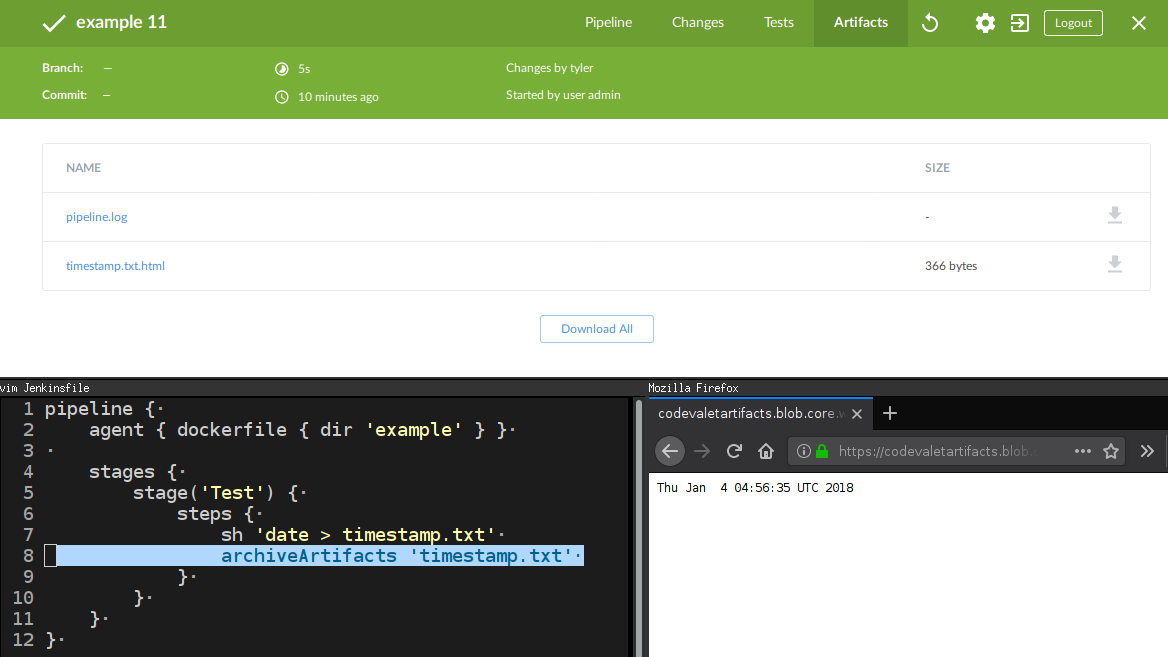
is code which will generate an HTML file with a redirect to the artifact in
Azure, and use the <em>actual</em> built-in <code class="language-plaintext highlighter-rouge">archiveArtifacts</code> to store that.
Presently I don’t have a more elegant solution for a “artifact pointer” but I’m
sure that could be solved via an actual plugin :).</p>

<p>By defining some environment variables and credentials at an administrative
level, to indicate where artifacts should be stored, and by using the “Load
Implicitly” pattern discussed in the <a href="/2017/08/03/overriding-builtin-steps-pipeline.html">overriding built-in
steps</a> blog post, I can
override the artifact archival for end-users in my Jenkins environment.</p>

<p><img src="/images/post-images/external-artifacts/finished-flow.png" alt="Finished product" /></p>

<h3 id="future-work">Future work</h3>

<p>My <a href="https://github.com/CodeValet/external-artifacts">current work-in-progress</a>
relies on a crazy Bash script for uploading files to Azure, which means it has
some system dependencies and does not work on Windows. I plan to work around
this by implementing the artifact upload with Go and embedding Go binaries in
the Shared Library for delivery with <code class="language-plaintext highlighter-rouge">libraryResource</code>.</p>

<p>The other bit of future work I would like to implement is <code class="language-plaintext highlighter-rouge">unarchive</code>, which is
actually a real built-in step in Pipeline, but doesn’t seem to actually be
usable in any tangible sense. There are some cross-Pipeline use-cases for
“unarchiving” an artifact for re-use, which is currently not well supported in
Pipeline.</p>

<p>Another potential area of exploration would be overriding <code class="language-plaintext highlighter-rouge">stash</code> and <code class="language-plaintext highlighter-rouge">unstash</code>
steps to use this external artifact storage mechanism to avoid some of the
<a href="https://jenkins.io/projects/remoting/">Remoting</a> performance penalties which
are associated with larger stashes.</p>

<h3 id="conclusion">Conclusion</h3>
<p>.
After a night of fervent hacking on this experiment, I cannot yet confidently
state whether it’s a terrible or brilliant idea. I do think this approach has
the potential to be an “easy win” for making Jenkins more scalable, without
requiring significant surgery in Jenkins core or the surrounding plugins.</p>

<p>Assuming this pattern has potential, I can imagine it being trivial to support
S3, Azure Blob Storage, Swift, and any number of other storage backends. If
they can be supported via a simple Go program, then why not!</p>]]></content><author><name>R. Tyler Croy</name></author><category term="jenkins" /><category term="azure" /><category term="pipeline" /><summary type="html"><![CDATA[One of the first pain points many organizations endure when scaling Jenkins is the rapid accumulation of artifacts on their master’s filesystem. Artifacts are typically built packages such as .jar, .tar.gz, or .img files, which are useful to persist after a Pipeline Run has completed for later review as necessary. The problem that manifests over time, is quite predictable, archived artifacts incur significant disk usage on the master’s filesystem and the network traffic necessary to store and serve the artifacts becomes a non-trivial problem for the availability of the Jenkins master.]]></summary></entry><entry><title type="html">Jenkins on Kubernetes with Azure storage</title><link href="https://brokenco.de//2017/12/01/aks-storage-research.html" rel="alternate" type="text/html" title="Jenkins on Kubernetes with Azure storage" /><published>2017-12-01T00:00:00+00:00</published><updated>2017-12-01T00:00:00+00:00</updated><id>https://brokenco.de//2017/12/01/aks-storage-research</id><content type="html" xml:base="https://brokenco.de//2017/12/01/aks-storage-research.html"><![CDATA[<p><em>This research was funded by <a href="https://cloudbees.com/">CloudBees</a> as part of my
work in the CTO’s Office with the vague guideline of “ask interesting
questions and then answer them.” It does not represent any specific product
direction by CloudBees and was performed with
<a href="https://jenkins.io">Jenkins</a>, rather than CloudBees products, and Kubernetes
1.8.1 on Azure.</em></p>

<p>At <a href="/tag/azure.html">this point</a> it is certainly no secret that I am fond of the
work the Microsoft Azure team have been doing over the past couple years. While
I was excited to announce <a href="https://jenkins.io/blog/2016/05/18/announcing-azure-partnership/">we had
partnered</a> to
run Jenkins project infrastructure on Azure. Things didn’t start to get <em>really</em>
interesting until they announced <a href="https://azure.microsoft.com/en-us/services/container-service/">Azure Container
Service</a>. A
mostly-turn-key Kubernetes service alone was pretty interesting, but then
“<a href="https://azure.microsoft.com/en-us/blog/introducing-azure-container-service-aks-managed-kubernetes-and-azure-container-registry-geo-replication/">AKS</a>”
was announced, bringing a, much needed, <em>managed</em> Kubernetes resource into the
Azure ecosystem. Long story short, thanks to Azure, I’m quite the fan of
Kubernetes now too.</p>

<p>Kubernetes is brilliant at a lot of things. It’s easy to use, has some really
great abstractions for common orchestration patterns, and is superb for running
stateless applications. State<strong>ful</strong> applications also run fairly well on
Kubernetes, but the challenge usually has <em>much</em> more to do with the
application, rather than Kubernetes. Jenkins is one of those challenging
applications.</p>

<p>Since Jenkins is my jam, this post covers the ins-and-outs of deploying a
Jenkins master on Kubernetes, specifically through the lens of Azure Container
Service (AKS).  This will cover the basic gist of running a Jenkins environment
on Kubernetes, evaluating the different storage options for “Persistent
Volumes” available in Azure, outlining their limitations for stateful
applications such as Jenkins, and will conclude with some recommendations.</p>

<ul>
  <li><a href="#filesystem">Jenkins and the File System</a></li>
  <li><a href="#k8s-storage">Kubernetes Storage</a></li>
  <li><a href="#azure-disk">Azure Disk</a></li>
  <li><a href="#azure-file">Azure File</a></li>
  <li><a href="#conclusions">Conclusions</a></li>
</ul>

<p><a name="filesystem"></a></p>

<h2 id="jenkins-and-the-file-system">Jenkins and the File System</h2>

<p>To understand how Jenkins relates to storage in Kubernetes, it’s useful to
first review how Jenkins utilizes its backing file system. Unlike many
contemporary web applications, Jenkins does not make use of a relational
database or any other off-host storage layer, but rather writes a number of
files to the file system of the host running the master process.</p>

<p>These files are not data files, or configuration files, in the traditional
sense. The Jenkins master maintains an internal tree-like object model, wherein
generally each node (object) in that tree is serialized in an XML format to the
file system. This does not mean that every single object in memory is written
to an XML file, but a non-trivial number of “live” objects representing
Credentials, Agents, Projects, and other configurations, may be periodically
written to disk at any given time.</p>

<p>A concrete example would be: when an administrator navigates to
<code class="language-plaintext highlighter-rouge">http://JENKINS_URL/manage</code> and changes a setting such as “Quiet Period” and
clicks “Save”, the <code class="language-plaintext highlighter-rouge">config.xml</code> file (typically) in <code class="language-plaintext highlighter-rouge">/var/lib/jenkins</code> will be
rewritten.</p>

<p>These files aren’t typically read in any periodic fashion, they’re usually
only read when objects are loaded into memory during the initialization of Jenkins.</p>

<p>Additionally, XML files will span a number of levels in the directory
hierarchy. Each Job or Pipeline will have a directory in
<code class="language-plaintext highlighter-rouge">/var/lib/jenkins/jobs/&lt;jobname&gt;</code> which will have subfolders containing files
corresponding to each Run.</p>

<p>In short, Jenkins generates a large number of little files across a broad, and
sometimes deep, directory hierarchy. Combined with the read/write access
patterns Jenkins has, I would consider it a “worst-case scenario” for just
about any commonly used network-based storage solution.</p>

<p>Perhaps some future post will more thoroughly profile the file system
performance of Jenkins, but suffice it to say: it’s complicated.</p>

<p><a name="k8s-storage"></a></p>

<h2 id="kubernetes-storage">Kubernetes Storage</h2>

<p>With a bit of background on Jenkins, here’s a cursory overview storage in
Kubernetes. Kubernetes itself provides a consistent, cross-platform, interface
primarily via three “objects” if you will: <a href="https://kubernetes.io/docs/concepts/storage/persistent-volumes/">Persistent
Volumes</a>,
Persistent Volume Claims, and <a href="https://kubernetes.io/docs/concepts/storage/storage-classes/">Storage
Classes</a>. Without
diving too deep into the details, workloads such as Jenkins will typically make
a “Persistent Volume Claim”, as in “hey give me something I can mount as a
persistent file system.”  Kubernetes then takes this and confers with the
configured Storage Classes to determine how to meet that need.</p>

<p>In Azure these claims are handled by one of two provisioners:</p>

<ul>
  <li><a href="#azure-disk">Azure Disk</a>: an abstraction on top of Azure’s “data disks”
which are attached to a Node within the cluster. These show up on the actual
Node as if a real disk/storage device has been plugged into the machine.</li>
  <li><a href="#azure-file">Azure File</a>: an abstraction on top of Azure Files Storage, which
is basically CIFS/SMB-as-a-Service. CIFS mounts are attached to the Node
within the cluster, but rapidly attachable/detachable like any other CIFS/SMB
mount.</li>
</ul>

<p>Both of these can be used simultaneously to provide persistence for stateful
applications in Kubernetes running on Azure, but their performance and
capabilities are not going to be interchangeable.</p>

<p><a name="azure-disk"></a></p>

<h3 id="azure-disk">Azure Disk</h3>

<p>In AKS, two Storage Classes are pre-configured by default, yet neither one is
configured to <a href="https://github.com/Azure/AKS/issues/48">actually <strong>be</strong> the default Storage
Class</a>:</p>

<ul>
  <li><code class="language-plaintext highlighter-rouge">default</code>: utilizes the “Standard” storage (as in, hard drive, spinning
magnetic disks) model in Azure.</li>
  <li><code class="language-plaintext highlighter-rouge">managed-premium</code>: utilizes the “Premium” storage (as in, solid state
drives).</li>
</ul>

<p>The only real distinctions between the two which I have observed are going to be
speed and cost.</p>

<h4 id="limitations">Limitations</h4>

<p>Regardless of whether “Standard” or “Premium” storage is used for Azure
Disk-backed Persistent Volumes in Kubernetes (AKS or ACS) the limitations are
the same.</p>

<p>In my testing, the most frustrating limitation is the <a href="https://docs.microsoft.com/en-us/azure/virtual-machines/windows/sizes-general">fixed number of data disks which can be attached to a Virtual Machine in Azure</a>.</p>

<p>As of this writing, the default Virtual Machine size used when provisioning AKS
is: <code class="language-plaintext highlighter-rouge">Standard_D1_v2</code>. One vCPU and 3.5GB of memory and a data disk limit of
<strong>four</strong>. Fortunately the default node count for AKS is current 3, but this
means that a default AKS cluster cannot currently support more than 12
Persistent Volumes backed by Azure Disk at once.</p>

<p>An easy way to change that is to provision larger Virtual Machine sizes with
AKS, but this <strong>cannot be changed</strong> once the cluster has been provisioned. For
my research clusters I have stuck with a minimum size of <code class="language-plaintext highlighter-rouge">Standard_D4_v2</code> which
provides up to 32 data disks per Virtual Machine, e.g.:
<code class="language-plaintext highlighter-rouge">az aks create -g my-resource-group -n aks-test-cluster -s Standard_D4_v2</code></p>

<p>The Azure Disk Storage Class in Kubernetes also only supports the
<code class="language-plaintext highlighter-rouge">ReadWriteOnce</code> <a href="https://kubernetes.io/docs/concepts/storage/persistent-volumes/#access-modes">access mode</a>.
In effect a Persistent Volume can only be mounted read/write by a single Node
within the Kubernetes cluster. By understanding how Azure Disk volumes are
provisioned and attached to Virtual Machines in Azure, this makes total sense.
The impact of this means that the only allowable <code class="language-plaintext highlighter-rouge">replica</code> setting for any
given workload which might use this Persistent Volume is <strong>1</strong>.</p>

<p>This has one further limitation on scheduling and high-availability for
workloads running on the cluster. Detaching and attaching disks to these
Virtual Machines is a <strong>slow</strong> operation. In my experimenting this varied from
approximately 1 to 5 minutes.</p>

<p>For a “high availability” stateful workload, this means that a Pod dying or
being killed by a rolling update, may incur a non-trivial outage <strong>if</strong>
Kubernetes schedules that Pod for a different Node in the cluster. While there
is support <a href="https://kubernetes.io/docs/concepts/configuration/assign-pod-node/">specifying node affinity</a>
in Kubernetes, I have not figured out a means of encouraging Kubernetes to keep
a workload scheduled on whichever Node has mounted the Persistent Volume.
Though it would be possible to explicitly pin a Persistent Volume to a specific
Node, and then pin a Pod to that Node, a lot of workload flexibility would be
lost.</p>

<h4 id="benefits">Benefits</h4>

<p>It may be tempting to think at this point “Azure Disk is not good, so
everything should just use Azure File!” But there are benefits to Azure Disk
which should be considered. Azure Disk is, for lack of a better description, a
big dumb block store. In that simplicity are its strengths.</p>

<p>While Persistent Volumes backed by Azure Disk can be slow to detach or reattach
to a Node, once they’re present, they’re fast. Operations like disk scans,
small reads and writes, all <em>feel</em> like trivially fast operations from the
Jenkins standpoint. In my testing the difference between a Jenkins master
running on local instance storage (the Virtual Machine’s “main” disk) and
running a Jenkins master on a partition from a Data Disk, is imperceptible.</p>

<p>Another benefit which I didn’t realize until I evaluated <a href="#azure-file">Azure
File</a> backed Persistent Volumes is that, as a big dumb block
store, Azure Disks are essentially whatever file system format you want them to
be. In AKS they default to <code class="language-plaintext highlighter-rouge">ext4</code> which is perfectly happy and native to me,
meaning my Linux-based containers will make the correct assumptions about the
underlying file system’s capabilities.</p>

<p><a name="azure-file"></a></p>

<h3 id="azure-file">Azure File</h3>

<p>AKS does not set up an Azure File Storage Class by default, but the Kubernetes
versions which are available (1.7.7, 1.8.1) have the support for Azure File
backed Persistent Volumes. In order to add the storage class, pass something
like the following to Kubernetes via <code class="language-plaintext highlighter-rouge">kubectl create -f azurefile.yaml</code>:</p>

<div class="language-yaml highlighter-rouge"><div class="highlight"><pre class="highlight"><code><span class="nn">---</span>
<span class="na">kind</span><span class="pi">:</span> <span class="s">StorageClass</span>
<span class="na">apiVersion</span><span class="pi">:</span> <span class="s">storage.k8s.io/v1</span>
<span class="na">metadata</span><span class="pi">:</span>
  <span class="na">name</span><span class="pi">:</span> <span class="s">azurefile</span>
  <span class="na">annotations</span><span class="pi">:</span>
  <span class="na">labels</span><span class="pi">:</span>
    <span class="na">kubernetes.io/cluster-service</span><span class="pi">:</span> <span class="s1">'</span><span class="s">true'</span>
<span class="na">provisioner</span><span class="pi">:</span> <span class="s">kubernetes.io/azure-file</span>
<span class="na">parameters</span><span class="pi">:</span>
  <span class="na">storageAccount</span><span class="pi">:</span> <span class="s1">'</span><span class="s">mygeneralpurposestorageaccount'</span>
<span class="na">reclaimPolicy</span><span class="pi">:</span> <span class="s1">'</span><span class="s">Retain'</span>
<span class="c1"># mountOptions are passed into mount.cifs as `-o` options</span>
<span class="na">mountOptions</span><span class="pi">:</span>
</code></pre></div></div>

<p>According to <a href="https://kubernetes.io/docs/concepts/storage/storage-classes/#azure-file">the Azure File documentation</a>
it’s not necessary to specify the <code class="language-plaintext highlighter-rouge">storageAccount</code> key, but I had some
difficulty coaxing AKS to provision an Azure Storage Account on its own, so I
manually provisioned one within the “hidden” AKS Resource Group”
(<code class="language-plaintext highlighter-rouge">MC_&lt;group&gt;_&lt;aks-name&gt;_&lt;location&gt;</code>) and entered the name into
<code class="language-plaintext highlighter-rouge">azurefile.yaml</code>.</p>

<p>Full disclosure: I <strong>hate</strong> Storage Accounts in Azure. Where nearly everything
else in Azure rather enjoyable to use, and neatly tucked into Resource Groups,
and have reasonable naming restrictions, Storage Accounts are crummy and live
in an Azure <em>global namespace</em> so if somebody else chooses the same name as what
you want, tough luck. The reason this is somewhat relevant to the current
discussion is that Storage Accounts <em>feel old</em> when you use them. Everything
about them <em>feels</em> as if it’s from a by-gone era in Azure’s development (ASM).</p>

<p>The feature used by the Azure File Storage Class is what I would describe as
“Samba/CIFS-as-a-Service.”  Kubernetes is basically utilizing the
Microsoft-technology-equivalent of NFS.</p>

<p>But it’s not NFS, it’s CIFS. And that is <strong>important</strong> to Linuxy container
folks.</p>

<h4 id="limitations-1">Limitations</h4>

<p>The biggest limitations with Azure File backed Persistent Volumes in Kubernetes
are really limitations of
<a href="https://technet.microsoft.com/en-us/library/cc939973.aspx">CIFS</a>, and frankly,
they are <em>infuriating</em>. An application like Jenkins will make, what were at one
point, reasonable assumptions about the operation system and underlying
file system. “If it looks like a Linux operating system, I am going to assume
the file system supports symbolic links” comes to mind. Jenkins will attempt to
create symbolic links when a Pipeline Run or Build completes, to update a
<code class="language-plaintext highlighter-rouge">lastSuccessfulBuild</code> or <code class="language-plaintext highlighter-rouge">lastFailedBuild</code> symbolic link, which are useful for
hyperlinks in the Jenkins web interface.</p>

<p>Jenkins should no doubt be more granular and thoughtful about file system
capabilities, but I’m willing to bet that a number of other applications which
you might consider deploying on Kubernetes are also making assumptions along
the lines of “it’s a Linux, so it’s probably a Linuxey file system” which Azure
File backed Persistent Volumes invalidate.</p>

<p>Volumes which are attached to the Node, are attached <a href="https://github.com/kubernetes/kubernetes/issues/2630#issuecomment-344091454">with very strict
permissions</a>.
On a Linux file system level, an Azure File backed volume attached at <code class="language-plaintext highlighter-rouge">/mnt/az</code>
would be attached with <code class="language-plaintext highlighter-rouge">0700</code> permissions allowing <em>only</em> root access. There
are two options for working around this, as far as I am aware of:</p>

<ol>
  <li>Adding a <code class="language-plaintext highlighter-rouge">uid=1000</code> to the <code class="language-plaintext highlighter-rouge">mountOptions</code> specified for the Storage Class in
the <code class="language-plaintext highlighter-rouge">azurefile.yaml</code> referenced above. Unfortunately this would require that
every container attempting to utilize Azure File backed volumes use the same
uid.</li>
  <li>Specifying a
<a href="https://kubernetes.io/docs/tasks/configure-pod-container/security-context/">securityContext</a>
for the container with: <code class="language-plaintext highlighter-rouge">runAsUser: 0</code>. This makes me feel exceptionally
uncomfortable, and I would absolutely not recommend running any untrusted
workloads on a Kubernetes cluster with this setting.</li>
</ol>

<p>The final, and for me the most important, limitation for Azure File backed
storage is the performance. Presently there is <a href="https://feedback.azure.com/forums/217298-storage/suggestions/8374074-offer-premium-storage-option-for-azure-file-servic">no Premium model offered for
Azure Files Storage</a>,
which I would presume means that Azure File volumes are backed by spinning hard
drives, rather than solid state.</p>

<p>The performance bottleneck for Jenkins is <em>not</em> theoretical however. With a
totally fresh Persistent Volume Claim for a Jenkins application, the
initialization of the application took upwards of <strong>5-15 minutes</strong>, namely:</p>

<ul>
  <li>2-3 <em>seconds</em> to create the Persistent Volume and bind it to a Node in the
Kubernetes cluster.</li>
  <li>3-4 minutes to “extract [Jenkins] from war file”. When <code class="language-plaintext highlighter-rouge">jenkins.war</code> runs the
first time, it unpacks the <code class="language-plaintext highlighter-rouge">.war</code> file into <code class="language-plaintext highlighter-rouge">JENKINS_HOME</code> (usually
<code class="language-plaintext highlighter-rouge">/var/lib/jenkins</code>) and populates <code class="language-plaintext highlighter-rouge">/var/lib/jenkins/war</code> with a number of small
 static files. Basically, unzipping a 100MB archive which contains hundreds of
 files.</li>
  <li>5-10 minutes from “Starting Initialization” to “Jenkins is ready.” In my
observation this tends to be highly variable depending on the size of Jenkins
environment, how many plugins are loaded, and what kind of configuration XML
files must be loaded at initialization time.</li>
</ul>

<p>The closest comparison to Azure File backed storage and the performance
challenges I have observed with it, are similar to challenges the CloudBees
Engineering team observed with <a href="https://aws.amazon.com/efs/">Amazon EFS</a> when
it was first announced. The disk read/write patterns exhibited by Jenkins
caused trouble on EFS as well, but that has seen marked improvement over the
last 6 months, whereas Azure Files Storage doesn’t appear to have had
significant performance improvements in a number of years.</p>

<h4 id="benefits-1">Benefits</h4>

<p>Despite performance challenges, Azure File backed Persistent Volumes are not
without their benefits. The most notable benefit, which is what originally
attracted me to the Azure File Storage Class, is the support for the
<code class="language-plaintext highlighter-rouge">ReadWriteMany</code> access mode.</p>

<p>For some workloads, of which Jenkins is not one of them, this would enable a
<code class="language-plaintext highlighter-rouge">replicas</code> setting greater than 1 and concurrent Persistent Volume access
between the running containers. Even for single container workloads, this is a
valuable setting as it allows for effectively zero-downtime rolling updates and
re-deployments when a new Pod is scheduled on a different underlying Node.</p>

<p>Additionally, Azure File volumes can be simultaneously mounted by other machines in the
resource group, or even across the internet, which can be very useful for
debugging or forensics when something goes wrong (things usually go wrong).
Compared to an Azure Disk volume which would require a <a href="https://kubernetes.io/docs/tasks/debug-application-cluster/get-shell-running-container/">container to be successfully
running</a> in the Kubernetes environment before you could dig into the disk.</p>

<p><a name="conclusions"></a></p>

<h2 id="conclusions">Conclusions</h2>

<p>Running a highly available Jenkins environment is a non-trivial exercise. One
which requires a substantial understanding of both the nuances of how Jenkins
interacts with the file system but also how users expect to interact with the
system. While I was optimistic at the outset of this work that Kubernetes, or
more specifically AKS, might significantly change the equation; it has not.</p>

<p>To the best of my understanding, this work applies evenly to Azure Container
Service (ACS) and Azure Container Service (AKS) (naming is hard), since both
are using the same fundamental Kubernetes support for Azure via the Azure Disk
and Azure File Storage Classes. Unfortunately I don’t have time to do a serious
performance analysis of Data Disks using Standard storage, Data Disks using
Premium Storage, and Azure File mounts. I would love to see work in that area
published by the Microsoft team though!</p>

<p>At this point in time, those seeking to provision Jenkins on ACS or AKS, I
strongly recommend using the Azure Disk Storage Class with Premium storage.
That will not help with “high availability” of Jenkins, but at least once
Jenkins is running, it will be running swiftly. I also recommend using <a href="https://jenkins.io/doc/book/pipeline">Jenkins
Pipeline</a> for all Jenkins-based
workloads, not just because I fundamentally think it’s a better tool than
classic Freestyle Jobs, but it has built-in <strong>durability</strong>.  Using Jenkins in
tandem with the <a href="https://plugins.jenkins.io/azure-vm-agents">Azure VM Agents</a>
plugin, workloads are kicked out to dynamically provisioned Virtual Machines,
and when the master goes down, from which recovery can take 5-ish minutes in
the worst case scenario, the outstanding Pipeline-based workloads will not be
interrupted during that window.</p>

<p>I still find myself excited about the potential of AKS, which is currently in
“public preview.” My recommendation to Microsoft would be to spend a
significant amount of time investing in both storage and cluster performance to
strongly differentiate AKS from Kubernetes provided on other clouds.
Personally, I would love to have: faster stateful applications, auto-scaled
Nodes based on compute (or even Data Disk limits!), and cross-location
<a href="https://kubernetes.io/docs/concepts/cluster-administration/federation/">Federation</a>
for AKS.</p>

<p>Maybe in 2018!</p>

<hr />

<h3 id="configuration">Configuration</h3>

<p>Below is the configuration for the Service, Namespace, Ingress, and Stateful
Set I used:</p>

<div class="language-yaml highlighter-rouge"><div class="highlight"><pre class="highlight"><code><span class="nn">---</span>
<span class="na">apiVersion</span><span class="pi">:</span> <span class="s">v1</span>
<span class="na">kind</span><span class="pi">:</span> <span class="s2">"</span><span class="s">List"</span>
<span class="na">items</span><span class="pi">:</span>
  <span class="pi">-</span> <span class="na">apiVersion</span><span class="pi">:</span> <span class="s">v1</span>
    <span class="na">kind</span><span class="pi">:</span> <span class="s">Namespace</span>
    <span class="na">metadata</span><span class="pi">:</span>
      <span class="na">name</span><span class="pi">:</span> <span class="s2">"</span><span class="s">jenkins-codevalet"</span>

  <span class="pi">-</span> <span class="na">apiVersion</span><span class="pi">:</span> <span class="s">v1</span>
    <span class="na">kind</span><span class="pi">:</span> <span class="s">Service</span>
    <span class="na">metadata</span><span class="pi">:</span>
      <span class="na">name</span><span class="pi">:</span> <span class="s1">'</span><span class="s">jenkins-codevalet'</span>
      <span class="na">namespace</span><span class="pi">:</span> <span class="s1">'</span><span class="s">jenkins-codevalet'</span>
    <span class="na">spec</span><span class="pi">:</span>
      <span class="na">ports</span><span class="pi">:</span>
        <span class="pi">-</span> <span class="na">name</span><span class="pi">:</span> <span class="s1">'</span><span class="s">http'</span>
          <span class="na">port</span><span class="pi">:</span> <span class="m">80</span>
          <span class="na">targetPort</span><span class="pi">:</span> <span class="m">8080</span>
          <span class="na">protocol</span><span class="pi">:</span> <span class="s">TCP</span>
        <span class="pi">-</span> <span class="na">name</span><span class="pi">:</span> <span class="s1">'</span><span class="s">jnlp'</span>
          <span class="na">port</span><span class="pi">:</span> <span class="m">50000</span>
          <span class="na">targetPort</span><span class="pi">:</span> <span class="m">50000</span>
          <span class="na">protocol</span><span class="pi">:</span> <span class="s">TCP</span>
      <span class="na">selector</span><span class="pi">:</span>
        <span class="na">app</span><span class="pi">:</span> <span class="s1">'</span><span class="s">jenkins-codevalet'</span>

  <span class="pi">-</span> <span class="na">apiVersion</span><span class="pi">:</span> <span class="s">extensions/v1beta1</span>
    <span class="na">kind</span><span class="pi">:</span> <span class="s">Ingress</span>
    <span class="na">metadata</span><span class="pi">:</span>
      <span class="na">name</span><span class="pi">:</span> <span class="s1">'</span><span class="s">http-ingress'</span>
      <span class="na">namespace</span><span class="pi">:</span> <span class="s1">'</span><span class="s">jenkins-codevalet'</span>
      <span class="na">annotations</span><span class="pi">:</span>
        <span class="na">kubernetes.io/tls-acme</span><span class="pi">:</span> <span class="s2">"</span><span class="s">true"</span>
        <span class="na">kubernetes.io/ingress.class</span><span class="pi">:</span> <span class="s2">"</span><span class="s">nginx"</span>
    <span class="na">spec</span><span class="pi">:</span>
      <span class="na">tls</span><span class="pi">:</span>
      <span class="pi">-</span> <span class="na">hosts</span><span class="pi">:</span>
        <span class="pi">-</span> <span class="s">codevalet.io</span>
        <span class="na">secretName</span><span class="pi">:</span> <span class="s">ingress-tls</span>
      <span class="na">rules</span><span class="pi">:</span>
      <span class="pi">-</span> <span class="na">host</span><span class="pi">:</span> <span class="s">codevalet.io</span>
        <span class="na">http</span><span class="pi">:</span>
          <span class="na">paths</span><span class="pi">:</span>
          <span class="pi">-</span> <span class="na">path</span><span class="pi">:</span> <span class="s1">'</span><span class="s">/u/codevalet'</span>
            <span class="na">backend</span><span class="pi">:</span>
              <span class="na">serviceName</span><span class="pi">:</span> <span class="s1">'</span><span class="s">jenkins-codevalet'</span>
              <span class="na">servicePort</span><span class="pi">:</span> <span class="m">80</span>

  <span class="pi">-</span> <span class="na">apiVersion</span><span class="pi">:</span> <span class="s">apps/v1beta1</span>
    <span class="na">kind</span><span class="pi">:</span> <span class="s">StatefulSet</span>
    <span class="na">metadata</span><span class="pi">:</span>
      <span class="na">name</span><span class="pi">:</span> <span class="s2">"</span><span class="s">jenkins-codevalet"</span>
      <span class="na">namespace</span><span class="pi">:</span> <span class="s2">"</span><span class="s">jenkins-codevalet"</span>
      <span class="na">labels</span><span class="pi">:</span>
        <span class="na">name</span><span class="pi">:</span> <span class="s2">"</span><span class="s">jenkins-codevalet"</span>
    <span class="na">spec</span><span class="pi">:</span>
      <span class="na">serviceName</span><span class="pi">:</span> <span class="s1">'</span><span class="s">jenkins-codevalet'</span>
      <span class="na">replicas</span><span class="pi">:</span> <span class="m">1</span>
      <span class="na">selector</span><span class="pi">:</span>
        <span class="na">matchLabels</span><span class="pi">:</span>
          <span class="na">app</span><span class="pi">:</span> <span class="s1">'</span><span class="s">jenkins-codevalet'</span>
      <span class="na">volumeClaimTemplates</span><span class="pi">:</span>
        <span class="pi">-</span> <span class="na">metadata</span><span class="pi">:</span>
            <span class="na">name</span><span class="pi">:</span> <span class="s2">"</span><span class="s">jenkins-codevalet"</span>
            <span class="na">namespace</span><span class="pi">:</span> <span class="s2">"</span><span class="s">jenkins-codevalet"</span>
          <span class="na">spec</span><span class="pi">:</span>
            <span class="na">accessModes</span><span class="pi">:</span>
              <span class="pi">-</span> <span class="s">ReadWriteOnce</span>
            <span class="na">resources</span><span class="pi">:</span>
              <span class="na">requests</span><span class="pi">:</span>
                <span class="na">storage</span><span class="pi">:</span> <span class="s">5Gi</span>
      <span class="na">template</span><span class="pi">:</span>
        <span class="na">metadata</span><span class="pi">:</span>
          <span class="na">labels</span><span class="pi">:</span>
            <span class="na">app</span><span class="pi">:</span> <span class="s2">"</span><span class="s">jenkins-codevalet"</span>
          <span class="na">annotations</span><span class="pi">:</span>
        <span class="na">spec</span><span class="pi">:</span>
          <span class="na">securityContext</span><span class="pi">:</span>
            <span class="na">fsGroup</span><span class="pi">:</span> <span class="m">1000</span>
            <span class="c1"># https://github.com/kubernetes/kubernetes/issues/2630#issuecomment-344091454</span>
            <span class="na">runAsUser</span><span class="pi">:</span> <span class="m">0</span>
          <span class="na">containers</span><span class="pi">:</span>
            <span class="pi">-</span> <span class="na">name</span><span class="pi">:</span> <span class="s2">"</span><span class="s">jenkins-codevalet"</span>
              <span class="na">image</span><span class="pi">:</span> <span class="s2">"</span><span class="s">rtyler/codevalet-master:latest"</span>
              <span class="na">imagePullPolicy</span><span class="pi">:</span> <span class="s">Always</span>
              <span class="na">ports</span><span class="pi">:</span>
                <span class="pi">-</span> <span class="na">containerPort</span><span class="pi">:</span> <span class="m">8080</span>
                  <span class="na">name</span><span class="pi">:</span> <span class="s">http</span>
                <span class="pi">-</span> <span class="na">containerPort</span><span class="pi">:</span> <span class="m">50000</span>
                  <span class="na">name</span><span class="pi">:</span> <span class="s">jnlp</span>
              <span class="na">resources</span><span class="pi">:</span>
                <span class="na">requests</span><span class="pi">:</span>
                  <span class="na">memory</span><span class="pi">:</span> <span class="s">384M</span>
                <span class="na">limits</span><span class="pi">:</span>
                  <span class="na">memory</span><span class="pi">:</span> <span class="s">1G</span>
              <span class="na">volumeMounts</span><span class="pi">:</span>
                <span class="pi">-</span> <span class="na">name</span><span class="pi">:</span> <span class="s2">"</span><span class="s">jenkins-codevalet"</span>
                  <span class="na">mountPath</span><span class="pi">:</span> <span class="s2">"</span><span class="s">/var/jenkins_home"</span>
              <span class="na">env</span><span class="pi">:</span>
                <span class="pi">-</span> <span class="na">name</span><span class="pi">:</span> <span class="s">CPU_REQUEST</span>
                  <span class="na">valueFrom</span><span class="pi">:</span>
                    <span class="na">resourceFieldRef</span><span class="pi">:</span>
                      <span class="na">resource</span><span class="pi">:</span> <span class="s">requests.cpu</span>
                <span class="pi">-</span> <span class="na">name</span><span class="pi">:</span> <span class="s">CPU_LIMIT</span>
                  <span class="na">valueFrom</span><span class="pi">:</span>
                    <span class="na">resourceFieldRef</span><span class="pi">:</span>
                      <span class="na">resource</span><span class="pi">:</span> <span class="s">limits.cpu</span>
                <span class="pi">-</span> <span class="na">name</span><span class="pi">:</span> <span class="s">MEM_REQUEST</span>
                  <span class="na">valueFrom</span><span class="pi">:</span>
                    <span class="na">resourceFieldRef</span><span class="pi">:</span>
                      <span class="na">resource</span><span class="pi">:</span> <span class="s">requests.memory</span>
                      <span class="na">divisor</span><span class="pi">:</span> <span class="s2">"</span><span class="s">1Mi"</span>
                <span class="pi">-</span> <span class="na">name</span><span class="pi">:</span> <span class="s">MEM_LIMIT</span>
                  <span class="na">valueFrom</span><span class="pi">:</span>
                    <span class="na">resourceFieldRef</span><span class="pi">:</span>
                      <span class="na">resource</span><span class="pi">:</span> <span class="s">limits.memory</span>
                      <span class="na">divisor</span><span class="pi">:</span> <span class="s2">"</span><span class="s">1Mi"</span>
                <span class="pi">-</span> <span class="na">name</span><span class="pi">:</span> <span class="s">JAVA_OPTS</span>
                  <span class="na">value</span><span class="pi">:</span> <span class="s2">"</span><span class="s">-Dhudson.DNSMultiCast.disabled=true</span><span class="nv"> </span><span class="s">-Djenkins.CLI.disabled=true</span><span class="nv"> </span><span class="s">-Djenkins.install.runSetupWizard=false</span><span class="nv"> </span><span class="s">-Xmx$(MEM_REQUEST)m</span><span class="nv"> </span><span class="s">-Dhudson.slaves.NodeProvisioner.MARGIN=50</span><span class="nv"> </span><span class="s">-Dhudson.slaves.NodeProvisioner.MARGIN0=0.85"</span>
</code></pre></div></div>]]></content><author><name>R. Tyler Croy</name></author><category term="aks" /><category term="azure" /><category term="jenkins" /><category term="kubernetes" /><summary type="html"><![CDATA[This research was funded by CloudBees as part of my work in the CTO’s Office with the vague guideline of “ask interesting questions and then answer them.” It does not represent any specific product direction by CloudBees and was performed with Jenkins, rather than CloudBees products, and Kubernetes 1.8.1 on Azure.]]></summary></entry><entry><title type="html">Running tasks with Docker and Azure Functions</title><link href="https://brokenco.de//2017/11/20/tasks-with-docker-azure-functions.html" rel="alternate" type="text/html" title="Running tasks with Docker and Azure Functions" /><published>2017-11-20T00:00:00+00:00</published><updated>2017-11-20T00:00:00+00:00</updated><id>https://brokenco.de//2017/11/20/tasks-with-docker-azure-functions</id><content type="html" xml:base="https://brokenco.de//2017/11/20/tasks-with-docker-azure-functions.html"><![CDATA[<p>Months ago Microsoft announced <a href="https://docs.microsoft.com/en-us/azure/container-instances/">Azure Container
Instances</a> (ACI), which
allow for rapidly provisioning containers “in the cloud.” When they were first
announced, I played around with them for a bit, before realizing that the
pricing for running a container “full-time” was almost 3x what it would cost to
deploy that container on an equitable Standard A0 virtual machine. Since then
however, Azure has added support for a “Never” restart policy, which opens the
door for using Azure Container Instances for <a href="https://docs.microsoft.com/en-us/azure/container-instances/container-instances-restart-policy">arbitrary task
execution</a>.</p>

<p>The ability to quickly run arbitrary containerized tasks is a really exciting
feature. Any Ruby, Python, JavaScript, script that I can package into a Docker
container I can kick out to Azure Container Instances in seconds, and pay by
the second of runtime. <strong>Very</strong> exciting, but it’s not practical for me to
always have the Azure CLI at the ready to execute something akin to:</p>

<div class="language-plaintext highlighter-rouge"><div class="highlight"><pre class="highlight"><code>az container create \
    --resource-group myResourceGroup \
    --name mycontainer \
    --image rtyler/my-silly-container:latest \
    --restart-policy Never
</code></pre></div></div>

<p>Fortunately, Microsoft publishes a number of client libraries for Azure,
including a Node.js one.  This is where introducing <a href="https://docs.microsoft.com/en-us/azure/azure-functions/">Azure
Functions</a> can help
make Azure Container Instances really <em>shine</em>.  Similar to AWS Lambda, or
Google Cloud Functions, Azure Functions provide a light-weight computing
environment for running teeny-tiny little bits of code, typically JavaScript,
“in the cloud.”</p>

<p>This past weekend I had an arguably good argument for combining the two in a
novel fashion: launching a (containerized) script every ten minutes.</p>

<p>The expensive and old fashioned way to handle this would be to just deploy a
small VM, add a crontab entry, and spend the money to keep that machine online
for what equates to approximately 6 hours of work throughout the month.</p>

<ul>
  <li>Standard A0 virtual machine monthly cost: $14.64</li>
  <li>Azure Container Instance, for 6 hours a month, cost: $0.56</li>
</ul>

<p>In this blog post I won’t go too deeply into the creation of an Azure Function,
but I will focus on the code which actually provisions an Azure Container
Instance from Node.js.</p>

<h3 id="prerequisites">Prerequisites</h3>

<p>In order to provision resources in Azure, we must first create the Azure
credentials objects necessary. For better or worse, Azure builds on top of
Azure Active Directory which offers an absurd amount of role-based access
controls and options. The downside of that flexibility is that it’s supremely
awkward to get simple API tokens set up for what seem like otherwise mundane
tasks.</p>

<p>To provision resources, we will need an “Application”, “Service Principal”, and
“Secret”. The instructions below will use the Azure CLI:</p>

<ul>
  <li><code class="language-plaintext highlighter-rouge">openssl rand -base64 24</code> will generate a good “client secret” to use.</li>
  <li><code class="language-plaintext highlighter-rouge">az ad app create --display-name MyAppName --homepage http://example.com/my-app --identifier-uris http://example.com/my-app --password $CLIENT_SECRET</code> creates the Azure Active Directory Application, mind the “App ID” (aka client ID).</li>
  <li><code class="language-plaintext highlighter-rouge">az ad sp create --id $CLIENT_ID</code> will create a Service Principal.</li>
  <li>And finally, I’ll assign a role to that Service Principal: <code class="language-plaintext highlighter-rouge">az role assignment create --assignee http://example.com/my-app --role Contributor --scope /subscriptions/$SUBSCRIPTION)_ID/resourceGroups/my-apps-resource-group</code>.</li>
</ul>

<p>In these steps, I’ve isolated the Service Principal to a specific Resource
Group (<code class="language-plaintext highlighter-rouge">my-apps-resource-group</code>) to keep it away from other resources, but also
to make it easier to monitor costs.</p>

<p>A number of these variables will be set in the Azure Function “Application
Settings” to enable my JavaScript function to authenticate against the Azure
APIs.</p>

<h3 id="accessing-azure-from-azure">Accessing Azure from Azure</h3>

<p>Writing the JavaScript to actually launch a container instance was a little
tricky, as I couldn’t find a single example in the <a href="https://github.com/Azure/azure-sdk-for-node/tree/master/lib/services/containerinstanceManagement">azure-arm-containerinstance
package</a>.</p>

<p>In the “Codes” section below is the entire Azure Function, but the only major
caveat is that in my example I’ve “hacked” the <code class="language-plaintext highlighter-rouge">apiVersion</code> which is used when
accessing the Azure REST APIs, as the current package hits an API which doesn’t
support the “Never” restart policy for the container.</p>

<p>With the Azure SDK for Node, authenticating properly, it’s feasible to do all
kinds of interesting operations in Azure, creating, updating, or deleting
resources based on specific triggers from Azure Functions.</p>

<h3 id="future-possibilities">Future Possibilities</h3>

<p>The code below is among the most simplistic use-cases imaginable for
combining Azure Functions and Azure Container Instances. Thinking more broadly,
one could conceivably trigger short-lived containers ‘on-demand” in response to
messages coming from Event Hub, or even inbound HTTP requests from another user
or system. Imagine, for example, if you wanted to provide a quick demo of some
application to new users on your website. One Azure Function provisioning
containers for specific users, and another periodically reaping any containers
which have been running past their timeout, would be both cheap and easily
deployed.</p>

<p>I still wouldn’t use Azure Container Instances for any “full-time” workload,
their pricing model is fundamentally flawed for those kinds of tasks. If you
have workloads which are run for only seconds, minutes, or hours at a time,
they make a <em>lot</em> more sense, and with Azure Functions, are cheaply and easily
orchestrated.</p>

<h3 id="codes">Codes</h3>

<hr />

<p><strong>2017-12-05 update</strong>: corrected the following code to delete any previously
existing container group, to more effectively emulate a “cron.”</p>

<hr />

<p><strong>index.js</strong></p>

<div class="language-plaintext highlighter-rouge"><div class="highlight"><pre class="highlight"><code>module.exports = function (context) {
    const ACI   = require('azure-arm-containerinstance');
    const AZ    = require('ms-rest-azure');

    context.log('Starting a container');

    AZ.loginWithServicePrincipalSecret(
        process.env.AZURE_CLIENT_ID,
        process.env.AZURE_CLIENT_SECRET,
        process.env.AZURE_TENANT_ID,
        (err, credentials) =&gt; {
            if (err) {
                throw err;
            }
            let client = new ACI(credentials, process.env.AZURE_SUBSCRIPTION_ID);

            /* First delete the previous existing container group if it exists */
            client.containerGroups.deleteMethod(group, containerGroup).then((r) =&gt; {
                context.log('Delete completed', r);
                let container = new client.models.Container();
                context.log('Launching a container for client', client);

                container.name = 'twitter-processing';
                container.environmentVariables = [
                    {
                        name: 'SOME_ENV_VAR',
                        value: process.env.SOME_ENV_VAR
                    }
                ];
                container.image = 'my-fancy-image-name:latest';
                container.ports = [{port: 80}];
                container.resources = {
                    requests: {
                        cpu: 1,
                        memoryInGB: 1
                    }
                };

                context.log('Provisioning a container', container);
                client.containerGroups.createOrUpdate(group, containerGroup,
                    {
                        containers: [container],
                        osType: osType,
                        location: region,
                        restartPolicy: 'never'
                    }
                ).then((r) =&gt; {
                    context.log('Launched:', r);
                    context.done();
                }).catch((r) =&gt; {
                    context.log('Finished up with error', r);
                    context.done();
                });
        });
    });
};
</code></pre></div></div>

<p><strong>package.json</strong></p>

<div class="language-plaintext highlighter-rouge"><div class="highlight"><pre class="highlight"><code>{
  "name": "foobar-processing",
  "version": "0.0.1",
  "description": "Timer-triggered function for running an Azure Container Instance",
  "main": "index.js",
  "author": "R Tyler Croy",
  "dependencies": {
    "azure-arm-containerinstance": "^1.0.0-preview"
  }
}
</code></pre></div></div>
<p><strong>function.json</strong></p>

<div class="language-plaintext highlighter-rouge"><div class="highlight"><pre class="highlight"><code>{
  "disabled": false,
  "bindings": [
    {
        "direction": "in",
        "schedule": "0 */10 * * * *",
        "name": "tenMinuteTimer",
        "type": "timerTrigger"
    }
  ]
}
</code></pre></div></div>]]></content><author><name>R. Tyler Croy</name></author><category term="azure" /><category term="docker" /><summary type="html"><![CDATA[Months ago Microsoft announced Azure Container Instances (ACI), which allow for rapidly provisioning containers “in the cloud.” When they were first announced, I played around with them for a bit, before realizing that the pricing for running a container “full-time” was almost 3x what it would cost to deploy that container on an equitable Standard A0 virtual machine. Since then however, Azure has added support for a “Never” restart policy, which opens the door for using Azure Container Instances for arbitrary task execution.]]></summary></entry><entry><title type="html">Azure OpenDev Wrap-up</title><link href="https://brokenco.de//2017/11/08/azure-opendev-wrapup.html" rel="alternate" type="text/html" title="Azure OpenDev Wrap-up" /><published>2017-11-08T00:00:00+00:00</published><updated>2017-11-08T00:00:00+00:00</updated><id>https://brokenco.de//2017/11/08/azure-opendev-wrapup</id><content type="html" xml:base="https://brokenco.de//2017/11/08/azure-opendev-wrapup.html"><![CDATA[<p>A couple weeks ago I boarded a plane at the always-adorable
<a href="https://sonomacountyairport.org/">Charles M. Schulz Sonoma County Airport</a>
en route to Seattle to participate in a <a href="/2017/10/05/azure-opendev.html">Microsoft Azure OpenDev Event</a>.
Thanks to my pal Ken Thompson, who recently joined Microsoft as a product
marketing manager for their Open Source DevOps team, I was invited to talk
about all things Jenkins with a dash of Azure.</p>

<p>It’s been no secret that I have <a href="https://twitter.com/agentdero/status/898957691510374401">become a fan of Azure</a> lately.
Microsoft’s investment in open source technologies as a means of driving
innovation for their cloud platform is <em>very</em> exciting for me. While they
<a href="https://twitter.com/agentdero/status/904808509065142272">don’t get everything right</a>,
I have seen tremendous month-to-month, and year-to-year, improvements from the
Azure team since I first started using Azure a few years ago.</p>

<p>Setting aside the Azure lovefest and getting back to the matter at hand
however: the Azure OpenDev event. Ken and his team decided to try something
different for this event and invited a number of folks from different
organizations like
<a href="https://www.youtube.com/watch?v=D3C12ojRcp0&amp;list=PLLasX02E8BPBmGz-fYt_TTqAxluLdcXEg&amp;index=3">Ryan from GitHub</a>,
<a href="https://www.youtube.com/watch?v=sNLAECL6wx8&amp;list=PLLasX02E8BPBmGz-fYt_TTqAxluLdcXEg&amp;index=5">Matt from Chef</a>,
<a href="https://www.youtube.com/watch?v=koYCkjYSkQ0&amp;list=PLLasX02E8BPBmGz-fYt_TTqAxluLdcXEg&amp;index=6">Nic from HashiCorp</a>,
and
<a href="https://www.youtube.com/watch?v=tOqWX9JWEYc&amp;list=PLLasX02E8BPBmGz-fYt_TTqAxluLdcXEg&amp;index=7">Christoph from Elastic</a>.
This line-up not only made for a really informative block of video content, but
it also made the whole experience quite fun too. From the pre-event speakers
dinner, to the <a href="https://twitter.com/bitwiseman/status/923374447897092096">panel
discussion</a> we had at
the “after-party”/Seattle Jenkins Area Meetup, it was two days of what felt
like non-stop talking and excitement.</p>

<p><img src="/images/post-images/azure-opendev/toon.jpg" alt="Toon version" /></p>

<h2 id="things-i-said">Things I said</h2>

<p>During my discussion with <a href="https://twitter.com/ashleymcnamara">Ashley</a> I talked
about (at length!) <a href="https://jenkins.io/doc/book/pipeline">Jenkins Pipeline</a>
which, regardless of who my employer presently is, has definitely moved the
needle for Jenkins automation forward in a spectacular way. In addition to
Pipeline, we also discussed and walked through some real-live Jenkins instances
running <a href="https://jenkins.io/projects/blueocean">Blue Ocean</a>.</p>

<p>We also discussed, briefly, some of the <a href="https://github.com/jenkins-infra/">Jenkins project’s own infrastructure code</a>.
Composed of Puppet, Terraform, Jenkins Pipeline, and a schmear of bash
script.</p>

<p>The video below is a bit of a whirlwind tour, dabbling in Jenkins, the
project’s infrastructure, and some Azure tools available for Jenkins.</p>

<center>
<strong>Behold! The least flattering still-shot possible</strong>
<iframe width="560" height="315" src="https://www.youtube-nocookie.com/embed/jOWY6wa38J0" frameborder="0" allowfullscreen=""></iframe>
</center>

<h2 id="things-i-didnt-have-time-to-say">Things I didn’t have time to say</h2>

<p>Unfortunately 30 minutes goes by really fast and I couldn’t cover absolutely
everything I wanted to talk about. I did warn Ashley beforehand however, that I
can probably talk about Jenkins things for hours on end.</p>

<p>I wanted to talk more about how the Jenkins project now uses
<a href="https://kubernetes.io">Kubernetes</a> quite heavily, on Azure, to power our
“application tier.” Contrasted with our infrastructure tier of virtual
machines, storage accounts, databases, or load balancers, I wanted to explain
that the “application tier” fits perfectly in the Kubernetes world, and enables
different web applications, bots, and services to be rapidly developed and
continuously delivered.</p>

<p>I also wanted to talk about how we use Puppet to <a href="https://github.com/jenkins-infra/jenkins-infra/tree/staging/dist/profile/manifests/kubernetes">manage our
Kubernetes</a>
resources after we tried a number of different approaches for managing our
Kubernetes-based infrastructure. Having realized that Puppet has all the basics
which we needed, but found ourselves reinventing: multiple environments,
secrets management, state management.</p>

<p>I didn’t quite get a chance to talk about some of the Jenkins project’s own
Jenkins Pipelines, like <a href="https://github.com/jenkins-infra/jenkins.io/blob/master/Jenkinsfile">this
Jenkinsfile</a>
which is what actually builds the <a href="https://jenkins.io">jenkins.io</a> static site
and uploads assets to Azure Storage. Or <a href="https://github.com/jenkins-infra/jenkins-infra/blob/staging/Jenkinsfile">this
Jenkinsfile</a>
which tests, lints, and ensures our Puppet code is correct. Fortunately, I did
talk a <em>little</em> bit about <a href="https://github.com/jenkins-infra/azure/blob/master/Jenkinsfile">this Jenkinsfile</a>
which manages our Terraform build, test, and deploy pipeline.</p>

<p>I alluded too the <a href="https://ci.jenkins.io">Jenkins project’s own Jenkins environment</a>
but there’s an entire presentation’s worth of content in how I have architected
that Jenkins environment.</p>

<p>I could literally talk for hours about Jenkins and Jenkins-related topics.</p>

<p><strong>Hours</strong>.</p>

<p>I’m not certain if that’s a good or a bad thing however; probably best not to
think too much about it.</p>

<hr />

<p>Overall between the speaker dinner, the OpenDev event, the after-party/JAM, and
the after-after party, the entire experience was challenging, informative, and
enjoyable. I do hope the team at Microsoft continues to host these types of
“rougher” open source friendly events in the future</p>

<p>Whether they realize it or not, Microsoft is in a great position to encourage
and facilitate some really interesting cross-project collaboration with more
events like this, so fingers crossed that they will step up to the plate.</p>

<p><img src="/images/post-images/azure-opendev/standing-tall.jpg" alt="Standing Tall" /></p>]]></content><author><name>R. Tyler Croy</name></author><category term="jenkins" /><category term="azure" /><category term="opendev" /><category term="presentation" /><category term="video" /><summary type="html"><![CDATA[A couple weeks ago I boarded a plane at the always-adorable Charles M. Schulz Sonoma County Airport en route to Seattle to participate in a Microsoft Azure OpenDev Event. Thanks to my pal Ken Thompson, who recently joined Microsoft as a product marketing manager for their Open Source DevOps team, I was invited to talk about all things Jenkins with a dash of Azure.]]></summary></entry><entry><title type="html">Join the Azure OpenDev Event</title><link href="https://brokenco.de//2017/10/05/azure-opendev.html" rel="alternate" type="text/html" title="Join the Azure OpenDev Event" /><published>2017-10-05T00:00:00+00:00</published><updated>2017-10-05T00:00:00+00:00</updated><id>https://brokenco.de//2017/10/05/azure-opendev</id><content type="html" xml:base="https://brokenco.de//2017/10/05/azure-opendev.html"><![CDATA[<p>Quite possibly my favorite part about working on open source infrastructure is
that I can <strong>share</strong> as much as I want! Contrary to corporate infrastructures,
where most of it is closed source and hidden away, open source project
infrastructure is by its very nature open. From a pedagogic standpoint, this
allows me to teach others without needing to create contrived demonstrations or
examples, but we can instead refer to the <a href="https://github.com/jenkins-infra">real
code</a> being used to deploy the Jenkins
project.</p>

<p>On <strong>October 25th</strong> at <strong>9am PST</strong> I will be at Microsoft’s Channel9 studios
with a <a href="https://azure.microsoft.com/en-us/opendev/">number of other smart
people</a> to talk open source tools
and technologies with Microsoft’s Azure cloud platform.</p>

<center><img src="/images/post-images/azure-opendev/opendev.png" title="Azure
OpenDev, Oct 25 2017" /></center>

<p>My session will begin at 9:45am, and will focus on <strong>Continuous delivery of infra to Azure</strong>:</p>

<blockquote>
  <p>The Jenkins project hosts most of its infrastructure—a combination of
Terraform, Kubernetes, and Puppet—in Azure. As an open source project, it
automates the delivery of their own infrastructure-as-code, all of which is, of
course, open source.</p>

  <p>In this session, Tyler will show some live examples of infrastructure
continuous delivery with Jenkins and Azure.</p>
</blockquote>

<p>Based on the previous Azure OpenDev events that I have seen, this should be a
lot of fun, I hope you’re able to tune in!</p>]]></content><author><name>R. Tyler Croy</name></author><category term="azure" /><category term="jenkins" /><category term="presentation" /><summary type="html"><![CDATA[Quite possibly my favorite part about working on open source infrastructure is that I can share as much as I want! Contrary to corporate infrastructures, where most of it is closed source and hidden away, open source project infrastructure is by its very nature open. From a pedagogic standpoint, this allows me to teach others without needing to create contrived demonstrations or examples, but we can instead refer to the real code being used to deploy the Jenkins project.]]></summary></entry><entry><title type="html">Making the Azure Dashboard Useful with Markdown</title><link href="https://brokenco.de//2017/08/13/customizing-azure-dashboard.html" rel="alternate" type="text/html" title="Making the Azure Dashboard Useful with Markdown" /><published>2017-08-13T00:00:00+00:00</published><updated>2017-08-13T00:00:00+00:00</updated><id>https://brokenco.de//2017/08/13/customizing-azure-dashboard</id><content type="html" xml:base="https://brokenco.de//2017/08/13/customizing-azure-dashboard.html"><![CDATA[<p>Azure has started to grow on me. I could imagine myself, a couple years ago,
lamenting their poor non-Windows support, clumsy user interfaces (and APIs),
and overall “beta dog” performance. Fortunately for cloud users like myself,
Microsoft is <strong>hungry</strong>, and has heavily invested in Azure, becoming <em>very</em>
competitive in a very short amount of time. One aspect of Azure I didn’t expect
to like however, was their web UI. If you’re already familiar with the AWS web
dashboard, you’re probably accustomed to…low expectations, so just about any
web interface designed later than 2008 would be an improvement in comparision.
Fortunately for me (and you if you use Azure), the Azure “blade UI” was
designed more recently, and was clearly created by a team of thoughtful UI
designers rather than engineers.</p>

<p>The first landing page for any Azure user, before they navigate into the
“blades”, is the Azure Dashboard. Unlike the AWS dashboard/home page, theAzure
Dashboard is customizable, insofar that you can add and arrange pre-defined
“tiles” to your heart’s content. When I first started to use Azure, I made my
best Liz Lemon eye-roll: “wow, I can rearrange clock tiles, how novel.” Then I
discovered one little feature, which I began to abuse almost immediately: the
<strong>Markdown</strong> tile.</p>

<p><img src="/images/post-images/azure-dashboard/markdown-is-fine.png" alt="Markdown is fine" /></p>

<p>Most infrastructure folks have graphs in Graphite, or another data provider,
which give them additional useful summarized information. Personally, I have
information from Jenkins, which I would like to always be present. Since
Markdown supports embedding images, as you can see above, any service which can
generate an image asset, can provide information into the Azure Dashboard.  In
the realm of Jenkins, I recommend the <a href="https://plugins.jenkins.io/embeddable-build-status">Embeddable Build Status
plugin</a> which can generate
helpful little badges for any Freestyle Job, or Pipeline.</p>

<p>As a nice side-effect, this isn’t limited to “public” services, if your web
browser can resolve the image URL, such as those on internal corporate
services, then the Dashboard will render it appropriately.</p>

<p><img src="/images/post-images/azure-dashboard/full-dashboard.png" alt="My full dashboard" /></p>

<p>I hope whoever thought of adding the Markdown tile received a raise for their
ingenuity since it’s the difference between the Azure Portal’s home page being
an annoying interstitial page and an infrastructure home page which I rely on
as a high-level overview.</p>

<h3 id="adding-the-tile">Adding the tile</h3>

<p>Assuming you’re already using Azure, adding the tile is supremely easy:</p>

<ul>
  <li>From the Azure Dashboard, click <strong>Edit dashboard</strong>.</li>
  <li>Drag the “Markdown” tile into the Dashboard.</li>
  <li>Edit the Markdown to include images and other useful information.</li>
  <li>Profit!</li>
</ul>

<p><img src="/images/post-images/azure-dashboard/adding-the-tile.png" alt="Adding the tile" /></p>]]></content><author><name>R. Tyler Croy</name></author><category term="azure" /><summary type="html"><![CDATA[Azure has started to grow on me. I could imagine myself, a couple years ago, lamenting their poor non-Windows support, clumsy user interfaces (and APIs), and overall “beta dog” performance. Fortunately for cloud users like myself, Microsoft is hungry, and has heavily invested in Azure, becoming very competitive in a very short amount of time. One aspect of Azure I didn’t expect to like however, was their web UI. If you’re already familiar with the AWS web dashboard, you’re probably accustomed to…low expectations, so just about any web interface designed later than 2008 would be an improvement in comparision. Fortunately for me (and you if you use Azure), the Azure “blade UI” was designed more recently, and was clearly created by a team of thoughtful UI designers rather than engineers.]]></summary></entry></feed>