<?xml version="1.0" encoding="utf-8"?><feed xmlns="http://www.w3.org/2005/Atom" ><generator uri="https://jekyllrb.com/" version="3.10.0">Jekyll</generator><link href="https://brokenco.de//feed/by_tag/linux.xml" rel="self" type="application/atom+xml" /><link href="https://brokenco.de//" rel="alternate" type="text/html" /><updated>2026-05-03T00:12:50+00:00</updated><id>https://brokenco.de//feed/by_tag/linux.xml</id><title type="html">rtyler</title><subtitle>a moderately technical blog</subtitle><author><name>R. Tyler Croy</name></author><entry><title type="html">The problem is obeying in advance</title><link href="https://brokenco.de//2026/03/25/do-not-comply.html" rel="alternate" type="text/html" title="The problem is obeying in advance" /><published>2026-03-25T00:00:00+00:00</published><updated>2026-03-25T00:00:00+00:00</updated><id>https://brokenco.de//2026/03/25/do-not-comply</id><content type="html" xml:base="https://brokenco.de//2026/03/25/do-not-comply.html"><![CDATA[<p>Linux power-users tend to have strong opinions about two things: distribution
and systemd. The bazaar of distributions means
competing implementations or different perspectives end up expressed
through the curation of the packaged software. <code class="language-plaintext highlighter-rouge">systemd</code> ended up so
contentious because it’s a decent piece of technology which suffers from
persistent scope creep that became a foundational component in a <em>lot</em> of
distributions. The drama du jour is that systemd is somehow implicated in “age
verification laws.”</p>

<p><code class="language-plaintext highlighter-rouge">systemd</code> as an init system is pretty good. Once upon a time I worked on
porting <a href="https://en.wikipedia.org/wiki/Launchd">launchd</a> to
<a href="https://freebsd.org">FreeBSD</a> and so I have <em>some</em> familiarity with the
silliness of most init systems.</p>

<p><code class="language-plaintext highlighter-rouge">systemd</code> as a <a href="https://en.wikipedia.org/wiki/Katamari_Damacy">katamari</a> at the
root level of most Linux systems is <em>not</em> “pretty good.” There have been
<em>numerous</em> tendrils of what is understood to be “systemd” which are of lesser
quality and have resulted in security issues.</p>

<p>Anyways, I hope you get the point. systemd as an init system: good. systemd as a operating system: bad.</p>

<p>The drama du jour is about the latter.</p>

<hr />

<p>One should not <a href="https://timothysnyder.org/on-tyranny">obey in advance</a>.
Especially in the domain free and open source software which is <em>literally a
political project</em>.</p>

<p>I stumbled into <a href="https://blog.bofh.it/debian/id_473">this blog post</a> through
<a href="https://planet.debian.org">Planet Debian</a> by a debian maintainer which is
patently absurd.</p>

<blockquote>
  <p>Recently, the free software Nazi bar crowd styling themselves as “concerned
citizens” has tried to start a moral panic by saying that systemd is
implementing age verification checks or that somehow it will require
providing personally identifiable information.</p>
</blockquote>

<p>The author is correct insofar that <code class="language-plaintext highlighter-rouge">systemd</code> did <strong>not</strong> add age verification.
<strong>However</strong> most of the folks upset with the change are upset that their Linux
systems are obeying in advance.</p>

<p>systemd
<strong>did</strong> make changes in order to obey. To take part in anti-free restrictions
under the guise of “age verification” From the <a href="https://github.com/systemd/systemd/pull/40954">pull
request</a></p>

<blockquote>
  <p>Stores the user’s birth date for age verification, as required by recent laws
in California (AB-1043), Colorado (SB26-051), Brazil (Lei 15.211/2025), etc.</p>
</blockquote>

<p>The whole motivation of the change was to <em>obey in advance</em> to these unjust laws.</p>

<p>The author then goes on to make some equally absurd claims about how this
functionality is <em>important for porents</em> to implement controls on computers, for
the children! Clearly this person must not know any actual children, or
even parents for that matter. Children are <em>excellent</em> at finding ways
to circumvent restrictions. The idea that a user-modifiable piece of data on
a local machine should be trusted for “parental controls” is so detached from
reality that I originally thought they were making a sarcastic joke.</p>

<p>I think this <a href="https://lists.debian.org/debian-legal/2026/03/msg00018.html">tongue-in-cheek systemd-censord</a> post does better than anybody to exclaim how absolutely ludicrous this obeying in advance is:</p>

<blockquote>
  <p>Systemd units will be created for every desired censorship function, and will
be started based on the user’s location. For example, a unit for Kazakhstan
will implement the government-required backdoor, a unit for China will
implement keyword scans and web access blocks (more on this later), a unit
for Florida will ban all packages with “trans” in the name (201 packages in
current stable distribution), a unit for Oklahoma will ensure all educational
software is compliant with the Christian Holy Bible, a unit for the entire
United States will prevent installation of any program capable of decoding
DVD or BluRay media, and a unit for California will provide the user’s age to
all applications and all web sites from which applications may be downloaded.
As can be seen, multiple units may be started for a given location.</p>
</blockquote>

<p>Do not obey in advance.</p>]]></content><author><name>R. Tyler Croy</name></author><category term="software" /><category term="opinion" /><category term="linux" /><summary type="html"><![CDATA[Linux power-users tend to have strong opinions about two things: distribution and systemd. The bazaar of distributions means competing implementations or different perspectives end up expressed through the curation of the packaged software. systemd ended up so contentious because it’s a decent piece of technology which suffers from persistent scope creep that became a foundational component in a lot of distributions. The drama du jour is that systemd is somehow implicated in “age verification laws.”]]></summary></entry><entry><title type="html">Jamming on Google Meet with Pulseaudio</title><link href="https://brokenco.de//2025/08/08/pairing-with-google-meet.html" rel="alternate" type="text/html" title="Jamming on Google Meet with Pulseaudio" /><published>2025-08-08T00:00:00+00:00</published><updated>2025-08-08T00:00:00+00:00</updated><id>https://brokenco.de//2025/08/08/pairing-with-google-meet</id><content type="html" xml:base="https://brokenco.de//2025/08/08/pairing-with-google-meet.html"><![CDATA[<p>For an upcoming hack week I wanted to have some live jam sessions with
colleagues on a video call. Mostly I wanted some background music we could
listen to while we hacked together, occasionally discussing our work, etc.
I don’t <em>normally</em> use Pulseaudio in anger but it seemed like the closest and
potentially simplest solution.</p>

<p>The biggest thing I <em>like</em> about Pulseaudio is having independent mixer
controls for <em>every application</em>. The
<a href="https://github.com/GeorgeFilipkin/pulsemixer">pulsemixer</a> tool sits in an open
terminal all day to make it easier for me to move audio levels around.</p>

<p>One big requirement was that I wanted to be able to make the volume in my
headphones louder than it was for other participants in the call.</p>

<p>Using <code class="language-plaintext highlighter-rouge">pacctl</code> I set out to solve this with:</p>

<ul>
  <li>Create two null sinks:
    <ul>
      <li>Music</li>
      <li>Playback</li>
    </ul>
  </li>
  <li>Create three loopback devices:
    <ul>
      <li>Two from Music sink</li>
      <li>Microphone</li>
    </ul>
  </li>
</ul>

<div class="language-plaintext highlighter-rouge"><div class="highlight"><pre class="highlight"><code>pactl load-module module-null-sink sink_name=Playback sink_properties=device.description=Stream
pactl load-module module-loopback source=Music.Monitor
pactl load-module module-loopback source=Music.monitor
pactl load-module module-combine-sink sink_name=Dualie slaves="Music,Playback" channels=2 channel_map=left,right
</code></pre></div></div>

<p>Then I:</p>

<ul>
  <li>assigned my music to the <code class="language-plaintext highlighter-rouge">Music</code> null sink.</li>
  <li>Move “Music loopback” and “Microphone loopback” to the Playback sink</li>
  <li>Move another Music loopback to my headphones.</li>
</ul>

<p>Finally, I select “Monitor of Stream” as the input device in the video call.</p>

<p>With a rhythm driving in the background, the hacking can commence!</p>]]></content><author><name>R. Tyler Croy</name></author><category term="linux" /><summary type="html"><![CDATA[For an upcoming hack week I wanted to have some live jam sessions with colleagues on a video call. Mostly I wanted some background music we could listen to while we hacked together, occasionally discussing our work, etc. I don’t normally use Pulseaudio in anger but it seemed like the closest and potentially simplest solution.]]></summary></entry><entry><title type="html">Listening to things on my Lenovo Slim 7</title><link href="https://brokenco.de//2024/12/01/lenovo-slim-7-sound.html" rel="alternate" type="text/html" title="Listening to things on my Lenovo Slim 7" /><published>2024-12-01T00:00:00+00:00</published><updated>2024-12-01T00:00:00+00:00</updated><id>https://brokenco.de//2024/12/01/lenovo-slim-7-sound</id><content type="html" xml:base="https://brokenco.de//2024/12/01/lenovo-slim-7-sound.html"><![CDATA[<p>Purchasing new hardware to run Linux on used to be so perilous that I would
only buy hardware which was at least 6 months out of date. The ecosystem has
changed <em>dramatically</em> such that when my Dell XPS experienced a chassis failure, I
went to a big box store and came home with a Lenovo Slim 7. I immediately
installed a Linux distribution on it and started setting up my new portable
workstation without even considering hardware support.</p>

<p>Only after a couple weeks of usage did I notice how peaceful everything was. No
notifications, no alerts, no sound of any form!</p>

<p>As desirable as some peace and quiet might be, I do need to hear things from my
computer every now and again. I scurried off to diagnose the problem.</p>

<p>I use a simple terminal-based UI for managing sound on my machines <a href="https://github.com/GeorgeFilipkin/pulsemixer">pulsemixer</a>, which was not
showing <em>any</em> sound cards attached to the machine. Searching for similar issues with this hardware, a search engine brought me to a Fedora-related thread where a particular package was referenced as having solved the problem: <code class="language-plaintext highlighter-rouge">sof-firmware</code>.</p>

<p>For well over a decade I have used <a href="https://opensuse.org">openSUSE</a>, the
reasons are not relevant for this post, but Fedora-alikes and openSUSE are
<em>usually</em> close enough in packages, naming, and ethos, that forum threads and
discussions for one can apply to the other:</p>

<div class="language-bash highlighter-rouge"><div class="highlight"><pre class="highlight"><code>zypper <span class="k">in </span>sof-firmware
</code></pre></div></div>

<p>Suddenly Slack was knocking down my door again, and I had sound! Ta-da! Of
course I closed Slack, muted the sound, and went back to work.</p>

<p>Generally speaking Linux hardware support has gotten so good in the last decade
that I forget the olden days when we had to walk uphill both ways in the snow
to get a working set of desktop drivers.</p>

<p>Maybe next year will finally be the year..</p>]]></content><author><name>R. Tyler Croy</name></author><category term="linux" /><category term="opensuse" /><summary type="html"><![CDATA[Purchasing new hardware to run Linux on used to be so perilous that I would only buy hardware which was at least 6 months out of date. The ecosystem has changed dramatically such that when my Dell XPS experienced a chassis failure, I went to a big box store and came home with a Lenovo Slim 7. I immediately installed a Linux distribution on it and started setting up my new portable workstation without even considering hardware support.]]></summary></entry><entry><title type="html">Dynamically forwarding SSH ports with “commandline disabled”</title><link href="https://brokenco.de//2023/07/10/dynamically-forwarding-ports-again.html" rel="alternate" type="text/html" title="Dynamically forwarding SSH ports with “commandline disabled”" /><published>2023-07-10T00:00:00+00:00</published><updated>2023-07-10T00:00:00+00:00</updated><id>https://brokenco.de//2023/07/10/dynamically-forwarding-ports-again</id><content type="html" xml:base="https://brokenco.de//2023/07/10/dynamically-forwarding-ports-again.html"><![CDATA[<p>I frequently use SSH for accessing one of the many development workstations I
use for work, which includes developing network services among other things. A
couple of years ago I wrote about this hidden gem in <code class="language-plaintext highlighter-rouge">ssh</code> which allows
<a href="/2021/05/16/dynamically-forward-ssh-ports.html">dynamocaily forwarding ports</a>. 
This handy little feature allows dynamocailly adding local port forwards from within an already running SSH session. Recently however this feature has stopped working properly, emitting <code class="language-plaintext highlighter-rouge">commandline disabled</code>.</p>

<p>It turns out that this is due to a backwards incompatible change which <a href="https://www.openssh.com/txt/release-9.2">OpenSSH released in 9.2</a> earlier this year:</p>

<blockquote>
  <p>ssh(1): add a new EnableEscapeCommandline ssh_config(5) option that controls
whether the client-side ~C escape sequence that provides a command-line is
available. Among other things, the ~C command-line could be used to add
additional port-forwards at runtime.</p>
</blockquote>

<p>The reason for this change is to support some sandboxing use-case which I don’t entirely understand but also don’t need, so I needed to add the following option to my host entries in <code class="language-plaintext highlighter-rouge">~/.ssh/config</code>:</p>

<div class="language-plaintext highlighter-rouge"><div class="highlight"><pre class="highlight"><code>Host foobar
    Hostname 172.16.1.1
    EnableEscapeCommandLine yes
</code></pre></div></div>

<p>This can also be configured on the command line with <code class="language-plaintext highlighter-rouge">-o EnableEscapeCommandline=yes</code>. Happy port forwarding!</p>]]></content><author><name>R. Tyler Croy</name></author><category term="ssh" /><category term="bsd" /><category term="linux" /><summary type="html"><![CDATA[I frequently use SSH for accessing one of the many development workstations I use for work, which includes developing network services among other things. A couple of years ago I wrote about this hidden gem in ssh which allows dynamocaily forwarding ports. This handy little feature allows dynamocailly adding local port forwards from within an already running SSH session. Recently however this feature has stopped working properly, emitting commandline disabled.]]></summary></entry><entry><title type="html">How sudo gets root</title><link href="https://brokenco.de//2021/07/17/how-sudo-works.html" rel="alternate" type="text/html" title="How sudo gets root" /><published>2021-07-17T00:00:00+00:00</published><updated>2021-07-17T00:00:00+00:00</updated><id>https://brokenco.de//2021/07/17/how-sudo-works</id><content type="html" xml:base="https://brokenco.de//2021/07/17/how-sudo-works.html"><![CDATA[<p>Today I fell into a rabbit hole around user and process
permissions and had to learn how <code class="language-plaintext highlighter-rouge">sudo</code> actually worked. For the program I was
working on I set out to figure out how to perform something akin to a “user
swap” when launching subprocesses. On its face it seems simple enough, my
program runs with user id <code class="language-plaintext highlighter-rouge">1000</code> and I wish to shunt child processes over to
run as another user id. <code class="language-plaintext highlighter-rouge">sudo</code> can do it, so why can’t I? “For reasons” is the answer.</p>

<p>The alternative for this post could be “unix permissions are insane”.</p>

<p>Regardless of whether spawning a child or doing something within the process
for modifying “who” is running a program is effectively the same. The program
runs with the user id (<code class="language-plaintext highlighter-rouge">uid</code>) of the caller, so in the case of your shell which
is running as you (often <code class="language-plaintext highlighter-rouge">uid</code> of <code class="language-plaintext highlighter-rouge">1000</code>) and spawned process will inherit the
same <code class="language-plaintext highlighter-rouge">uid</code> .</p>

<p>In a C program, I can however reassign my process’ <code class="language-plaintext highlighter-rouge">uid</code> with
the <code class="language-plaintext highlighter-rouge">setuid(2)</code> system call:</p>

<blockquote>
  <p><strong><code class="language-plaintext highlighter-rouge">setuid()</code></strong> sets  the  effective  user  ID of the calling process.  If the
calling process is privileged (more precisely: if the process has the
<strong>CAP_SETUID</strong> capability in its user namespace), the real UID and saved
set-user-ID are also set.</p>
</blockquote>

<p>(In Rust this function is helpfully exposed via <a href="https://docs.rs/nix/0.22.0/nix/unistd/fn.setuid.html">the nix crate</a>.)</p>

<p>My normal shell user is <em>not</em> the <code class="language-plaintext highlighter-rouge">root</code> user and therefore in just about every
program I execute, they cannot use <code class="language-plaintext highlighter-rouge">setuid(2)</code> to change to <strong>any other user
id</strong>.</p>

<p>If processes spawned by my user cannot assume other user ids, how the heck does
<code class="language-plaintext highlighter-rouge">sudo</code> do it?</p>

<p>Based on the man page excerpt above, it’s easy to assume that perhaps the
process has the <code class="language-plaintext highlighter-rouge">CAP_SETUID</code> capability? Per-file capabilities are a Linux-ism which exposed to user-land via libcap:</p>

<blockquote>
  <p>Libcap implements the user-space interfaces to the POSIX 1003.1e capabilities
available in Linux kernels. These capabilities are a partitioning of the all
powerful root privilege into a set of distinct privileges.</p>
</blockquote>

<p>These capabilities <em>can</em> provide the desired <code class="language-plaintext highlighter-rouge">setuid</code> functionality, but they
can also be dangerous and lead to vulnerabilities.  <a href="https://steflan-security.com/linux-privilege-escalation-exploiting-capabilities/">This blog
post</a>
has a simple demonstration of using <code class="language-plaintext highlighter-rouge">CAP_SETUID</code> to gain root on a machine.  We
can check whether the <code class="language-plaintext highlighter-rouge">sudo</code> binary has this capability with the <code class="language-plaintext highlighter-rouge">getcap</code>
program, which is not always in the distribution’s default packages:</p>

<div class="language-plaintext highlighter-rouge"><div class="highlight"><pre class="highlight"><code>❯ sudo getcap `which sudo`

❯
</code></pre></div></div>

<p>Unfortunately it looks like <code class="language-plaintext highlighter-rouge">sudo</code> has no special file capabilities,
fortunately there is <em>one</em> other way to for a program to run with <code class="language-plaintext highlighter-rouge">root</code>
privileges, but if you don’t know where to look, good luck finding it!</p>

<p>The file system contains a little bit more information about an executable
referred to as the “setuid bit”. Using <code class="language-plaintext highlighter-rouge">chmod</code> you take a binary that you own,
set the “setuid bit” and then whenever <em>any</em> user runs the binary, it will run
as your user. Naturally if a binary is owned by root with the setuid bit set,
any caller of that binary will run the binary <strong>as root</strong>.</p>

<p>This is exactly what sudo does, which you can check just by exampling the file mode:</p>

<div class="language-plaintext highlighter-rouge"><div class="highlight"><pre class="highlight"><code>❯ ls -lah `which sudo`
-rwsr-xr-x 1 root root 181K May 27 07:49 /usr/bin/sudo
❯
</code></pre></div></div>

<p>Note the <code class="language-plaintext highlighter-rouge">rws</code> at the beginning of the mode string, this means read (<code class="language-plaintext highlighter-rouge">r</code>),
write (<code class="language-plaintext highlighter-rouge">w</code>), and setuid (<code class="language-plaintext highlighter-rouge">s</code>) are all set at the user level on the file.
Additionally the executable (<code class="language-plaintext highlighter-rouge">x</code>) bits allow all users within the <code class="language-plaintext highlighter-rouge">root</code> group,
and <em>everybody else</em> to execute the file.</p>

<p>Sudo basically starts out as <code class="language-plaintext highlighter-rouge">root</code> and then will read its configuration file
and validate/drop permissions as necessary. Since the program is running with
the <code class="language-plaintext highlighter-rouge">root</code> level privileges, it can easily call <code class="language-plaintext highlighter-rouge">setuid(2)</code> type functions and
change to <em>any</em> user on the system.</p>

<p>Should you wish to explore <em>exactly</em> how sudo works, the <a href="https://github.com/sudo-project/sudo">source code is on GitHub</a>.</p>

<hr />

<p>There is effectively no user hierarchy in Unix-inspired systems, there is
<em>root</em> and then there is everybody else. Unfortunately for my hacking this
means I cannot have a user (<code class="language-plaintext highlighter-rouge">1000</code>) launch a process with a “lateral” user
permission such as uid <code class="language-plaintext highlighter-rouge">1001</code>. I would first need to escalate privileges in
some manner from <code class="language-plaintext highlighter-rouge">1000</code> to <code class="language-plaintext highlighter-rouge">root</code> and then drop back down again to <code class="language-plaintext highlighter-rouge">1001</code>.</p>

<p>If you ever see a program that “drops privileges” such as Docker, Nginx, or Systemd, just
remember that in there is no dropping privileges without first escalating to
<code class="language-plaintext highlighter-rouge">root</code> in a Unix-inspired system!</p>]]></content><author><name>R. Tyler Croy</name></author><category term="security" /><category term="linux" /><category term="unix" /><summary type="html"><![CDATA[Today I fell into a rabbit hole around user and process permissions and had to learn how sudo actually worked. For the program I was working on I set out to figure out how to perform something akin to a “user swap” when launching subprocesses. On its face it seems simple enough, my program runs with user id 1000 and I wish to shunt child processes over to run as another user id. sudo can do it, so why can’t I? “For reasons” is the answer.]]></summary></entry><entry><title type="html">Dynamically forwarding SSH ports</title><link href="https://brokenco.de//2021/05/16/dynamically-forward-ssh-ports.html" rel="alternate" type="text/html" title="Dynamically forwarding SSH ports" /><published>2021-05-16T00:00:00+00:00</published><updated>2021-05-16T00:00:00+00:00</updated><id>https://brokenco.de//2021/05/16/dynamically-forward-ssh-ports</id><content type="html" xml:base="https://brokenco.de//2021/05/16/dynamically-forward-ssh-ports.html"><![CDATA[<p>Working over SSH on a big beefy remote machine is a great way to extend the
life of any laptop, but presents challenges when developing network-based
services. Fortunately OpenSSH has a “port forwarding” feature which has been around for a number of
years. Port forwarding allows the user to tunnel a port from the remote machine back to
their local machine, in essence allowing you to access a remote service bound to port 8000 on your own <code class="language-plaintext highlighter-rouge">localhost:8000</code>. When I first learned about this, I would fiddle around
with my <code class="language-plaintext highlighter-rouge">ssh </code> invocations or hardcode a list of potential ports forwarded in
my <code class="language-plaintext highlighter-rouge">~/.ssh/config</code>.  If I was working on a new service that needed a port not yet forwarded, I would disconnect, add it to the list of ports in my <code class="language-plaintext highlighter-rouge">config</code> file, and then reconnect. That was until my pal <a href="https://github.com/nibalizer">nibz
(nibalizer)</a> showed me how to <em>dynamically</em> add
port forwards to an already existing session.</p>

<p><a href="https://www.openssh.com/">OpenSSH</a> provides a number of <strong>escape characters</strong>
that can be used on a running connection, one of these is <code class="language-plaintext highlighter-rouge">~C</code> which will open
up a little command line interface:</p>

<div class="language-plaintext highlighter-rouge"><div class="highlight"><pre class="highlight"><code>❯
ssh&gt; ?
Commands:
      -L[bind_address:]port:host:hostport    Request local forward
      -R[bind_address:]port:host:hostport    Request remote forward
      -D[bind_address:]port                  Request dynamic forward
      -KL[bind_address:]port                 Cancel local forward
      -KR[bind_address:]port                 Cancel remote forward
      -KD[bind_address:]port                 Cancel dynamic forward
</code></pre></div></div>

<p>From this simple command line you can add or remove local, remote, and dynamic
port forwards! Pretty snazzy! When I was first learning how to use these escape
characters I had a difficult time getting the key-combination correct,
frequently I would somehow screw it up and just send <code class="language-plaintext highlighter-rouge">~C</code> to the shell:</p>

<div class="language-plaintext highlighter-rouge"><div class="highlight"><pre class="highlight"><code>❯ ~C
zsh: no such user or named directory: 
</code></pre></div></div>

<p>The approach that I have found most reliable is to hold my left shift key down
while I hit <code class="language-plaintext highlighter-rouge">~</code> and <code class="language-plaintext highlighter-rouge">C</code> in sequence. In essence, my left pinky finger keeps
shift depressed while my middle finger and then my pointer finger consecutively
hit the two keys. I share this because when I first started to use these escape
sequences I could never get the timing/cadence correct the first time and it
felt like I was wasting more time than it would take to just disconnect and
reconnect.</p>

<p>Another tip is to make sure you have detached from any active <code class="language-plaintext highlighter-rouge">tmux</code> sessions, as <code class="language-plaintext highlighter-rouge">tmux</code> has it’s own escape sequences and key bindings that you likely want to avoid triggering.</p>

<p>Once you get the hang of it, you can dynamically allocate new ports for whatever service you’re developing and then easily use your local browser/client to access the service under development. Much better!</p>

<p>For more escape characters, refer to the <code class="language-plaintext highlighter-rouge">ssh(1)</code> manpage via <code class="language-plaintext highlighter-rouge">man ssh</code> which has a section dedicated to these magic key combos.</p>

<div class="language-plaintext highlighter-rouge"><div class="highlight"><pre class="highlight"><code>ESCAPE CHARACTERS
     When a pseudo-terminal has been requested, ssh supports a number of functions through the use of an escape character.

     A single tilde character can be sent as ~~ or by following the tilde by a character other than those described below.  The escape
     character must always follow a newline to be interpreted as special.  The escape character can be changed in configuration files us-
     ing the EscapeChar configuration directive or on the command line by the -e option.

     The supported escapes (assuming the default ‘~’) are:

     ~.      Disconnect.

     ~^Z     Background ssh.

     ~#      List forwarded connections.

     ~&amp;      Background ssh at logout when waiting for forwarded connection / X11 sessions to terminate.

     ~?      Display a list of escape characters.

     ~B      Send a BREAK to the remote system (only useful if the peer supports it).

     ~C      Open command line.  Currently this allows the addition of port forwardings using the -L, -R and -D options (see above).  It
             also allows the cancellation of existing port-forwardings with -KL[bind_address:]port for local, -KR[bind_address:]port for
             remote and -KD[bind_address:]port for dynamic port-forwardings.  !command allows the user to execute a local command if the
             PermitLocalCommand option is enabled in ssh_config(5).  Basic help is available, using the -h option.

     ~R      Request rekeying of the connection (only useful if the peer supports it).

     ~V      Decrease the verbosity (LogLevel) when errors are being written to stderr.

     ~v      Increase the verbosity (LogLevel) when errors are being written to stderr.
</code></pre></div></div>]]></content><author><name>R. Tyler Croy</name></author><category term="ssh" /><category term="bsd" /><category term="linux" /><summary type="html"><![CDATA[Working over SSH on a big beefy remote machine is a great way to extend the life of any laptop, but presents challenges when developing network-based services. Fortunately OpenSSH has a “port forwarding” feature which has been around for a number of years. Port forwarding allows the user to tunnel a port from the remote machine back to their local machine, in essence allowing you to access a remote service bound to port 8000 on your own localhost:8000. When I first learned about this, I would fiddle around with my ssh invocations or hardcode a list of potential ports forwarded in my ~/.ssh/config. If I was working on a new service that needed a port not yet forwarded, I would disconnect, add it to the list of ports in my config file, and then reconnect. That was until my pal nibz (nibalizer) showed me how to dynamically add port forwards to an already existing session.]]></summary></entry><entry><title type="html">Open Build Service is a sysadmin secret weapon</title><link href="https://brokenco.de//2020/02/06/obs-ftw.html" rel="alternate" type="text/html" title="Open Build Service is a sysadmin secret weapon" /><published>2020-02-06T00:00:00+00:00</published><updated>2020-02-06T00:00:00+00:00</updated><id>https://brokenco.de//2020/02/06/obs-ftw</id><content type="html" xml:base="https://brokenco.de//2020/02/06/obs-ftw.html"><![CDATA[<p>If you are a sysadmin, <a href="https://openbuildservice.org/">Open Build Service</a> is
one of the tools you should add to your toolbox..<em>today</em>. “OBS”, hosted at
<a href="https://build.opensuse.org">build.opensuse.org</a> is one of my favorite “killer
apps” for openSUSE, yet for system administrators it has continued to be
relatively unknown, but disproportionately valuable. At a high-level OBS is a tool
for building and distributing packages, but on
<a href="https://build.opensuse.org">build.opensuse.org</a>, there’s a social component
which may someday save your bacon!</p>

<p>Today’s example was a common situation, one in which I frequently find myself:
I want to use a tool which is available in the distribution’s packages
but doesn’t quite have all features enabled. In today’s prototype, I was
tinkering around with <a href="https://www.rsyslog.com/">rsyslog</a> and <a href="https://kafka.apache.org">Apache
Kafka</a> via the
<a href="https://rsyslog.readthedocs.io/en/latest/configuration/modules/omkafka.html">omkafka</a>
module.</p>

<p>One problem: the default <code class="language-plaintext highlighter-rouge">rsyslog</code> package did not come with <code class="language-plaintext highlighter-rouge">omkafka</code> enabled,
and <code class="language-plaintext highlighter-rouge">omkafka</code> was not packaged through another means. Since my test instance
was running openSUSE, I found the <a href="https://build.opensuse.org/package/show/Base:System/rsyslog">rsyslog
package</a>, branched
it, and <a href="https://build.opensuse.org/request/show/770738">made some minor
changes</a> to build a
<code class="language-plaintext highlighter-rouge">rsyslog-module-kafka</code> rpm.</p>

<p>But wait! That’s not even the cool part!</p>

<p>Using the power of OBS, the project I branched (imagine the
GitHub fork model) started building my changes immediately, and published my
development packages within minutes! Suddenly I was able to have a fully formed
rpm repository with my package in it. One which I could enable in my test
environment and immediately start using!</p>

<p>Rather than fooling around with an entire custom build of <code class="language-plaintext highlighter-rouge">rsyslog</code>, I spent
around an hour in between a couple of meetings tweaking the official package to
add Kafka support, and then was back to the <em>real</em> work of prototyping!</p>

<p>OBS was well worth the learning curve!</p>]]></content><author><name>R. Tyler Croy</name></author><category term="opensuse" /><category term="obs" /><category term="linux" /><summary type="html"><![CDATA[If you are a sysadmin, Open Build Service is one of the tools you should add to your toolbox..today. “OBS”, hosted at build.opensuse.org is one of my favorite “killer apps” for openSUSE, yet for system administrators it has continued to be relatively unknown, but disproportionately valuable. At a high-level OBS is a tool for building and distributing packages, but on build.opensuse.org, there’s a social component which may someday save your bacon!]]></summary></entry><entry><title type="html">Once again running openSUSE</title><link href="https://brokenco.de//2019/02/24/welcome-back-opensuse.html" rel="alternate" type="text/html" title="Once again running openSUSE" /><published>2019-02-24T00:00:00+00:00</published><updated>2019-02-24T00:00:00+00:00</updated><id>https://brokenco.de//2019/02/24/welcome-back-opensuse</id><content type="html" xml:base="https://brokenco.de//2019/02/24/welcome-back-opensuse.html"><![CDATA[<p>Linux has now been my primary desktop operating system for the better part of
the last decade. Originally I had used <a href="https://www.opensuse.org">openSUSE</a> but
found myself migrating to Debian for a number of reasons. I recently jumped
back over to openSUSE, and have been impressed once again with the overall
quality of the entire distribution.</p>

<p>I was originally attrached to openSUSE due to their truly innovative work in
packaging Linux. They championed reiserfs, xfs, and later btrfs. From my
understanding, they shipped the first production “delta RPMs” to users. Most of
all openSUSE packaged numerous desktop environments <em>well</em> and emphasized user
choice and flexibility, at a time when Ubuntu was chasing the One True User
Experience, attempting to emulate the Mac OS X playbook.</p>

<p>When I left for Debian, openSUSE was at a bit of a cross-roads. The
openSUSE Tumbleweed project had just started to get focus, but overall the
entire distribution felt trapped between two extremes: old packages and high
quality, or new packages and low quality.  Over time, I also became rather
frustrated that newer tools were never packaged for openSUSE, but almost always
provided for Red Hat and Debian users.</p>

<p>I started to feel the itch again after successive upgrades of Debian on my
primary laptop. That old problem of new packages with low quality or old
packages with high quality was creeping into my day-to-day more and more.
Reflecting upon much of the software I was using, I realized that much of it
wasn’t actually packaged for Debian, but relied on the comedy trio of <code class="language-plaintext highlighter-rouge">curl</code>,
pipe, and <code class="language-plaintext highlighter-rouge">bash</code>.</p>

<p>The catalyst for my return was an infrastructure issue in the Jenkins project,
wherein I needed to re-familiarize myself with the <a href="https://build.opensuse.org">openSUSE Build
Service</a>. An installation of <a href="https://openbuildservice.org/">Open Build
Service</a> (OBS), yet another openSUSE innovation, OBS
allows for users and developers to easily create packages for a myriad of
operating systems. I have long <a href="https://build.opensuse.org/project/show/home:agentdero">had an
account</a> in OBS, but
had not really taken advantage of it. Looking at a smattering of unpackaged
garbage strewn across the file system, and then considering this excellent tool
for packaging applications for Linux, I had found a solution to (some) of my
woes. One afternoon of playing around with packaging
<a href="https://github.com/swaywm/sway">sway</a> (<a href="https://build.opensuse.org/project/show/home:agentdero:sway">packages
here</a>), I was
sold: back to openSUSE.</p>

<p>OBS is what drew me back in, but I have noticed that openSUSE Tumbleweed is
far more stable and mature than it once was, providing much newer packages with
good quality. I am not sure what other tunables openSUSE ships with, but I have
noticed a dramatic reduction in resident memory usage, running similar
workloads to what I had previously under Debian. Finally, everything I was
using previously is <em>packaged</em> now, which makes me feel much better about the
state of the system. Signal, Sway, Docker, and everything else already provided
by most systems is coming through easily managed and upgraded <em>packages</em>. The
only things I’ve curl-bashed have been <a href="https://rvm.io">RVM</a> and Rust, but I
have no expectations that RVM or Rust nightly would fit into any sane packaging
scheme.</p>

<p>I recommend trying out openSUSE, for me it strikes the balance between
stability of a curated system and providing power users flexibility, with
minimal sacrifices in either direction.</p>

<p>What can I say, a tidy system brings me joy.</p>]]></content><author><name>R. Tyler Croy</name></author><category term="opinion" /><category term="linux" /><category term="opensuse" /><summary type="html"><![CDATA[Linux has now been my primary desktop operating system for the better part of the last decade. Originally I had used openSUSE but found myself migrating to Debian for a number of reasons. I recently jumped back over to openSUSE, and have been impressed once again with the overall quality of the entire distribution.]]></summary></entry><entry><title type="html">Navigating Linux/BSD in the newer Open File dialog</title><link href="https://brokenco.de//2018/07/17/one-weird-trick.html" rel="alternate" type="text/html" title="Navigating Linux/BSD in the newer Open File dialog" /><published>2018-07-17T00:00:00+00:00</published><updated>2018-07-17T00:00:00+00:00</updated><id>https://brokenco.de//2018/07/17/one-weird-trick</id><content type="html" xml:base="https://brokenco.de//2018/07/17/one-weird-trick.html"><![CDATA[<p>With the latest (quantum!) releases of Firefox, a number of things changed for
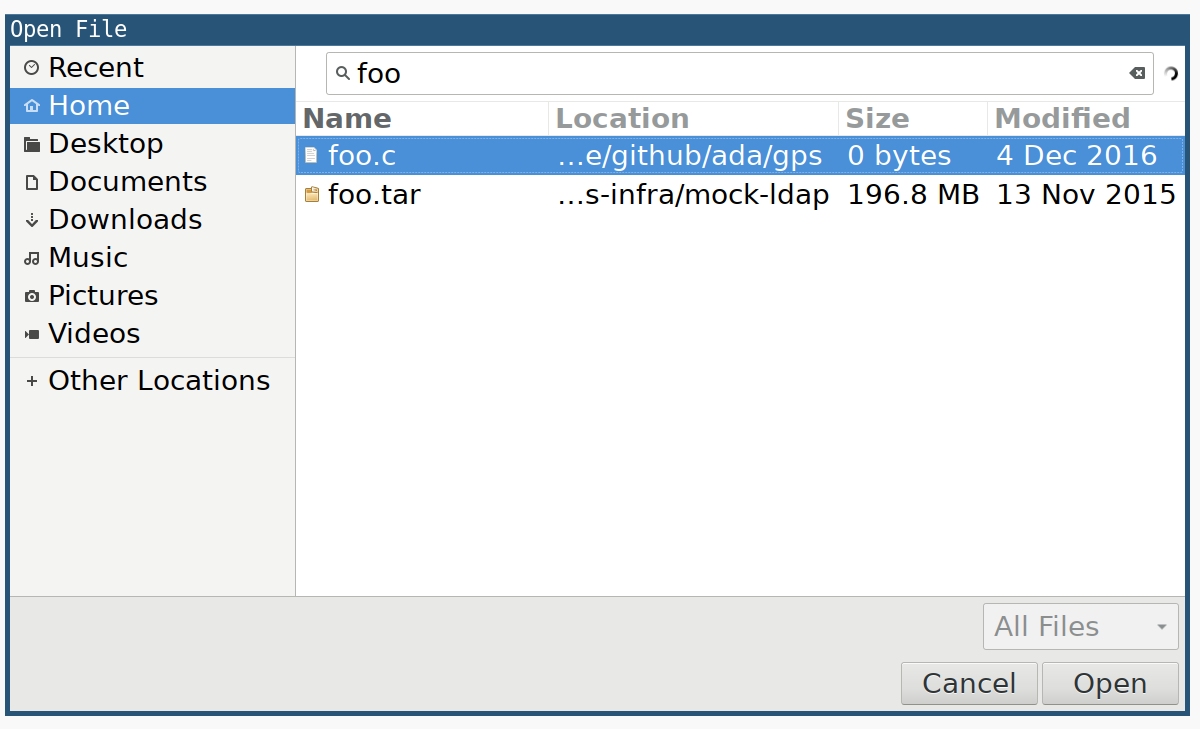
the better but one of the few things that seemed to get <em>worse</em> was the Open
File dialog. I tend to use the dialog quite frequently to open up HTML generated reports from test and coverage tooling, and with the newer Firefox versions I had become very frustrated with the mouse-heavy requirements to use the dialog.</p>

<p><img src="/images/post-images/open-file-dialog/open-file-search.png" alt="Open File Dialog Search" /></p>

<p>I have since learned that this is a Gtk+ 3.x dialog, which is changed the
default behavior for handling key strokes to use <strong>search</strong> rather than
entering in of a path.</p>

<p>I abhor using the trackpad on my laptop, which makes me feel like an old
“hunt-and-peck” typist, and instead rely on a number of keyboard-heavy tools to
navigate quickly and efficiently around web pages, terminals, and editors.</p>

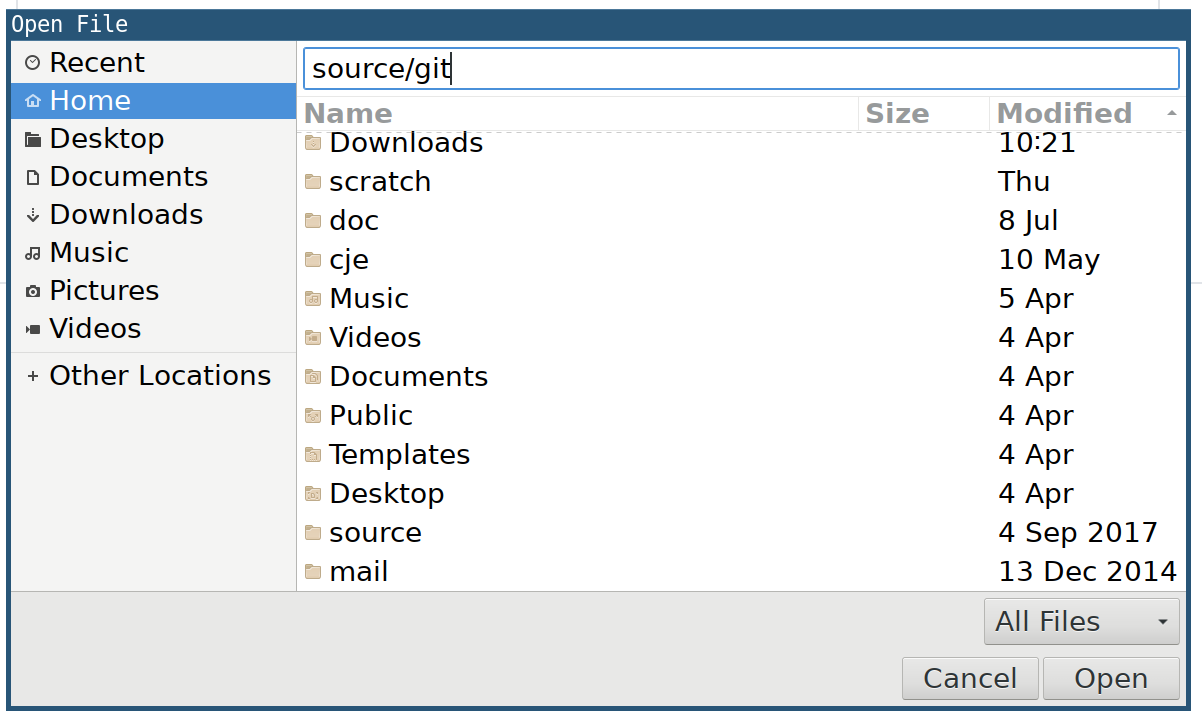
<p>While waiting for a build to complete earlier today, I was frustrated enough to scour the internet for a potential solution and happened upon <a href="https://winaero.com/blog/how-to-enter-file-location-manually-in-gtk-3-opensave-dialog">this blog post</a> which contained a suitable workaround!</p>

<p><strong>Ctrl+L</strong> in the Open File dialog will display a text field where the surly
keyboard-heavy user can simply type in a relative, or absolute, path followed
by <em>Enter</em> and navigate immediately to that directory or file.</p>

<p><img src="/images/post-images/open-file-dialog/open-file-direct-navigate.png" alt="Open File Dialog Search" /></p>

<p>Much better!</p>]]></content><author><name>R. Tyler Croy</name></author><category term="linux" /><summary type="html"><![CDATA[With the latest (quantum!) releases of Firefox, a number of things changed for the better but one of the few things that seemed to get worse was the Open File dialog. I tend to use the dialog quite frequently to open up HTML generated reports from test and coverage tooling, and with the newer Firefox versions I had become very frustrated with the mouse-heavy requirements to use the dialog.]]></summary></entry><entry><title type="html">See you at SCALE10x</title><link href="https://brokenco.de//2011/11/14/see-you-at-scale10x.html" rel="alternate" type="text/html" title="See you at SCALE10x" /><published>2011-11-14T00:00:00+00:00</published><updated>2011-11-14T00:00:00+00:00</updated><id>https://brokenco.de//2011/11/14/see-you-at-scale10x</id><content type="html" xml:base="https://brokenco.de//2011/11/14/see-you-at-scale10x.html"><![CDATA[<p>It’s almost that time of year again! Almost time for <a href="http://www.socallinuxexpo.org/scale10x">Southern California Linux
Expo</a> in Los Angeles!</p>

<p><a href="http://www.socallinuxexpo.org/scale10x" target="_blank"><img src="http://agentdero.cachefly.net/unethicalblogger.com/images/scale10x_cloud_85h.png" align="right" alt="SCALE10x" /></a></p>

<p>Last year I participated and helped man the <a href="http://www.opensuse.org">openSUSE</a>
booth with the great folks from the openSUSE community. This year there is a
distinct possibility that I will help man a
<a href="https://www.jenkins-ci.org">Jenkins</a> booth!</p>

<p>If you’ve not been, I recommend showing up and taking advantage of the
opportunity to meet other local open source users, developers, packagers and
sysadmins, all collected together under one roof.</p>

<p>The conference is still in the “call-for-papers” state, after which the
session schedule will be posted.</p>

<p>If you’re within a 1-2 hour plane ride of Los Angeles, then I expect to see you
there!</p>]]></content><author><name>R. Tyler Croy</name></author><category term="linux" /><category term="jenkins" /><category term="scale10x" /><category term="scale" /><summary type="html"><![CDATA[It’s almost that time of year again! Almost time for Southern California Linux Expo in Los Angeles!]]></summary></entry></feed>