<?xml version="1.0" encoding="utf-8"?><feed xmlns="http://www.w3.org/2005/Atom" ><generator uri="https://jekyllrb.com/" version="3.10.0">Jekyll</generator><link href="https://brokenco.de//feed/by_tag/pipeline.xml" rel="self" type="application/atom+xml" /><link href="https://brokenco.de//" rel="alternate" type="text/html" /><updated>2026-10-31T17:58:32+00:00</updated><id>https://brokenco.de//feed/by_tag/pipeline.xml</id><title type="html">rtyler</title><subtitle>a moderately technical blog</subtitle><author><name>R. Tyler Croy</name></author><entry><title type="html">Parsing Jenkins Pipeline without Jenkins</title><link href="https://brokenco.de//2020/12/25/jenkins-declarative-parser.html" rel="alternate" type="text/html" title="Parsing Jenkins Pipeline without Jenkins" /><published>2020-12-25T00:00:00+00:00</published><updated>2020-12-25T00:00:00+00:00</updated><id>https://brokenco.de//2020/12/25/jenkins-declarative-parser</id><content type="html" xml:base="https://brokenco.de//2020/12/25/jenkins-declarative-parser.html"><![CDATA[<p>Writing and locally verifying a CI/CD pipeline is a challenge thousands of
developers face, which I’m hoping to make a little bit easier with a new tool
named: <a href="https://github.com/rtyler/jdp">Jenkins Declarative Parser</a> (<code class="language-plaintext highlighter-rouge">jdp</code>).
Jenkins Pipeline is one of the most important advancements made in the last 10
years for Jenkins, it can however behave like a frustrating black box for many
new and experienced Jenkins users. The goal with <code class="language-plaintext highlighter-rouge">jdp</code> is to provide a
lightweight and easy to run utility and library for validating declarative
Jenkinsfiles.</p>

<hr />

<p>If you have <code class="language-plaintext highlighter-rouge">cargo</code> installed, you can get <code class="language-plaintext highlighter-rouge">jdp</code> right now by running <code class="language-plaintext highlighter-rouge">cargo
install jdp</code>, or you can download a Linux/amd64-based binary from the
<a href="https://github.com/rtyler/jdp/releases/tag/v0.2.2">releases</a>.</p>

<hr />

<p>Within the Jenkins advocacy group, I think the biggest marketing coup we have
accomplished to date is making people think that “Declarative Pipeline” is
<em>actually</em> declarative. For better or worse, it’s really not. There is no
first-party grammar or parser for a declarative <code class="language-plaintext highlighter-rouge">Jenkinsfile</code>. The dirty little
secret is that Declarative Pipeline is just a <a href="https://groovy-lang.org">Groovy</a>
domain specific language, one which tries to hide Groovy from the user, but in
many cases fails to do so. Personally, I still think Declarative is a <em>much</em>
better option than Scripted, with far more guardrails which  help keep users
working with best practices. As I have gotten deep into the supported syntax of
Declarative however, I have started to see numerous holes in the thin veneer
over Groovy.</p>

<p>As of now, <code class="language-plaintext highlighter-rouge">jdp</code> is at v0.2.2 and can support <em>lots</em> of Declarative Pipeline
syntax.</p>

<p>This parser is not a Groovy syntax parser and as such any advanced or wacky
groovy that is littered around a Jenkinsfile will be ignored. This
includes the <code class="language-plaintext highlighter-rouge">script</code> step which is basically checked to make sure that there is
a <code class="language-plaintext highlighter-rouge">script { }</code> block, but anything within it is explicitly ignored.</p>

<p>Here’s an example of a non-trivial pipeline pulled from the Jenkins documentation:</p>

<div class="language-groovy highlighter-rouge"><div class="highlight"><pre class="highlight"><code><span class="n">pipeline</span> <span class="o">{</span>
    <span class="n">agent</span> <span class="n">any</span>
    <span class="n">stages</span> <span class="o">{</span>
        <span class="n">stage</span><span class="o">(</span><span class="s1">'Example Build'</span><span class="o">)</span> <span class="o">{</span>
            <span class="n">steps</span> <span class="o">{</span>
                <span class="n">echo</span> <span class="s1">'Hello World'</span>
            <span class="o">}</span>
        <span class="o">}</span>
        <span class="n">stage</span><span class="o">(</span><span class="s1">'Example Deploy'</span><span class="o">)</span> <span class="o">{</span>
            <span class="n">when</span> <span class="o">{</span>
                <span class="n">branch</span> <span class="s1">'production'</span>
            <span class="o">}</span>
            <span class="n">steps</span> <span class="o">{</span>
                <span class="n">echo</span> <span class="s1">'Deploying'</span>
            <span class="o">}</span>
        <span class="o">}</span>
    <span class="o">}</span>
<span class="o">}</span>
</code></pre></div></div>

<p>When <code class="language-plaintext highlighter-rouge">jdp check</code> is executed against this file, it let’s me know that it’s correct!</p>

<div class="language-plaintext highlighter-rouge"><div class="highlight"><pre class="highlight"><code>❯ jdp check data/valid/when-branch/Jenkinsfile
Looks valid! Great work!
</code></pre></div></div>

<p>The <code class="language-plaintext highlighter-rouge">jdp check</code> tries to be as helpful as possible with bad syntax or semantics
in an invalid <code class="language-plaintext highlighter-rouge">Jenkinsfile</code>. This is an area that I want to improve more, with
<code class="language-plaintext highlighter-rouge">rustc</code> as a good inspiration for how helpful a “compiler” or “linter” should
behave:</p>

<div class="language-groovy highlighter-rouge"><div class="highlight"><pre class="highlight"><code><span class="n">pipeline</span> <span class="o">{</span>
    <span class="n">agent</span> <span class="n">any</span>
    <span class="n">stages</span> <span class="o">{</span>
        <span class="n">stage</span><span class="o">(</span><span class="s1">'Build'</span><span class="o">)</span> <span class="o">{</span>
        <span class="o">}</span>
    <span class="o">}</span>
<span class="o">}</span>
</code></pre></div></div>

<p>The above pipeline doesn’t have syntax errors, but does lack some important
semantics required by a Declarative Jenkinsfile:</p>

<div class="language-plaintext highlighter-rouge"><div class="highlight"><pre class="highlight"><code>jdp check data/invalid/no-steps-in-stage/Jenkinsfile 

data/invalid/no-steps-in-stage/Jenkinsfile
------------------------------------------
0: pipeline {
1:     agent any
2:     stages {
3:         stage('Build') {
  --------^

Fail: A stage must have either steps{}, parallel{}, or nested stages {}
</code></pre></div></div>

<hr />

<p>There are still <em>tons</em> of things I want to do with <code class="language-plaintext highlighter-rouge">jdp</code>, which is written in
Rust. If you’re keen on building a first-class <code class="language-plaintext highlighter-rouge">Jenkinsfile</code> grammar or
development tooling: check out the <a href="https://github.com/rtyler/jdp/issues">issues
page</a> for some of the ideas I have in
mind for <code class="language-plaintext highlighter-rouge">jdp</code>.</p>

<p>As we enter 2021, Jenkins Pipeline will definitely continue to play a major
role in many of our CI/CD pipelines. With <code class="language-plaintext highlighter-rouge">jdp</code>, I’m hoping it becomes a bit
easier for us all to write high quality and correct Jenkinsfiles!</p>]]></content><author><name>R. Tyler Croy</name></author><category term="jenkins" /><category term="rust" /><category term="otto" /><category term="pipeline" /><summary type="html"><![CDATA[Writing and locally verifying a CI/CD pipeline is a challenge thousands of developers face, which I’m hoping to make a little bit easier with a new tool named: Jenkins Declarative Parser (jdp). Jenkins Pipeline is one of the most important advancements made in the last 10 years for Jenkins, it can however behave like a frustrating black box for many new and experienced Jenkins users. The goal with jdp is to provide a lightweight and easy to run utility and library for validating declarative Jenkinsfiles.]]></summary></entry><entry><title type="html">Sketches of syntax, a pipeline for Otto</title><link href="https://brokenco.de//2020/11/06/pipeline-syntax-for-otto.html" rel="alternate" type="text/html" title="Sketches of syntax, a pipeline for Otto" /><published>2020-11-06T00:00:00+00:00</published><updated>2020-11-06T00:00:00+00:00</updated><id>https://brokenco.de//2020/11/06/pipeline-syntax-for-otto</id><content type="html" xml:base="https://brokenco.de//2020/11/06/pipeline-syntax-for-otto.html"><![CDATA[<p>Defining a good continuous integration and delivery pipeline syntax for
<a href="https://github.com/rtyler/otto">Otto</a> is one of the most important
challenges in the entire project. It is one which I struggled with early in
the project almost a year and a half ago. It is a challenge I continue to
struggle with today, even as the puzzles pieces start to interlock for the
multi-service system I originally imagined Otto to be. Now that I have started
writing the parser, the pressure to make some design decisions and play them
out to their logical ends is growing. The following snippet compiles to the
<em>current</em> Otto intermediate representation and will execute on the <em>current</em>
prototype agent implementation:</p>

<div class="language-groovy highlighter-rouge"><div class="highlight"><pre class="highlight"><code><span class="n">pipeline</span> <span class="o">{</span>
  <span class="n">stages</span> <span class="o">{</span>
    <span class="n">stage</span> <span class="o">{</span>
      <span class="n">name</span> <span class="o">=</span> <span class="s1">'Build'</span>
      <span class="n">steps</span> <span class="o">{</span>
        <span class="n">echo</span> <span class="s1">'&gt;&gt; Building project'</span>
        <span class="n">sh</span> <span class="s1">'make all'</span>
      <span class="o">}</span>
    <span class="o">}</span>
  <span class="o">}</span>
<span class="o">}</span>
</code></pre></div></div>

<p>“It works!”</p>

<p>The reaction upon sharing this with friends and colleagues on Twitter was
largely: “looks like Declarative [Pipeline].” The syntax above is just a simple
shim to get the basics working, but the similarities are no accident. <a href="https://jenkins.io/doc/book/pipeline/syntax/">Jenkins
Pipeline</a> is the best publicly
available syntax for describing a CI/CD pipeline (in my not-so-humble opinion).
If I didn’t believe that I wouldn’t continue to advocate for its use at every
possible turn.</p>

<p>For Otto however, the goal is not to create a Jenkins Pipeline knock-off. In
this post I wanted to share some sketches of what I think Otto Pipelines should
look like and why. For starters, the README <a href="https://github.com/rtyler/otto/tree/3c2daa412ab091d827040c56f891ad0fdcd7cd2c#modeling-continuous-delivery">has an incomplete
list</a>
covering some high-level goals that I have for modeling continuous delivery. The <a href="https://github.com/rtyler/otto/tree/3c2daa412ab091d827040c56f891ad0fdcd7cd2c/examples">examples/
directory</a>
also has a few sample <code class="language-plaintext highlighter-rouge">.otto</code> files which I will use for reference throughout
this post.</p>

<p>It may also be worth reading my previous post describing <a href="/2020/10/18/otto-steps.html">Step
Libraries</a> if you haven’t already, since they play
an integral part in making this syntax “go.”</p>

<p>With the pre-requisites out of the way, let’s walk through some syntax!</p>

<h2 id="defining-the-available-tools">Defining the available tools</h2>

<div class="language-groovy highlighter-rouge"><div class="highlight"><pre class="highlight"><code><span class="n">use</span> <span class="o">{</span>
  <span class="n">stdlib</span>
  <span class="s1">'./common/slack'</span>
<span class="o">}</span>
</code></pre></div></div>

<p>Sprinkled at the top of Otto Pipelines is the <code class="language-plaintext highlighter-rouge">use</code> block. A common problem
with Jenkins Pipeline is that the steps available in the <code class="language-plaintext highlighter-rouge">Jenkinsfile</code> is
completely dependent on what plugins have been installed on the controller <em>or</em>
what <a href="https://jenkins.io/doc/book/pipeline/shared-libraries/">Shared Libraries</a>
have been configured. The <code class="language-plaintext highlighter-rouge">use</code> block effectively brings Otto Step Libraries
into scope for the given pipeline. Because Step Libraries require no
“controller-side” execution in Otto, each Otto Pipeline can use a completely
different sets of steps for users to leverage in their workflow.</p>

<p><strong>Open questions</strong>:</p>

<ul>
  <li>Versioning for step libraries seems like it is worth doing, but what’s the right syntax for expressing it?</li>
  <li>Referring to step libraries by URL could be incredibly useful, but is it worth the complexity?</li>
</ul>

<h2 id="defining-the-execution-environment">Defining the execution environment</h2>

<p>Next is declaring the execution environment for a stage/stages:</p>

<div class="language-groovy highlighter-rouge"><div class="highlight"><pre class="highlight"><code><span class="cm">/* snip */</span>
<span class="n">stage</span> <span class="o">{</span>
  <span class="n">name</span> <span class="o">=</span> <span class="s1">'Build'</span>

  <span class="n">runtime</span> <span class="o">{</span>
    <span class="n">docker</span> <span class="o">{</span>
      <span class="n">image</span> <span class="o">=</span> <span class="s1">'ruby:2.6'</span>
    <span class="o">}</span>
  <span class="o">}</span>

  <span class="n">steps</span> <span class="o">{</span>
  <span class="o">}</span>
<span class="o">}</span>
</code></pre></div></div>

<p>Resource allocation is one of the areas I am most excited to explore with Otto,
but from a modeling standpoint and an execution standpoint. Jenkins was build
before “cloud” was a thing, and arguably before “containers”, depending on
whether or not any rabid Solaris users are within earshot. As such it has some
pitfalls when mapping pipeline execution to these much more dynamic
environments. On the flip side, newer CI/CD systems seem to have all gravitated
towards container-all-the-things and typically don’t consider non-container
workloads in any form, and will also usually require a Kubernetes clusters just
to get started.</p>

<div class="language-groovy highlighter-rouge"><div class="highlight"><pre class="highlight"><code><span class="n">runtime</span> <span class="o">{</span>
  <span class="n">arch</span> <span class="o">=</span> <span class="s1">'amd64'</span>
  <span class="n">linux</span> <span class="o">{</span>
    <span class="n">pkgconfig</span> <span class="o">=</span> <span class="o">[</span><span class="s1">'openssl'</span><span class="o">,</span> <span class="s1">'libxml-2.0'</span><span class="o">]</span>
  <span class="o">}</span>
  <span class="n">python</span> <span class="o">{</span>
    <span class="n">version</span> <span class="o">=</span> <span class="s1">'~&gt; 3.8.5'</span>
    <span class="n">virtualenv</span> <span class="o">=</span> <span class="kc">true</span>
  <span class="o">}</span>
<span class="o">}</span>
</code></pre></div></div>

<p>For Otto I want to do <em>better</em> and started thinking about <em>capabilities</em> rather
than fixed labels or names. In many cases, I don’t particularly care where my
Rust project builds, just so long as it has <code class="language-plaintext highlighter-rouge">cargo</code> and an up-to-date stable
<code class="language-plaintext highlighter-rouge">rustc</code>. Similarly for Python projects, I might need an execution environment
with Python 3.x, <code class="language-plaintext highlighter-rouge">virtualenv</code>, and <code class="language-plaintext highlighter-rouge">libxml2</code> installed. In most systems that
precede Otto, administrators end up defining complex labels which users must
know. Another way to paper over this complexity is to say “just bring your own
container!” which pushes a lot of work back onto developers, typically leading
to one-off <code class="language-plaintext highlighter-rouge">Dockerfile</code>s which just take an upstream image and add one or two
dependencies.</p>

<p>With a capabilities-oriented model, the pipeline orchestration layer is no
longer looking for machines labeled “linux-python” or and then hoping one is
available. Instead the orchestrator can be smarter and find any available
capacity to meet the capabilities request.  I believe this approach can improve
on overall system performance and scheduling. An idea which I have floating
around as <a href="https://github.com/rtyler/otto/blob/main/rfc/0003-resource-auctioning.adoc">a draft
RFC</a>
right now is basically to “auction” pipeline tasks to the lowest bidder. When I
first started considering this idea, I found this paper titled <a href="https://www.scribd.com/document/439692166/Efficient-Nash-Equilibrium-Resource-Allocation-Based-on-Game-Theory-Mechanism-in-Cloud-Computing-by-Using-Auction">Efficient Nash
Equilibrium Resource Allocation Based on Game Theory Mechanism in Cloud
Computing by Using
Auction</a>,
which will likely guide the implementation of <code class="language-plaintext highlighter-rouge">auctioneer</code> quite a bit.</p>

<p>What remains to be seen is whether users are actually interested in
<em>expressing</em> the capabilities that would be necessary to make a highly
efficient resource auction practical.</p>

<p><strong>Open questions:</strong></p>

<ul>
  <li>Do most developers think about what their pipeline needs in the same way I think about capabilities?</li>
  <li>How would an administrator define capabilities of a cloud-based VM template?</li>
</ul>

<h2 id="caching">Caching</h2>

<p>From an operational standpoint, I think the most common problem of <em>any</em> CI
system is overuse of remote resources by pipelines. <a href="https://twitter.com/technosophos/status/1324037674588463105">This is not a niche
problem</a>, but
rather something that affects practically everybody. Some will say “you should
be caching and proxying all your remote resources!” which is simply not a
practical solution for the vast majority of the users in the ecosystem. Many at
users won’t be at organizations large enough to deploy such caching proxies.</p>

<div class="language-groovy highlighter-rouge"><div class="highlight"><pre class="highlight"><code><span class="n">stage</span> <span class="o">{</span>
  <span class="n">name</span> <span class="o">=</span> <span class="s1">'Build'</span>

  <span class="n">cache</span> <span class="o">{</span>
    <span class="c1">// Create a cache named "gems", immutable for the rest of the Pipeline</span>
    <span class="n">gems</span> <span class="o">=</span> <span class="o">[</span><span class="s1">'vendor/'</span><span class="o">]</span>
    <span class="n">assets</span> <span class="o">=</span> <span class="o">[</span><span class="s1">'dist/css/'</span><span class="o">,</span> <span class="s1">'dist/js/'</span><span class="o">]</span>
  <span class="o">}</span>

  <span class="cm">/* snip */</span>
<span class="o">}</span>
<span class="n">stage</span> <span class="o">{</span>
  <span class="n">name</span> <span class="o">=</span> <span class="s1">'Test'</span>
  <span class="n">cache</span> <span class="o">{</span>
    <span class="n">use</span> <span class="n">gems</span>
  <span class="o">}</span>
<span class="o">}</span>
</code></pre></div></div>

<p>The <code class="language-plaintext highlighter-rouge">cache</code> block is intended to provide pipeline authors with a way to cache
arbitrary sections of the workspace for later re-use in the pipeline across
multiple agents. This is a pretty simple syntax addition, but something built
into the Otto infrastructure from the beginning.</p>

<p>On the implementation side, this requires that archiving and retrieving these
artifacts is relatively quick, which I don’t believe will be a major challenge.</p>

<p><strong>Open questions:</strong></p>

<ul>
  <li>Is it sufficient to cache a file subtree and simply restore it into the same
location in another agent’s workspace?</li>
  <li>Would this syntax accommodate the caching of Docker image layers?</li>
</ul>

<h2 id="composition-and-re-use">Composition and Re-use</h2>

<p>Inevitably developers try to abstract common functionality and behaviors into
re-usable components. Step Libraries can provide one flavor of this
re-usability, but I don’t believe that it is sufficient. The ubiqitous adoption
of YAML by newer CI/CD tools lead me to joke about <a href="/2018/08/15/five-stages-of-yaml.html">the five stages of
YAML</a> wherein developers end up turning a
declarative syntax into templates and then into just another turing-complete
language.</p>

<p>In Jenkins we have seen numerous tools for templatizing jobs, pipelines, or
other aspects of Jenkins configuration. Suffice it to say, there is a need to
compose and re-use various aspects of pipelines.</p>

<p>For Otto, I have been playing around with a context-aware <code class="language-plaintext highlighter-rouge">from</code> keyword, such as below:</p>

<div class="language-groovy highlighter-rouge"><div class="highlight"><pre class="highlight"><code><span class="n">stage</span> <span class="o">{</span>
  <span class="n">name</span> <span class="o">=</span> <span class="s1">'Test'</span>
  <span class="n">runtime</span> <span class="o">{</span>
    <span class="n">from</span> <span class="s1">'Build'</span>
  <span class="o">}</span>
  <span class="n">steps</span> <span class="o">{</span>
    <span class="n">sh</span> <span class="s1">'bundle exec rake spec'</span>
  <span class="o">}</span>
<span class="o">}</span>
</code></pre></div></div>

<p>In the above example, <code class="language-plaintext highlighter-rouge">from</code> instructs the pipeline to re-use the contents of
the runtime block from the <code class="language-plaintext highlighter-rouge">Build</code> stage. My current thinking is that this
simple use of <code class="language-plaintext highlighter-rouge">from</code> allows for pipeline-internal re-use of pieces without the
need to set variables or turn this into a scripting language.</p>

<p>That said, re-usability within the pipeline isn’t where the main interest in
“templates” lies.</p>

<p>I have been exploring the concept of a “blueprint” which can act as an
re-usable unit of Otto Pipeline. I am imagining that these would be published
and managed similarly to Step Libraries. In order to provide maximum
flexibility, I think blueprints should be able to capture just about any
snippet of the Otto Pipeline syntax for re-use, consider the following example
to help make common Ruby gem build/test/publish pipelines cleaner:.</p>

<p><strong>rubygem.blueprint</strong></p>
<div class="language-groovy highlighter-rouge"><div class="highlight"><pre class="highlight"><code><span class="n">use</span> <span class="o">{</span>
  <span class="n">stdlib</span>
<span class="o">}</span>

<span class="n">blueprint</span> <span class="o">{</span>
  <span class="n">parameters</span> <span class="o">{</span>
    <span class="n">rubyVersion</span> <span class="o">{</span>
      <span class="n">description</span> <span class="o">=</span> <span class="s1">'Specify the Ruby container'</span>
      <span class="k">default</span> <span class="o">=</span> <span class="s1">'ruby'</span>
      <span class="n">type</span> <span class="o">=</span> <span class="n">string</span>
    <span class="o">}</span>

    <span class="n">deploy</span> <span class="o">{</span>
      <span class="n">description</span> <span class="o">=</span> <span class="s1">'Push to rubygems.oorg'</span>
      <span class="k">default</span> <span class="o">=</span> <span class="kc">true</span>
      <span class="n">type</span> <span class="o">=</span> <span class="kt">boolean</span>
    <span class="o">}</span>
  <span class="o">}</span>

  <span class="n">plan</span> <span class="o">{</span>
    <span class="n">stages</span> <span class="o">{</span>
      <span class="n">stage</span><span class="o">(</span><span class="s1">'Build'</span><span class="o">)</span> <span class="o">{</span>
        <span class="n">runtime</span> <span class="o">{</span>
          <span class="n">docker</span> <span class="o">{</span>
            <span class="n">image</span> <span class="o">=</span> <span class="n">vars</span><span class="o">.</span><span class="na">rubyVersion</span>
          <span class="o">}</span>
        <span class="o">}</span>

        <span class="n">steps</span> <span class="o">{</span>
          <span class="n">sh</span> <span class="s1">'bundle install'</span>
          <span class="n">sh</span> <span class="s1">'bundle exec rake build'</span>
        <span class="o">}</span>
      <span class="o">}</span>

      <span class="n">stage</span><span class="o">(</span><span class="s1">'Test'</span><span class="o">)</span> <span class="o">{</span>
        <span class="n">runtime</span> <span class="o">{</span> <span class="n">from</span> <span class="s1">'Build'</span> <span class="o">}</span>
        <span class="n">steps</span> <span class="o">{</span>
          <span class="n">sh</span> <span class="s1">'bundle exec rake test'</span>
        <span class="o">}</span>
      <span class="o">}</span>

      <span class="n">stage</span><span class="o">(</span><span class="s1">'Deploy'</span><span class="o">)</span> <span class="o">{</span>
        <span class="n">gates</span> <span class="o">{</span> <span class="n">enter</span> <span class="o">{</span> <span class="n">vars</span><span class="o">.</span><span class="na">deploy</span> <span class="o">}</span> <span class="o">}</span>
        <span class="n">runtime</span> <span class="o">{</span> <span class="n">from</span> <span class="s1">'Build'</span> <span class="o">}</span>
        <span class="n">steps</span> <span class="o">{</span>
          <span class="n">sh</span> <span class="s1">'bundle exec rake push'</span>
        <span class="o">}</span>
      <span class="o">}</span>
    <span class="o">}</span>
  <span class="o">}</span>
<span class="o">}</span>
</code></pre></div></div>

<p>This would then be later re-used within an Otto Pipeline by using the same <code class="language-plaintext highlighter-rouge">from</code> syntax as before:</p>

<div class="language-groovy highlighter-rouge"><div class="highlight"><pre class="highlight"><code><span class="n">pipeline</span> <span class="o">{</span>
  <span class="n">from</span> <span class="s1">'blueprints/rubygem'</span>

  <span class="cm">/*
   * Optionally I could add additional post-deployment configuration here,
   * which would be ordered after the blueprint's stages have completed
   */</span>
<span class="o">}</span>
</code></pre></div></div>

<p>Since <code class="language-plaintext highlighter-rouge">from</code> would be somewhat context-aware and would be able to pull all the
right stages “into place” within the pipeline. I’m optimistic that this
approach would allow the definition that includes just one stage for example,
or other blocks which can be defined within the <code class="language-plaintext highlighter-rouge">pipeline { }</code>.</p>

<p>I am not yet sure what the right mechanism for passing parameters into the
blueprint should be. Right now I am leaning towards keyword arguments on the
<code class="language-plaintext highlighter-rouge">from</code> directive: <code class="language-plaintext highlighter-rouge">from blueprint: 'blueprints/rubygem', rubyVersion: '2.6',
deploy: false</code>.I am not really sure what the implementation complexity of this
approach will bring however.</p>

<p><strong>Open Questions:</strong></p>

<ul>
  <li>Will treating <code class="language-plaintext highlighter-rouge">from</code> almost like a preprocessor directive allow the parser to successfully handle blueprints for arbitrary blocks of pipeline?</li>
  <li>Does this amount of composition alleviate the pressure that templates tend to solve for other systmes?</li>
</ul>

<h2 id="gates">Gates</h2>

<p>The final bit of syntax I wish to discuss at the moment are “gates.” One of the
least appreciated parts of just about every CD pipeline, gates define how the
pipeline should behave differently under certain conditions, including pausing
for user input or an external event.</p>

<p>From one of the modeling goals I had set:</p>

<blockquote>
  <p><strong>External interactions must be model-able.</strong> Deferring control to an external
system must be accounted for in a user-defined model. For example, submitting
a deployment request, and then waiting for some external condition to be made
to indicate that the deployment has completed and the service is now online.
This should support both an evented model, wherein the external service
“calls back” and a polling model, where the process waits until some external
condition can be verified.</p>
</blockquote>

<p>A contrived example of what this might look like for a pipeline which prepares
a deployment whenever changes land in the <code class="language-plaintext highlighter-rouge">main</code> branch:</p>

<div class="language-groovy highlighter-rouge"><div class="highlight"><pre class="highlight"><code><span class="n">gates</span> <span class="o">{</span>
  <span class="n">enter</span> <span class="o">{</span> <span class="n">branch</span> <span class="o">==</span> <span class="s1">'main'</span> <span class="o">}</span>

  <span class="cm">/*
  * The exit block is where external stimuli back into the system
  * should be modeled, providing some means of holding back the pipeline
  * until the condition has been met
  */</span>
  <span class="n">exit</span> <span class="o">{</span>
    <span class="n">input</span> <span class="s1">'Does staging look good to you?'</span>
  <span class="o">}</span>
<span class="o">}</span>
</code></pre></div></div>

<p>Of anything discussed thus far, gates have the <em>most</em> runtime implementation requirements. In the primitive example above we have:</p>

<ul>
  <li>A Git branch being referenced, which needs to be pulled into scope somehow/somewhere.</li>
  <li>An expression that needs to be evaluated in the service mesh before this stage of the pipeline is dispatched.</li>
  <li>An <code class="language-plaintext highlighter-rouge">input</code> step which should allow the agent which executed the stage to
deallocate <strong>and</strong> pause further execution of the pipeline until some
external event is provided.</li>
</ul>

<p>The last item is the most challenging for me to think about from an
implementation and modeling standpoint. Somewhere within Otto a state machine
for each pipeline must be maintained, and once an <code class="language-plaintext highlighter-rouge">input</code>, <code class="language-plaintext highlighter-rouge">webhook</code>, or some
other step is encountered, the state machine must pause for external actions.
How those external actions should be wired in? Not sure! How those steps should
be defined? Not sure!</p>

<p>There are so many open questions at this point.</p>

<p>Gates leave me with the most discomfort of any of my ideas for Otto. Done well,
gates could provide a key component missing from many existing tools. The
challenge is going to be finding the space between the pipeline modeling
language and the execution engine which will accommodate them.</p>

<hr />

<p>I still probably have more questions than answers at this point about how the
pipeline modeling syntax should be defined and how it should execute. The one
major lesson which I have learned from my time in the Jenkins project is that
the pipeline syntax cannot be improved in isolation from the execution
environment. There are many key design decisions which need to be made in both
domains which will have major repercussions in the other.</p>

<p>I think back to the word used by a developer who read my thoughts on what I
want to do with Otto:</p>

<p>“<strong>Ambitious</strong>.”</p>

<hr />

<p>As always, if you’re curious to learn more, you’re welcome to join <code class="language-plaintext highlighter-rouge">#otto</code> on the
<a href="https://freenode.net">Freenode</a> IRC network, or follow along on
<a href="https://github.com/rtyler/otto">GitHub</a></p>]]></content><author><name>R. Tyler Croy</name></author><category term="otto" /><category term="jenkins" /><category term="pipeline" /><category term="cicd" /><category term="ci" /><summary type="html"><![CDATA[Defining a good continuous integration and delivery pipeline syntax for Otto is one of the most important challenges in the entire project. It is one which I struggled with early in the project almost a year and a half ago. It is a challenge I continue to struggle with today, even as the puzzles pieces start to interlock for the multi-service system I originally imagined Otto to be. Now that I have started writing the parser, the pressure to make some design decisions and play them out to their logical ends is growing. The following snippet compiles to the current Otto intermediate representation and will execute on the current prototype agent implementation:]]></summary></entry><entry><title type="html">Modeling continuous delivery</title><link href="https://brokenco.de//2019/07/18/otto-matic.html" rel="alternate" type="text/html" title="Modeling continuous delivery" /><published>2019-07-18T00:00:00+00:00</published><updated>2019-07-18T00:00:00+00:00</updated><id>https://brokenco.de//2019/07/18/otto-matic</id><content type="html" xml:base="https://brokenco.de//2019/07/18/otto-matic.html"><![CDATA[<p>I spend more time than I wish to admit thinking about how continuous delivery
(CD) processes should be modeled. The problem domain is one that affects every
single organization which distributes software, yet the approach each
organization takes is almost as unique as the software they develop. From my
perspective <a href="https://jenkins.io/doc/book/pipeline">Jenkins Pipeline</a>,
especially its declarative syntax, is the best available option for most
organizations to model their continuous delivery processes. That does not
mean however that I believe Jenkins Pipeline is the best <em>possible</em> option.</p>

<p>In the small amount of “open source time” which isn’t already committed to
maintaining Jenkins project infrastructure, I have been exploring some ideas in
a project named “<a href="https://github.com/rtyler/otto">otto</a>”. I have been trying to
learn from our collective experiences developing and adopting Jenkins Pipeline.
Trying to imagine what a good next step of “pipeline” development might look like.</p>

<hr />

<p>A quick note about <strong>YAML</strong>: A lot of people have adopted YAML syntaxes because
they’re “simpler.” A premise which is fundamentally out of alignment with
reality. The YAML syntaxes which I have seen for representing branching logic, abstraction, or reuse are incredibly error-prone and confusing. Often times
relying on common strings to reference a conceptual graph which is itself
difficult to describe with YAML alone. YAML is not bad as a declarative
language for describing data, but modeling something as complex as
continuous delivery, I do not believe is passable with YAML.</p>

<hr />

<p>When I consider the continuous delivery process, I think <em>all</em> tools should
strive to meet the following requirements:</p>

<ul>
  <li><strong>Deterministic ahead-of-time</strong>. Without executing the full process, it must
be possible to “explain” what will happen.</li>
  <li><strong>External interactions must be model-able.</strong> Deferring control to an
external system must be accounted for in a user-defined model. For example,
submitting a deployment request, and then waiting for some external condition
to be made to indicate that the deployment has completed and the service is now
online. This should support both an evented model, wherein the external service
“calls back” and a polling model, where the process waits until some external
condition can be verified.</li>
  <li><strong>Describe/reference environments.</strong> All applications have at least
some concept of environments, whether it is a web application’s concept of
staging/production, or a compiled asset’s concept of debug/release builds.</li>
  <li><strong>Branching logic</strong>, a user must be able to easily define branching logic.
For example, a web application’s delivery may be different depending on
whether this is a production or a staging deployment.</li>
  <li><strong>Safe credentials access</strong>, credentials should not be exposed to in a way
which might allow the user-defined code to inadvertently leak the credential.</li>
  <li><strong>Caching data between runs</strong> must be describable in some form or fashion.
Taking Maven projects as an example, where successive runs of <code class="language-plaintext highlighter-rouge">mvn</code> on a
cold-cache will result in significant downloads of data, whereas caching
<code class="language-plaintext highlighter-rouge">~/.m2</code> will result in more acceptable performance.</li>
  <li><strong>Refactor/extensibility support in-repo or externally.</strong> Depending on
whether the source repository is a monorepo, or something more modular.
Common aspects of the process must be able to be templatized/parameterized in
some form, and shared within the repository or via an external repository.</li>
  <li><strong>Scale down to near zero-configuration.</strong> the simplest model possible should
simply define what platform’s conventions to use. With Rails applications,
many applications are functionally in the same with their use of Bundler,
Rake, and RSpec.</li>
</ul>

<p>Quite the laundry list! The two biggest departures from what Jenkins Pipeline
can somewhat model would be: the ability to model external interactions and
determinism.</p>

<p>Modeling external interactions is something which I think <em>many</em> approaches to
modeling continuous delivery simply fail to acknowledge. Every tool wants to
act as if it is the center of the universe but they can’t <em>all</em> be the center!
In order to effectively model external interactions in a pipeline the language alone is
insufficient, the runtime must also participate. Imagine a scenario where
validation of a deployment occurs via an external system. The pipeline would
necessarily be paused, pending an external callback or something along those
lines. This means the language itself has to represent the callback in some
way, but the runtime has to allow for an event to continue the pipeline’s
execution. All without consuming resources, like a VM or container in the meantime.</p>

<p>The approach in most current systems is:</p>

<ul>
  <li>provision VM</li>
  <li>install dependencies</li>
  <li>run user-provided scripts</li>
  <li>check status</li>
  <li>end, stop VM</li>
</ul>

<p>Basically in order to do “anything”, resources must be allocated and maintained
until the stage or entire pipeline completes. In order to “wait” for some
condition to be met by an external system, a busy loop must tie up an allocated
resource (VM) in this example.</p>

<p>The current syntax I’m playing with explicitly separates these logical gates
from the runtime allocation:</p>

<div class="language-plaintext highlighter-rouge"><div class="highlight"><pre class="highlight"><code>      stage {
        name = 'Production'
        environment -&gt; production

        gates {
          enter {
            input 'Are you extra sure that staging looks good to you?'
          }

          exit {
            /*
            * The system must have some form of tagging of this specific run,
            * to allow an external system to call back and say "this is good and
            * finished"
            */
            webhook {
              description = 'Pingdom health check'
            }
          }
        }

        docker {
          image = 'ruby'
        }

        steps {
          // This is contrived and incorrect, but irrelevant to the example
          sh 'rake deploy-prod'
        }

        notify {
          failure {
            slack 'Failed to ship it'
          }
          complete {
            slack 'New changes are live in production'
          }
        }
      }
</code></pre></div></div>

<p>The mechanics still need some protoytping to figure out, but this is the gist
of what’s bouncing around my brain at the moment. Gates must be separate from
the runtime by default to allow deferred control to another system.</p>

<hr />

<p>I have also been thinking about how a CD process models the logical concept of
“environments”. In most cases, I would have an environment constructed and
managed externally. The two most common examples I can think of are:</p>

<ul>
  <li>Infrastructure environments are defined in a cloud provider, e.g. Azure, by
some other infrastructure as code (or whatever), and my web application delivery process
only needs to be aware of them.</li>
  <li>Mobile application development, e.g. Google Play Store, where an “alpha”,
“beta”, and “general” channels are available for releasing an Android
application into. These are out of the control of my mobile application
pipeline, but still hugely relevant to the process.</li>
</ul>

<p>In both scenarios I see commonalities which warrant modeling, such as:</p>

<ul>
  <li>Deployment credentials, different signing keys or API tokens.</li>
  <li>Compile flags</li>
  <li>Test/validation settings, e.g. different hostnames for where things will end
up or be pushed to.</li>
</ul>

<p>The big difference between these two kinds of environments is how one
progresses from an environment to the next. It could be a simple automated
check, an external set of synthetic transactions, feedback from a monitoring
tool, or a manual intervention by a developer/QE/etc. The latter is especially
common with mobile or desktop applications, and frequently underserved by
existing modeling syntaxes.</p>

<p>Imagining a single declarative <code class="language-plaintext highlighter-rouge">.otto</code> file with:</p>

<ul>
  <li>named environments for the application to progress through, complete with
various settings and metadata defined for those environments.</li>
  <li>a stage in the pipeline which describes the entry and exit gates necessary
to being and complete the process.</li>
</ul>

<p>I’m not sure modeling with environments <em>needs</em> to be much more complex than
that. The way an operations team might conceive of an environment may be
different from an application team. Their mental models converge however when
it comes to hostnames, settings, and credentials.</p>

<p>I won’t share a syntax snippet for environments at the moment since I’m not yet
happy with it. I am very interested in how other people think of modeling
environments, and what characteristics of those environments are important for
their continuous delivery process.</p>

<hr />

<p>My work thus far includes a full grammar for the description language that I’ve
been exploring, and with each passing week the parser and runtime to support
it come a little bit closer to reality. I’ve got a clear model in my head of
how the different components fit together, how extensibility can be supported
without sacrificing determinism, and how to secure it.</p>

<p>The only <em>real</em> challenge has been finding the time to build it.</p>]]></content><author><name>R. Tyler Croy</name></author><category term="otto" /><category term="pipeline" /><summary type="html"><![CDATA[I spend more time than I wish to admit thinking about how continuous delivery (CD) processes should be modeled. The problem domain is one that affects every single organization which distributes software, yet the approach each organization takes is almost as unique as the software they develop. From my perspective Jenkins Pipeline, especially its declarative syntax, is the best available option for most organizations to model their continuous delivery processes. That does not mean however that I believe Jenkins Pipeline is the best possible option.]]></summary></entry><entry><title type="html">Thoughts about a secure enclave for Jenkins Pipeline</title><link href="https://brokenco.de//2019/04/30/pipeline-secure-enclave.html" rel="alternate" type="text/html" title="Thoughts about a secure enclave for Jenkins Pipeline" /><published>2019-04-30T00:00:00+00:00</published><updated>2019-04-30T00:00:00+00:00</updated><id>https://brokenco.de//2019/04/30/pipeline-secure-enclave</id><content type="html" xml:base="https://brokenco.de//2019/04/30/pipeline-secure-enclave.html"><![CDATA[<p>Continuous integration and continuous delivery (CI/CD) projects might just be
one of the hardest to lock down and secure. As system designers and
implementors we must enable developers to automate their builds, tests, and
deployments. And yet, in doing so, we also give those same developers the
ability to bypass many of the boundaries we may have set up to secure our
environments. If you give me the ability to automate my deployment with a
script, I can think of a number of ways in which that ability can lead to
information disclosure or other types of breaches. <a href="https://jenkins.io/doc/book/pipeline">Jenkins
Pipeline</a> is filled with any number of
problematic examples here the same feature can be looked at as <em>empowering</em> or
as <em>compromising</em>. I believe the immense flexibility of Jenkins Pipeline also gives us
a path to provide automation which is inherently more secure than some
competitors. In this post, I’ll outline one such idea: a pipeline secure
enclave.</p>

<p>I have spent a lot of time thinking about how to properly secure CI/CD
workloads, and it’s genuinely a tough problem, as you may have noticed from
some of my previously blog posts:</p>

<ul>
  <li><a href="/2019/04/15/trust-and-jenkins.html">Jenkins should not be the only line of defense</a></li>
  <li><a href="/2019/02/22/its-not-credentials-stealing.html">It’s not stealing when you’re giving them away</a></li>
  <li><a href="/2019/02/14/untrusted-docker-workloads.html">Securely running Docker workloads in your CI/CD
environment</a></li>
  <li><a href="/2018/01/05/jenkins-policy-enforcement.html">Enforcing administrative policy in Jenkins, the hard
way</a></li>
  <li><a href="/2017/08/03/donut-disable-groovy-sandbox.html">Do not disable the Groovy
Sandbox</a></li>
</ul>

<p>Many systems typically expose credentials to scripts via environment variables.
Many tools, Jenkins included make a good effort to mask these credentials
should some developer accidentally
or maliciously attempt ot log them to the console output. As I <a href="/2019/02/22/its-not-credentials-stealing.html">have shown
before</a>, this simply does not
adequately protect credentials. It’s possible to leak credentials by: piping
them through some encoding before printing, archiving them as artifacts,
sending them to a remote service, along with numerous slight variations on
those three approaches. So long as a credential is exposed to code editable by
developers, it is trivial to leak.</p>

<p>Unlike some of its competitors, I believe Jenkins Pipeline has the tooling
necessary to provide a secure approach to utilizing credentials in the CI/CD
process. My “secure enclave” proposal revolves around a key feature: <a href="https://jenkins.io/doc/book/pipeline/shared-libraries">Shared
Libraries</a>. With shared
libraries, administrators can load common snippets of pipeline code into the
master, for easy re-use within multiple projects. To learn more about some of
the cool things you can do with shared libraries, I recommend <a href="https://www.youtube.com/watch?v=lzzx59kLW9w&amp;list=PLvBBnHmZuNQLqgKDFmGnUClw68qsQ9Hq5&amp;index=46">Alvin Huang’s presentation from Jenkins World 2017</a>.</p>

<p>A secure enclave for Jenkins Pipeline would rest upon the foundation provided
by shared libraries, but require additional implementation to properly secure
credentials:</p>

<ul>
  <li>
    <p>An administrator would need to be able to bind credentials <strong>solely</strong> to the
shared library. Right now there are system-level, and folder-level
credentials in Jenkins. For system-level credentials, there is nothing which
prevents my <code class="language-plaintext highlighter-rouge">Jenkinsfile</code> from utilizing a credential so long as I know the ID
before hand.</p>

    <p>By allowing the credential to be bound solely to the shared library, then the
credential would not be accessible to pipelines developed and used elsewhere in
the master.</p>
  </li>
  <li>
    <p>Utilizing the credential within the shared library would need to be done in a
manner which does <em>not</em> allow arbitrary user code to be utilized. After all,
if the shared library provides me a function to pass in code, which is then
executed with access to the credentials, then we would have gained nothing.</p>

    <p>Invocations into the “secure enclave” methods would need to reject <code class="language-plaintext highlighter-rouge">Closure</code>
types from being passed, and likely need to tag and track <code class="language-plaintext highlighter-rouge">String</code>/<code class="language-plaintext highlighter-rouge">GString</code>
types to ensure those aren’t inadvertently passed to the <code class="language-plaintext highlighter-rouge">sh</code> step or
interpolated into other strings. Suggesting this is a little out of my
comfort zone, since I don’t fully understand how the <code class="language-plaintext highlighter-rouge">workflow-cps</code> engine
underneath functions. I feel fairly certain that special-case tracking and handling of a
<code class="language-plaintext highlighter-rouge">CredentialsString</code> would <em>not</em> be the gnarliest bit of object-hacking going on
in CPS.</p>
  </li>
  <li>
    <p>To further avoid inadvertent disclosure, Pipelines which attempt to use a
secure enclave would need to use the Groovy sandbox, and should probably not
be allowed any <code class="language-plaintext highlighter-rouge">@NonCPS</code> methods as well. Furthermore, a secure enclave
must not be editable on Replay of a Pipeline except by a Jenkins
administrator.</p>
  </li>
</ul>

<p>I believe this approach would provide a rigid set of constraints that would
provide increased security for the use of secrets in a Jenkins environment,
while still providing flexibility to developers and administrators.</p>

<p>That said, there is still a potential “escape” if an administrator is enabling
code in this secure enclave simply access the credentials and immediately
passes them into code defined by the repository:</p>

<div class="language-groovy highlighter-rouge"><div class="highlight"><pre class="highlight"><code><span class="kt">void</span> <span class="nf">deployit</span><span class="o">()</span> <span class="o">{</span>
    <span class="n">checkout</span> <span class="n">scm</span>

    <span class="nf">withCredentialsthCredentials</span><span class="o">([</span><span class="n">string</span><span class="o">(</span><span class="nl">credentialsId:</span> <span class="s1">'aws-secret'</span><span class="o">,</span> <span class="nl">variable:</span> <span class="s1">'AWS_SECRET'</span><span class="o">)])</span> <span class="o">{</span>
        <span class="n">sh</span> <span class="s1">'./deploy.sh'</span>
    <span class="o">}</span>
<span class="o">}</span>
</code></pre></div></div>

<p>When thinking about this aspect of the problem, I was considering the potential
to lock down a workspace, or only allow code in the secure enclave to interact
with stashed or archived artifacts. These approaches still suffer from the same
type of circumventions, I am not convinced that the problem is 100% solvable
while still allowing developers to own the code running in their CI/CD
pipelines.</p>

<p>The secure enclave approach is just one potential improvement to the security of
Jenkins Pipeline. Perhaps a bit complex but I believe it would provide a more
comprehensive layer of security atop Jenkins Pipeline.</p>

<p>Another, far simpler, approach would allow the binding of credentials to
a Pipeline and some source control criteria. In my continuously delivered world, the
<code class="language-plaintext highlighter-rouge">master</code> branch indicates a pre-existing level of trust and validation. Code in
<code class="language-plaintext highlighter-rouge">master</code> often is trusted enough to be deployed to a staging or test
environment. Relying on that pre-existing system of trust and only binding a
credential, thereby making it available to the <code class="language-plaintext highlighter-rouge">Jenkinsfile</code> in the <code class="language-plaintext highlighter-rouge">master</code>
branch, would be a simple improvement to the security of Jenkins Pipelines.</p>

<p>There is certainly still be potential for disclosures, but if I am already
putting systems of trust around that merge to <code class="language-plaintext highlighter-rouge">master</code>, I likely have bigger
problems if untrusted/unvalidated code is finding its way to the master branch.</p>

<hr />

<p>Any way we look at it, I think Jenkins Pipelines and their treatment of
credentials are quite lacking given the scope and severity of inadvertent
disclosures which have happened over the past couple years. Additionally, none of the
approaches I suggest above would be effective so long as the current system for
adding global credentials and accessing them in pipelines are the “default”
flow. Jenkins must make it more difficult to add and use credentials in
insecure ways.</p>]]></content><author><name>R. Tyler Croy</name></author><category term="jenkins" /><category term="pipeline" /><category term="opinion" /><category term="otto" /><summary type="html"><![CDATA[Continuous integration and continuous delivery (CI/CD) projects might just be one of the hardest to lock down and secure. As system designers and implementors we must enable developers to automate their builds, tests, and deployments. And yet, in doing so, we also give those same developers the ability to bypass many of the boundaries we may have set up to secure our environments. If you give me the ability to automate my deployment with a script, I can think of a number of ways in which that ability can lead to information disclosure or other types of breaches. Jenkins Pipeline is filled with any number of problematic examples here the same feature can be looked at as empowering or as compromising. I believe the immense flexibility of Jenkins Pipeline also gives us a path to provide automation which is inherently more secure than some competitors. In this post, I’ll outline one such idea: a pipeline secure enclave.]]></summary></entry><entry><title type="html">Jenkins Pipeline ♥ Docker</title><link href="https://brokenco.de//2019/02/21/docker-in-jenkins.html" rel="alternate" type="text/html" title="Jenkins Pipeline ♥ Docker" /><published>2019-02-21T00:00:00+00:00</published><updated>2019-02-21T00:00:00+00:00</updated><id>https://brokenco.de//2019/02/21/docker-in-jenkins</id><content type="html" xml:base="https://brokenco.de//2019/02/21/docker-in-jenkins.html"><![CDATA[<p>As the number of different ways to configure Jenkins approaches infinity, I
have come to appreciate one pattern in particular as generally <em>good</em>. When I
first started the draft of this blog post, <em>three years ago</em> (!), I wanted to
share that by coupling Jenkins and Docker together I finally had the CI/CD
server I had been waiting for. In the past few years, Docker has
increasingly become the default environment for Jenkins, and rightfully so. In my <a href="/2019/02/14/untrusted-docker-workloads.html">previous
post</a> I mentioned some of the
security pitfalls of using Docker in an untrusted CI/CD context, like that
which we have in the Jenkins project. Regardless of trusted or untrusted
workloads, I still think Docker is a key piece of our CI/CD story, and here I
would like to outline why we need Docker in the first place.</p>

<p>To understand Docker’s popularity, it’s important to consider the problems
which Docker solves.  Some of the things I have historically found difficult
around designing and implementing CI/CD processes have been:</p>

<ul>
  <li><strong>Managing environmental dependencies</strong>: for various Ruby, Python and other
non-JVM-based workloads there have <em>always</em> been system dependencies that
build machines have needed. One build needs <code class="language-plaintext highlighter-rouge">libxml2-dev</code> while another
needs <code class="language-plaintext highlighter-rouge">zlib-dev</code> while another requires a specific Linux and OpenSSL version
combination. Some dependencies like
<a href="https://github.com/sparklemotion/nokogiri">nokogiri</a> try to hand-wave these
dependencies away by embedding the compilation of these system libraries into
their installation process. For CI, this not only introduces another set of
build-time variables to concern yourself with, but a myriad of security
concerns. At a previous employer who will remain nameless, we ended up
having to split our entire Jenkins agent pool because we had one subset of
projects which depended on MySQL 5.1 and another which needed MySQL 5.5. Since
we did not have the tooling to move the dependencies closer to the
applications, we had to manage these system dependencies in the release
engineering team. Suffice it to say, this was an unpleasant state of affairs.
A problem which is virtually nonexistent with Docker-based environments.</li>
  <li><strong>Managing service dependencies</strong>: many of the workloads I have worked with
in the past have been web applications. These services invariably need a
Redis, a Memcached or a MySQL running around in the background to execute tests
of any non-trivial scope. As time wears on, services (for better or worse) end
up relying on version-specific installations of these background processes. To
complicate matters more, each build <em>must</em> have a pristine state in these
background processes. In some cases this might mean no state whatsoever, in
others it might mean some “fixtures” pre-loaded into the database(s).
This is also one area where <code class="language-plaintext highlighter-rouge">docker-compose</code> is absolutely stellar, and should
be used gratuitously to incorporate external service dependencies into the
build process directly.</li>
  <li><strong>Managing performance</strong>: ideally, as an application grows, more test cases
get added. More test cases mean longer build times which can lead to
developer frustration, or worse, developers attempting to circumvent or reduce
reliance on the CI/CD server. With automation servers like Jenkins, one
might have a large pool of machines waiting idle for workloads, but the
challenge is mapping a project’s test execution to that pool of machines. By
utilizing Docker for the execution environment, I have found it much easier to
build out a large homogenous pool of agents which can be ready for highly
parallelizable workloads, without running into too much trouble from an
administration standpoint. Quickly getting back to a pristine state typically
involves simply stopping and restarting a container. With container
orchestrators like Kubernetes, Docker Swarm, AWS Elastic Container Service, or
Azure Container Instances, it’s possible (and really cool!) to enable huge
amounts of auto-scaled compute for CI/CD workloads. Which, by their very nature
are very elastic, especially just before lunch time and the end of the day!</li>
</ul>

<p>This tutorial has a quick <a href="https://jenkins.io/doc/tutorials/build-a-node-js-and-react-app-with-npm">Node-based Jenkins
Pipeline</a>
example, but below I’ve included a very simple example of how <em>easy</em>
incorporating Docker into a Pipeline can be:</p>

<div class="language-groovy highlighter-rouge"><div class="highlight"><pre class="highlight"><code><span class="n">pipeline</span> <span class="o">{</span>
    <span class="n">agent</span> <span class="o">{</span>
        <span class="n">docker</span> <span class="o">{</span>
            <span class="n">image</span> <span class="s1">'node:9-alpine'</span> 
            <span class="n">args</span> <span class="s1">'-p 3000:3000'</span> 
        <span class="o">}</span>
    <span class="o">}</span>
    <span class="n">stages</span> <span class="o">{</span>
        <span class="n">stage</span><span class="o">(</span><span class="s1">'Build'</span><span class="o">)</span> <span class="o">{</span> 
            <span class="n">steps</span> <span class="o">{</span>
                <span class="n">sh</span> <span class="s1">'npm install'</span> 
            <span class="o">}</span>
        <span class="o">}</span>
        <span class="n">stage</span><span class="o">(</span><span class="s1">'Test'</span><span class="o">)</span> <span class="o">{</span> 
            <span class="n">steps</span> <span class="o">{</span>
                <span class="n">sh</span> <span class="s1">'npm run test'</span> 
            <span class="o">}</span>
        <span class="o">}</span>
    <span class="o">}</span>
<span class="o">}</span>
</code></pre></div></div>

<p>While there are a number of CI/CD workloads where Docker containers might not be
helpful: mobile build/test, embedded, or for non-Linux based applications. But
should your workload be Docker-compatible, I cannot highly recommend using
Docker with Jenkins Pipeline!</p>]]></content><author><name>R. Tyler Croy</name></author><category term="jenkins" /><category term="pipeline" /><category term="docker" /><summary type="html"><![CDATA[As the number of different ways to configure Jenkins approaches infinity, I have come to appreciate one pattern in particular as generally good. When I first started the draft of this blog post, three years ago (!), I wanted to share that by coupling Jenkins and Docker together I finally had the CI/CD server I had been waiting for. In the past few years, Docker has increasingly become the default environment for Jenkins, and rightfully so. In my previous post I mentioned some of the security pitfalls of using Docker in an untrusted CI/CD context, like that which we have in the Jenkins project. Regardless of trusted or untrusted workloads, I still think Docker is a key piece of our CI/CD story, and here I would like to outline why we need Docker in the first place.]]></summary></entry><entry><title type="html">Publishing containers with Jenkins Pipeline</title><link href="https://brokenco.de//2018/03/10/publishing-containers-in-pipeline.html" rel="alternate" type="text/html" title="Publishing containers with Jenkins Pipeline" /><published>2018-03-10T00:00:00+00:00</published><updated>2018-03-10T00:00:00+00:00</updated><id>https://brokenco.de//2018/03/10/publishing-containers-in-pipeline</id><content type="html" xml:base="https://brokenco.de//2018/03/10/publishing-containers-in-pipeline.html"><![CDATA[<p>Pulling Docker containers from <a href="https://hub.docker.com">Docker Hub</a> doesn’t
require any special handling or credentials, making it quite simple to
<em>consume</em> Docker containers in a <a href="https://jenkins.io/doc/book/pipeline">Jenkins Pipeline</a>.
In this blog post however, I’ll describe a simple pattern which I have been
using to programmatically <em>publish</em> Docker containers to Docker Hub from a
Jenkins Pipeline.</p>

<p>To the best of my current understanding, there are no environment variables or
command line arguments available for specifying an authentication credential
with Docker Hub. This has caused a number of the Pipelines I have seen to
include a <code class="language-plaintext highlighter-rouge">docker login</code> invocation directly inside of a <code class="language-plaintext highlighter-rouge">Jenkinsfile</code>. I
dislike this for a number of reasons, but generally it seems unnecessarily
hackish. Fortunately, the Docker command line supports a handy environment
variable <code class="language-plaintext highlighter-rouge">DOCKER_CONFIG</code> which allows a user to override the default path of
<code class="language-plaintext highlighter-rouge">~/.docker/config.json</code> to some place else on the filesystem. This combined
with the credentials support Jenkins has out of the box, allows this problem to
be easily solved without any additional plugins or hacks.</p>

<h3 id="prepare-credentials-file">Prepare credentials file</h3>

<p>On a systems administrators workstation, the credentials file can be prepared
by running the following commands:</p>

<div class="language-plaintext highlighter-rouge"><div class="highlight"><pre class="highlight"><code>mkdir dot-docker
DOCKER_CONFIG=$PWD/dot-docker docker login
(cd dot-docker &amp;&amp; zip -r docker-config.json.zip config.json)
</code></pre></div></div>

<p>This takes advantage of the <code class="language-plaintext highlighter-rouge">DOCKER_CONFIG</code> environment variable to create a
brand new <code class="language-plaintext highlighter-rouge">config.json</code> with my desired authentication token. Once I have this
<code class="language-plaintext highlighter-rouge">zip</code> file I can add the credential to Jenkins.</p>

<h3 id="add-credentials-to-jenkins">Add credentials to Jenkins</h3>

<p>As an administrator, one can add credentials to a global scope in Jenkins,
which the following screenshots demonstrate. Users may be allowed to add
credentials on a per-Folder level as well, but in this example I’m simply
adding credentials which are visible to all Pipelines in my Jenkins
environment.</p>

<p>First I navigate from the home page to <strong>Credentials</strong>, then click on the
<strong>(global)</strong> item under “Stores scoped to Jenkins”. From that page I click
<strong>Add Credentials</strong>.</p>

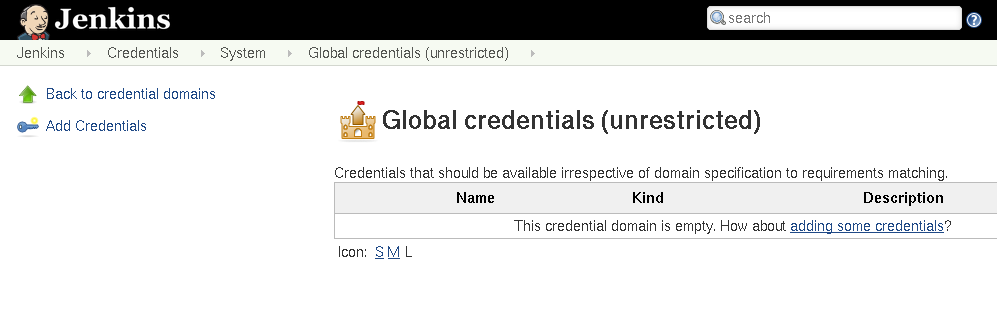
<p><img src="/images/post-images/docker-config-pipeline/adding-credentials.png" alt="Adding credentials to Jenkins" /></p>

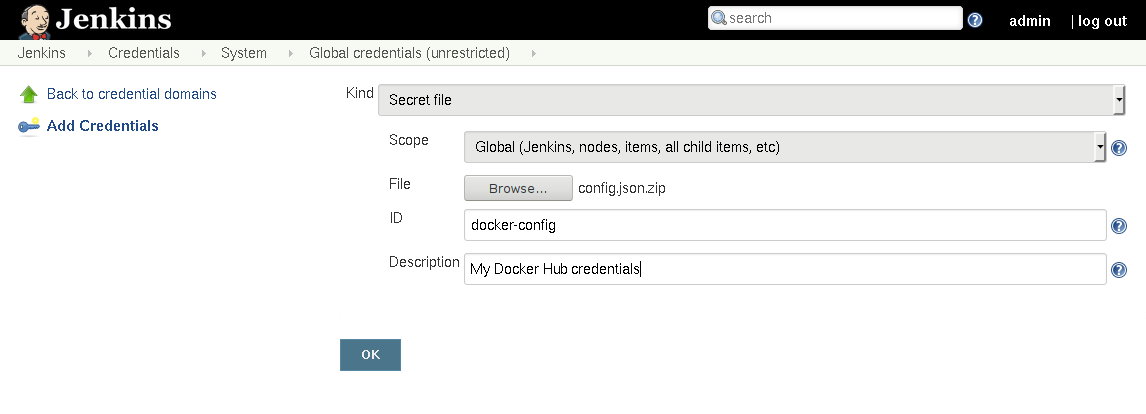
<p>From the “Add Credentials” page, I can then upload the <code class="language-plaintext highlighter-rouge">config.json.zip</code> I
previously created. I will also give this credential a useful,
human-understandable ID, to make it easier to reference in the future.</p>

<p><img src="/images/post-images/docker-config-pipeline/configure-credentials.png" alt="Configuring credentials to Jenkins" /></p>

<p>Once the credential has been saved, I can use it in my Pipeline.</p>

<h3 id="use-credentials-in-pipeline">Use credentials in Pipeline</h3>

<p>This example uses Scripted Pipeline syntax, though it’s relatively trivial to
use the Docker CLI from within Declarative Pipeline syntax to accomplish
something similar.</p>

<p>In my Jenkins environments, I typically label agents which have a <code class="language-plaintext highlighter-rouge">docker.sock</code>
available to Jenkins as “docker”. Since the Pipeline needs to first build the
image, I’m assigning the Pipeline to a “docker” agent.</p>

<p>Once the Pipeline begins to execute, it will first build the container, then
test it (typically using bats or shellcheck), and then publish the container to
Docker Hub.</p>

<div class="language-plaintext highlighter-rouge"><div class="highlight"><pre class="highlight"><code>node('docker') {
    def container
    stage('Build') {
        container = docker.build('zerocool:latest')
    }
    stage('Test') {
        /* test the container */
    }
    stage('Publish') {
        withCredentials([zip(credentialsId: 'docker-config',
                                  variable: 'DOCKER_CONFIG')]) {
            echo 'Pushing to Docker Hub'
            container.push()
        }
    }
}
</code></pre></div></div>

<p>While Declarative Pipeline syntax doesn’t yet support the use of Zip credentials in
the <code class="language-plaintext highlighter-rouge">environment {}</code> directive
(<a href="https://issues.jenkins-ci.org/browse/JENKINS-50021">JENKINS-50021</a>), but the
<code class="language-plaintext highlighter-rouge">withCredentials</code> step can be used with Declarative syntax.</p>

<p>Using the above steps, it’s easy to start building more and more advanced
continuous delivery pipelines for Docker containers, preventing rogue
developers (like myself) from yolo-pushing containers straight from their
laptops to Docker Hub :)</p>]]></content><author><name>R. Tyler Croy</name></author><category term="docker" /><category term="jenkins" /><category term="pipeline" /><summary type="html"><![CDATA[Pulling Docker containers from Docker Hub doesn’t require any special handling or credentials, making it quite simple to consume Docker containers in a Jenkins Pipeline. In this blog post however, I’ll describe a simple pattern which I have been using to programmatically publish Docker containers to Docker Hub from a Jenkins Pipeline.]]></summary></entry><entry><title type="html">Enforcing administrative policy in Jenkins, the hard way</title><link href="https://brokenco.de//2018/01/05/jenkins-policy-enforcement.html" rel="alternate" type="text/html" title="Enforcing administrative policy in Jenkins, the hard way" /><published>2018-01-05T00:00:00+00:00</published><updated>2018-01-05T00:00:00+00:00</updated><id>https://brokenco.de//2018/01/05/jenkins-policy-enforcement</id><content type="html" xml:base="https://brokenco.de//2018/01/05/jenkins-policy-enforcement.html"><![CDATA[<p>One foggy morning a few weeks ago, I received a disk usage alert courtesy of
the Jenkins project’s infrastructure on-call rotation. In every infrastructure
ever, disk usage alerts seem to be the most common alert to crop up, something
<em>somewhere</em> is not properly cleaning up after itself. This time, the alert was
from our own <a href="https://ci.jenkins.io/">Jenkins environment</a>. The logging
filesystem wasn’t the problem, the filesystem hosting <code class="language-plaintext highlighter-rouge">JENKINS_HOME</code> was
perilously close to running out of space. The local time, about 6:20 in the
morning, and yours truly was quietly furious at the back of a bus headed into
San Francisco for the day.</p>

<p>To put it delicately, Jenkins has always been a pain for Systems
Administrators. What was originally a huge selling point, the WYSIWYG
configuration screens, over time, and thanks to the healthy adoption of
“infrastructure as code” tooling such as Puppet, has become a weakness. With the
introduction of “Pipeline as Code” as a core concept in Jenkins 2,
circa 2016, the problem was even further exacerbated.  Empowering developers
with some level of code-driven autonomy is now a key aspect of any modern
development tool, but without corresponding tooling and controls for
administrators, such autonomy rapidly leads to chaos.</p>

<p>Back on the bus ride, the usage of <code class="language-plaintext highlighter-rouge">JENKINS_HOME</code> slowly inched towards 100%. A
quick analysis indicated that most of the disk space was being occupied by
what any capable Jenkins admin would expect:</p>

<ul>
  <li>Old archived artifacts.</li>
  <li>Old test reports.</li>
  <li>Old console logs.</li>
</ul>

<p>With Jenkins Pipeline, developers have control. To the detriment of
administrators like me, who have no (<em>simple</em>) means to systematically enforce
things like log rotation.</p>

<p>That doesn’t mean administrators are left entirely out in the cold, but rather
we have to enforce administrative policy <strong>the hard way</strong>.</p>

<h3 id="scripting-jenkins">Scripting Jenkins</h3>

<p>Jenkins has support for built-in <a href="http://groovy-lang.org">Groovy</a> scripting,
which is the usual solution for enforcing administrative policy in Jenkins.
In order to rectify the disk usage situation, I wrote a little snippet of
Groovy which will forcefully purge <strong>all but the last 5 runs</strong> of every
Pipeline in the “Plugins” folder on the system:</p>

<div class="language-groovy highlighter-rouge"><div class="highlight"><pre class="highlight"><code><span class="n">Jenkins</span><span class="o">.</span><span class="na">instance</span><span class="o">.</span><span class="na">items</span><span class="o">.</span><span class="na">each</span> <span class="o">{</span> <span class="n">f</span> <span class="o">-&gt;</span>
    <span class="k">if</span> <span class="o">(</span><span class="n">f</span><span class="o">.</span><span class="na">name</span> <span class="o">==</span> <span class="s1">'Plugins'</span><span class="o">)</span> <span class="o">{</span>
        <span class="n">f</span><span class="o">.</span><span class="na">items</span><span class="o">.</span><span class="na">each</span> <span class="o">{</span> <span class="n">p</span> <span class="o">-&gt;</span>
            <span class="cm">/* each  p is really a Multibranch Pipeline, which looks like a
             * folder, so need to iterate over its items */</span>
            <span class="n">p</span><span class="o">.</span><span class="na">items</span><span class="o">.</span><span class="na">each</span> <span class="o">{</span> <span class="n">pipeline</span> <span class="o">-&gt;</span>
                <span class="k">if</span> <span class="o">(</span><span class="n">pipeline</span><span class="o">.</span><span class="na">builds</span><span class="o">.</span><span class="na">size</span><span class="o">()</span> <span class="o">&gt;</span> <span class="mi">5</span><span class="o">)</span> <span class="o">{</span>
                    <span class="n">println</span> <span class="s2">"Deleting from ${p}"</span>
                    <span class="cm">/* Delete runs older than the last five */</span>
                    <span class="n">pipeline</span><span class="o">.</span><span class="na">builds</span><span class="o">[</span><span class="mi">5</span> <span class="o">..</span> <span class="o">-</span><span class="mi">1</span><span class="o">].</span><span class="na">each</span> <span class="o">{</span> <span class="n">it</span><span class="o">.</span><span class="na">delete</span><span class="o">()</span> <span class="o">}</span>
                <span class="o">}</span>
            <span class="o">}</span>
        <span class="o">}</span>
    <span class="o">}</span>
<span class="o">}</span>
</code></pre></div></div>

<p>Scary! Right now I have only added this little Groovy script to the
infrastructure team’s runbooks. If I wanted to enforce this more
systematically, I would add file to the <code class="language-plaintext highlighter-rouge">init.groovy.d/</code> directory on the
Jenkins master.</p>

<h4 id="initgroovyd">init.groovy.d</h4>

<p>Many administrators aren’t aware of the <code class="language-plaintext highlighter-rouge">init.groovy.d/</code> directory, which can
be added to <code class="language-plaintext highlighter-rouge">JENKINS_HOME</code>. The <em>really really</em> useful characteristic of Groovy
scripts added to <code class="language-plaintext highlighter-rouge">init.groovy.d/</code> is that they are executed after Jenkins
plugins are loaded, but before Jenkins is “ready” and starts accepting web
requests or executing workloads. These qualities make <code class="language-plaintext highlighter-rouge">init.groovy.d/</code> an ideal
place to insert scripts which:</p>

<ul>
  <li><strong>Clean up the filesystem</strong>, such as with my forceful log rotation script
referenced above.</li>
  <li><strong>Enforce security policy</strong>, like my Groovy scripts which <a href="https://github.com/CodeValet/master/blob/master/init.groovy.d/disable-cli.groovy">disable the
Jenkins CLI</a>, or <a href="https://github.com/CodeValet/master/blob/master/init.groovy.d/setup-github-oauth.groovy">configure GitHub OAuth-based authentication and authorization</a>.</li>
  <li><strong>Configure monitoring tooling</strong>, such as <a href="https://github.com/CodeValet/master/blob/master/init.groovy.d/configure-datadog.groovy">the Datadog
plugin</a></li>
  <li><strong>Pre-configure Pipeline Libraries</strong>, like those which should be <a href="https://github.com/CodeValet/master/blob/master/init.groovy.d/pipeline-global-configuration.groovy">enabled
globally for all Pipelines</a></li>
</ul>

<p>As I mentioned in my previous post <a href="/2017/07/24/groovy-automation-for-jenkins.html">Developing Groovy Scripts to Automate
Jenkins</a>, creating these
scripts requires a <strong>lot</strong> of knowledge about how Jenkins works on the inside.
While this is definitely “the hard way,” the end result is a much more
automated and manageable Jenkins environment.</p>

<p>To learn more about scripting Jenkins, I highly recommend the talk embedded
below, given by my pal Sam Gleske at Jenkins World 2017.</p>

<center><iframe width="560" height="315" src="https://www.youtube-nocookie.com/embed/qaUPESDcsGg" frameborder="0" gesture="media" allow="encrypted-media" allowfullscreen=""></iframe><br /></center>

<h3 id="scripting-pipeline">Scripting Pipeline</h3>

<p>In my previous post <a href="/2017/08/03/overriding-builtin-steps-pipeline.html">Overriding steps in Pipeline with Shared Library sleight
of hand</a>, I discussed another
option for enforcing administrative policy: overriding Pipeline steps. While I
won’t repeat too much, I do wish to point out a very useful pattern to
consider: enforcing timeouts on built-in steps. Take the <code class="language-plaintext highlighter-rouge">sh</code> step as an
example, by default in Jenkins there is no built-in, configurable or otherwise,
way to constrain the time spent by a step. This means a malicious or
incompetent developer can run script which performs an infinite loop,
wastefully tying up resources in the Jenkins environment.</p>

<p>By overriding the <code class="language-plaintext highlighter-rouge">sh</code> step, I can wrap it with a 2 hour timeout safe-guard as
is implemented below. Once the Shared Library has been implicitly loaded in the
Global Pipeline Libraries configuration, developers won’t notice any changes,
but the beleaguered administrator will sleep a bit easier at night.</p>

<div class="language-groovy highlighter-rouge"><div class="highlight"><pre class="highlight"><code><span class="kt">def</span> <span class="nf">call</span><span class="o">(</span><span class="n">Map</span> <span class="n">params</span> <span class="o">=</span> <span class="o">[:])</span> <span class="o">{</span>
    <span class="n">String</span> <span class="n">script</span> <span class="o">=</span> <span class="n">params</span><span class="o">.</span><span class="na">script</span>
    <span class="n">Boolean</span> <span class="n">returnStatus</span> <span class="o">=</span> <span class="n">params</span><span class="o">.</span><span class="na">get</span><span class="o">(</span><span class="s1">'returnStatus'</span><span class="o">,</span> <span class="kc">false</span><span class="o">)</span>
    <span class="n">Boolean</span> <span class="n">returnStdout</span> <span class="o">=</span> <span class="n">params</span><span class="o">.</span><span class="na">get</span><span class="o">(</span><span class="s1">'returnStdout'</span><span class="o">,</span> <span class="kc">false</span><span class="o">)</span>
    <span class="n">String</span> <span class="n">encoding</span> <span class="o">=</span> <span class="n">params</span><span class="o">.</span><span class="na">get</span><span class="o">(</span><span class="s1">'encoding'</span><span class="o">,</span> <span class="kc">null</span><span class="o">)</span>

    <span class="n">timeout</span><span class="o">(</span><span class="nl">time:</span> <span class="mi">2</span><span class="o">,</span> <span class="nl">unit:</span> <span class="n">HOURS</span><span class="o">)</span> <span class="o">{</span>
        <span class="cm">/* invoke the built-in sh step */</span>
        <span class="k">return</span> <span class="n">steps</span><span class="o">.</span><span class="na">sh</span><span class="o">(</span><span class="nl">script:</span> <span class="n">script</span><span class="o">,</span>
                    <span class="nl">returnStatus:</span> <span class="n">returnStatus</span><span class="o">,</span>
                    <span class="nl">returnStdout:</span> <span class="n">returnStdout</span><span class="o">,</span>
                        <span class="nl">encoding:</span> <span class="n">encoding</span><span class="o">)</span>
    <span class="o">}</span>
<span class="o">}</span>
<span class="cm">/* Convenience overload */</span>
<span class="kt">def</span> <span class="nf">call</span><span class="o">(</span><span class="n">String</span> <span class="n">script</span><span class="o">)</span> <span class="o">{</span>
    <span class="k">return</span> <span class="nf">call</span><span class="o">(</span><span class="nl">script:</span> <span class="n">script</span><span class="o">)</span>
<span class="o">}</span>
</code></pre></div></div>

<h3 id="an-easier-way">An easier way?</h3>

<p>Work is currently being undertaken, spear-headed by <a href="https://github.com/ewelinawilkosz2">Ewelina
Wilkosz</a> at Praqma
under <a href="https://github.com/jenkinsci/jep/tree/master/jep/201">JEP-201</a> titled
“Configuration as Code.”</p>

<blockquote>
  <p>We want to introduce a simple way to define Jenkins configuration from a
declarative document that would be accessible even to newcomers. Such a
document should replicate the web UI user experience so the resulting structure
looks natural to end user. Jenkins components have to be identified by
convention or user-friendly names rather than by actual implementation class
name.</p>
</blockquote>

<p>While I haven’t had the time to really dive deeper into what Ewelina and her
crew are proposing, they are certainly in the right ballpark for making Jenkins
easier to administer, and policies easier to enforce.</p>

<hr />

<p>Once you come to terms with scripting Jenkins, there are a number of ways in
which policy can be enforced using those scripts. My current preferred method
is to use <code class="language-plaintext highlighter-rouge">init.groovy.d/</code>, but those only apply during boot/restarts. It’s
also possible to execute those very same scripts via the Jenkins CLI, which I
have done in the past. Through a clever combination of shell, Groovy, and
Puppet scripting, it’s possible to write idempotent scripts which Puppet can
run every time the Puppet Agent runs, ensuring on-going compliance.</p>

<p>Just because it isn’t easy, doesn’t mean it’s impossible,</p>]]></content><author><name>R. Tyler Croy</name></author><category term="cicd" /><category term="jenkins" /><category term="opinion" /><category term="pipeline" /><summary type="html"><![CDATA[One foggy morning a few weeks ago, I received a disk usage alert courtesy of the Jenkins project’s infrastructure on-call rotation. In every infrastructure ever, disk usage alerts seem to be the most common alert to crop up, something somewhere is not properly cleaning up after itself. This time, the alert was from our own Jenkins environment. The logging filesystem wasn’t the problem, the filesystem hosting JENKINS_HOME was perilously close to running out of space. The local time, about 6:20 in the morning, and yours truly was quietly furious at the back of a bus headed into San Francisco for the day.]]></summary></entry><entry><title type="html">Transparently supporting external Artifacts in Jenkins</title><link href="https://brokenco.de//2018/01/04/external-artifacts-jenkins.html" rel="alternate" type="text/html" title="Transparently supporting external Artifacts in Jenkins" /><published>2018-01-04T00:00:00+00:00</published><updated>2018-01-04T00:00:00+00:00</updated><id>https://brokenco.de//2018/01/04/external-artifacts-jenkins</id><content type="html" xml:base="https://brokenco.de//2018/01/04/external-artifacts-jenkins.html"><![CDATA[<p>One of the first pain points many organizations endure when scaling Jenkins is
the rapid accumulation of artifacts on their master’s filesystem. Artifacts
are typically built packages such as <code class="language-plaintext highlighter-rouge">.jar</code>, <code class="language-plaintext highlighter-rouge">.tar.gz</code>, or <code class="language-plaintext highlighter-rouge">.img</code>
files, which are useful to persist after a Pipeline Run has completed for later
review as necessary. The problem that manifests over time, is quite
predictable, archived artifacts incur significant disk usage on the master’s
filesystem and the network traffic necessary to store and serve the artifacts
becomes a non-trivial problem for the availability of the Jenkins master.</p>

<p>Perhaps one of my “favorite” (read: not my favorite) responses from the “Not
Actually Helpful Brigade” to questions or
concerns about scaling artifact storage on the
Jenkins mailing list is something along the lines: “Archived artifacts aren’t
supposed to be used like that, you should really be using Artifactory or
Nexus.”</p>

<p><strong>Not. Actually. Helpful.</strong></p>

<p>One of my number one pet-peeves with any piece of software is when people tell
me that I’m using it wrong. <strong>No.</strong> If I’m not supposed to use Jenkins in this
fashion, and Jenkins doesn’t prevent me from doing so, that’s a bug in Jenkins,
full stop.</p>

<p>While discussing this a bit with my crazy-idea co-conspirator
<a href="https://github.com/i386">Jimbo</a>, I came to a delightfully devious idea: <strong>what
if I could transparently make artifact archival external to Jenkins?</strong></p>

<p>Traditionally in Jenkins people solve problems with plugins. I hate plugins. I
hate to write them. I hate managing their N-different upgrade lifecycles in
Jenkins environments I maintain. I hate that “write a plugin” is the de-facto
answer given to many who wish to do interesting things in Jenkins.</p>

<p>I do, however, love Jenkins Pipeline. I love writing Jenkins Pipeline. I love
that I can put Jenkins Pipelines in a <code class="language-plaintext highlighter-rouge">Jenkinsfile</code> and check it into my source
repo. I love that I can do many interesting things with Jenkins via Pipelines.</p>

<h3 id="implementing-crazy-things">Implementing crazy things</h3>

<p>Pipeline provides two steps, <code class="language-plaintext highlighter-rouge">archive</code> which was deprecated against all
sensible logic, and <code class="language-plaintext highlighter-rouge">archiveArtifacts</code> which does the exact same thing with
more arguments and verbosity. Starting with the <a href="/2017/08/03/overriding-builtin-steps-pipeline.html">overriding built-in
steps</a> pattern, which I
discussed last August, I set about re-implementing these two steps in a <a href="https://jenkins.io/doc/book/pipeline/shared-libraries/">Shared
Library</a></p>

<p>Part of the challenge with implementing a Pipeline Shared Library is that the
Groovy code implemented in them executes within the Jenkins <strong>master</strong> JVM,
whereas Pipeline <em>steps</em> execute within the Jenkins <strong>agent</strong> JVM. The
consequence of this is that I cannot simply load a Java library which supports
uploading files to Azure Blob Storage (for example) because when that code
would execute, it would be executing inside the Jenkins <strong>master</strong> rather than
the <strong>agent</strong> and therefore would not have access to the filesystem.</p>

<p>Approaching this problem from a slightly different angle: I need to be able to
get “my” Pipeline Shared Library code to execute on the <strong>agent</strong> in order to
have access to the filesystem. Reaching into my Pipeline bag of tricks, which
looks suspiciously similar to my Pipeline pit of despair, I grabbed the
built-in <code class="language-plaintext highlighter-rouge">libraryResource</code> step which can “Load a resource file from a shared
library.” The following snippet of (Scripted Pipeline) code will allow me to drop code onto an
<strong>agent</strong> for execution:</p>

<div class="language-plaintext highlighter-rouge"><div class="highlight"><pre class="highlight"><code>    String uploadScript =  libraryResource 'io/codevalet/externalartifacts/upload-file-azure.sh'
    writeFile file: 'my-special-script', text: uploadScript
    sh 'bash my-special-script'
</code></pre></div></div>

<p>Overriding <code class="language-plaintext highlighter-rouge">archiveArtifacts</code> is only half of the solution however, from the
web UI in Jenkins, end-users should still be able to access the archived
artifacts.</p>

<p>Included in my
<a href="https://github.com/CodeValet/external-artifacts/blob/master/vars/archiveArtifacts.groovy">override</a>
is code which will generate an HTML file with a redirect to the artifact in
Azure, and use the <em>actual</em> built-in <code class="language-plaintext highlighter-rouge">archiveArtifacts</code> to store that.
Presently I don’t have a more elegant solution for a “artifact pointer” but I’m
sure that could be solved via an actual plugin :).</p>

<p>By defining some environment variables and credentials at an administrative
level, to indicate where artifacts should be stored, and by using the “Load
Implicitly” pattern discussed in the <a href="/2017/08/03/overriding-builtin-steps-pipeline.html">overriding built-in
steps</a> blog post, I can
override the artifact archival for end-users in my Jenkins environment.</p>

<p><img src="/images/post-images/external-artifacts/finished-flow.png" alt="Finished product" /></p>

<h3 id="future-work">Future work</h3>

<p>My <a href="https://github.com/CodeValet/external-artifacts">current work-in-progress</a>
relies on a crazy Bash script for uploading files to Azure, which means it has
some system dependencies and does not work on Windows. I plan to work around
this by implementing the artifact upload with Go and embedding Go binaries in
the Shared Library for delivery with <code class="language-plaintext highlighter-rouge">libraryResource</code>.</p>

<p>The other bit of future work I would like to implement is <code class="language-plaintext highlighter-rouge">unarchive</code>, which is
actually a real built-in step in Pipeline, but doesn’t seem to actually be
usable in any tangible sense. There are some cross-Pipeline use-cases for
“unarchiving” an artifact for re-use, which is currently not well supported in
Pipeline.</p>

<p>Another potential area of exploration would be overriding <code class="language-plaintext highlighter-rouge">stash</code> and <code class="language-plaintext highlighter-rouge">unstash</code>
steps to use this external artifact storage mechanism to avoid some of the
<a href="https://jenkins.io/projects/remoting/">Remoting</a> performance penalties which
are associated with larger stashes.</p>

<h3 id="conclusion">Conclusion</h3>
<p>.
After a night of fervent hacking on this experiment, I cannot yet confidently
state whether it’s a terrible or brilliant idea. I do think this approach has
the potential to be an “easy win” for making Jenkins more scalable, without
requiring significant surgery in Jenkins core or the surrounding plugins.</p>

<p>Assuming this pattern has potential, I can imagine it being trivial to support
S3, Azure Blob Storage, Swift, and any number of other storage backends. If
they can be supported via a simple Go program, then why not!</p>]]></content><author><name>R. Tyler Croy</name></author><category term="jenkins" /><category term="azure" /><category term="pipeline" /><summary type="html"><![CDATA[One of the first pain points many organizations endure when scaling Jenkins is the rapid accumulation of artifacts on their master’s filesystem. Artifacts are typically built packages such as .jar, .tar.gz, or .img files, which are useful to persist after a Pipeline Run has completed for later review as necessary. The problem that manifests over time, is quite predictable, archived artifacts incur significant disk usage on the master’s filesystem and the network traffic necessary to store and serve the artifacts becomes a non-trivial problem for the availability of the Jenkins master.]]></summary></entry><entry><title type="html">A genuinely terrible abuse of Jenkins Pipeline</title><link href="https://brokenco.de//2017/08/07/jenkins-pipeline-shell.html" rel="alternate" type="text/html" title="A genuinely terrible abuse of Jenkins Pipeline" /><published>2017-08-07T00:00:00+00:00</published><updated>2017-08-07T00:00:00+00:00</updated><id>https://brokenco.de//2017/08/07/jenkins-pipeline-shell</id><content type="html" xml:base="https://brokenco.de//2017/08/07/jenkins-pipeline-shell.html"><![CDATA[<p>I consider myself one of the world’s foremost experts in terrible ways to use
<a href="https://jenkins.io/">Jenkins</a>, partially because my brain is awash with awful
ideas, but also because I have been around the project long enough to see
hundreds of different “clever” (ab)uses of Jenkins. Today I thought I would
share something I came up with a few weeks ago which, to date, might be one of
my more deplorable creations.</p>

<p><strong>If you are responsible for a Jenkins instnce, please ensure your plugins are
upgraded in accordance with <a href="https://jenkins.io/security/advisory/2017-08-07">this security
advisory</a> immediately</strong>.</p>

<hr />

<p><strong>DISCLAIMER</strong></p>

<blockquote>
  <p>Jenkins, like many other CI/CD tools, runs code typically stored in a source
control repository. If you cannot trust people to run “arbitrary” code in your
CI/CD environment then you should reconsider whether you trust them to commit
to the repository. This is especially important with pre-merge validation
like that conventionally performed on pull requests. If running “arbitrary”
code on your CI/CD infrastructure makes you queasy, I strongly recommend
reconsidering your security model, particularly how long instances live, and
where secrets are stored.</p>
</blockquote>

<hr />

<p><a href="https://jenkins.io/doc/book/pipeline">Jenkins Pipeline</a> is an incredibly
useful tool for codifying continuous delivery pipelines in code
(<code class="language-plaintext highlighter-rouge">Jenkinsfile</code>). Made popular with the Jenkins 2.0 release last year, I can
honestly say that I no longer allow “Freestyle projects” in the Jenkins
environments I manage. It’s so fundamentally better than what preceded it, that
I do not wish to ever return to configuring jobs manually in Jenkins.</p>

<p>Jenkins Pipeline exists in two forms, Declarative and Scripted Pipeline, both
of which are, in essence, domain-specific languages. Also known as “code.”</p>

<p>Since it is just “code”, it can be abused! Lo and behold, Pipeline Shell:</p>

<div class="language-plaintext highlighter-rouge"><div class="highlight"><pre class="highlight"><code>#!/usr/bin/env groovy

def label = input(message: 'Pick an agent:', parameters: [string(defaultValue: '', description: 'Agent name or label', name: 'Agent')])

node(label) {
    def lastCommand = 'ls'
    while (true) {
        lastCommand = input(message: 'Execute on the host:', ok: 'Run', parameters: [string(defaultValue: lastCommand, description: '', name: 'Command')])

        sh(returnStatus: true, script: lastCommand)
    }
}
</code></pre></div></div>

<p>(<a href="https://gist.github.com/rtyler/6f4993999c1ff03226abb22edcb9486a">click here for the terribad hosted on
GitHub</a>)</p>

<p>The Scripted Pipeline above (ab)uses the <code class="language-plaintext highlighter-rouge">input</code> step which blocks the
executing Pipeline until a user provides input. The <code class="language-plaintext highlighter-rouge">input</code> step is
fantastically useful for authorizing a deployment or providing some form of
user input mid-Pipeline. With some built-in semantics of Groovy, I can loop
over the <code class="language-plaintext highlighter-rouge">input</code> step, and naturally, this means I can run an infinite number
of commands. Additionally, as the screenshot below demonstrates with <a href="https://jenkins.io/projects/blueocean">Blue
Ocean</a>, execute the command and receive
the output from a machine in my Jenkins environment.</p>

<p><img src="/images/post-images/jenkins-pipeline-abuse/blueocean-shell.png" alt="Jenkins Pipeline Shell" /></p>

<p>How unabashedly awful. At the same time, I can think of a good half-dozen
ways in which this pattern can be very useful too! With great power comes
great… something or other.</p>

<p>For example, if you have ever had to debug issues on a long-lived Jenkins agent
hosted behind a firewall (or something which runs an agent but has no <code class="language-plaintext highlighter-rouge">sshd</code>),
this could be very helpful! Of course, if you’re trusting a firewall to provide
some protection against the workloads running on a Jenkins agent, this coulde
be very terrifying (and, by the way, your security model would be incorrect if
you’re relying purely on network security here).</p>

<p>Or perhaps the build takes an eternity, and something goes haywire, but only in
Jenkins, right in the middle of the Pipeline. Dropping in this little <code class="language-plaintext highlighter-rouge">input</code>
loop gives you a tool to investigate the agent’s filesystem and state
mid-Pipeline run.</p>

<p>Or what about when you’re bored, and you just want to watch the world burn?</p>

<hr />

<p><strong>NOTE</strong>: Don’t ever run <strong>any</strong> CI/CD workload from a developer on a network
who you wouldn’t trust to have direct access to said network.  You’re running
“arbitrary” code for crying out loud.</p>

<hr />

<p>Regardless of how you feel about this abuse of the Pipeline DSL, please consider
how you felt when your eyes scanned over the dozen or so lines of Scripted
Pipeline. If this made you feel nervous please remember that:</p>

<p><strong>all CI/CD systems run arbitrary code from source control.</strong></p>

<p>Your CI/CD environment should work with this assumption as a central part of
the security model. If you cannot trust the <code class="language-plaintext highlighter-rouge">Jenkinsfile</code> from the source
repository, why can you trust the <code class="language-plaintext highlighter-rouge">Makefile</code>?</p>

<p>I strongly recommend <a href="https://www.blackhat.com/docs/eu-15/materials/eu-15-Mittal-Continuous-Intrusion-Why-CI-Tools-Are-An-Attackers-Best-Friend.pdf">this presentation from
Blackhat</a>
a few years ago. While some of the criticisms of Jenkins were
fixed as of Jenkins 2, the fundamental security concerns of running “arbitrary”
code on machines is still relevant to the discussion here.</p>

<p>People sometimes joke that Jenkins is “cron with a web UI”, but I will
typically refer to it as “remote code execution as a service.” A statement
which garners some uncomfortable laughs. If you’re not thinking of
CI/CD systems like Jenkins, GoCD, Bamboo, GitLab, or buildbot as such, you
might be sticking your head in the proverbial sand, and not adequately
addressing some important security ramifications of the tool.</p>]]></content><author><name>R. Tyler Croy</name></author><category term="pipeline" /><category term="jenkins" /><summary type="html"><![CDATA[I consider myself one of the world’s foremost experts in terrible ways to use Jenkins, partially because my brain is awash with awful ideas, but also because I have been around the project long enough to see hundreds of different “clever” (ab)uses of Jenkins. Today I thought I would share something I came up with a few weeks ago which, to date, might be one of my more deplorable creations.]]></summary></entry><entry><title type="html">Do not disable the Groovy Sandbox</title><link href="https://brokenco.de//2017/08/03/donut-disable-groovy-sandbox.html" rel="alternate" type="text/html" title="Do not disable the Groovy Sandbox" /><published>2017-08-03T00:00:00+00:00</published><updated>2017-08-03T00:00:00+00:00</updated><id>https://brokenco.de//2017/08/03/donut-disable-groovy-sandbox</id><content type="html" xml:base="https://brokenco.de//2017/08/03/donut-disable-groovy-sandbox.html"><![CDATA[<p>One of the things I have worked on this week has been documenting the
“In-process Script Approval” and some of sandboxing features in Jenkins
Pipeline. While waiting for some pull requests to be reviewed I had the thought
“how bad could disabling the sandbox be?”</p>

<p>The Groovy Sandbox is enabled by default, helping to protect the Jenkins
instance from scripts which are incompetent, malicious, or both. Being Jenkins,
naturally, if you want to purchase the ammunition, load the gun, and point it
directly at your foot, Jenkins <em>will</em> let you shoot it.</p>

<p><img src="/images/post-images/groovy-sandbox/unchecked-groovy-sandbox-on-pipeline.png" alt="Disabling the Groovy Sandbox" /></p>

<p>What’s the worst that could happen?</p>

<p><strong>VERY VERY BAD THINGS CAN HAPPEN</strong></p>

<p><strong>NEVER DISABLE THE GROOVY SANDBOX</strong></p>

<p><strong>DID YOU HEAR ME? IT’S A TERRIBLE TERRIBLE IDEA JUST DON’T DO IT</strong></p>

<p>With that disclaimer out of the way. Disabling the Groovy Sandbox means that a
Scripted Pipeline can access, and more importantly manipulate, Jenkins’
internal objects.</p>

<p><strong>VERY VERY BAD THINGS CAN HAPPEN</strong></p>

<p><strong>NEVER DISABLE THE GROOVY SANDBOX</strong></p>

<p><strong>DID YOU HEAR ME? IT’S A TERRIBLE TERRIBLE IDEA JUST DON’T DO IT</strong></p>

<p>Okay with that second, more important, disclaimer out of the way. I spent some
time thinking about “really, what <em>is</em> the worst that could happen?”</p>

<p>Below is an example Pipeline which, if run outside of the Groovy Sandbox will:</p>

<ul>
  <li>Delete every other Pipeline, Job, Folder, except itself</li>
  <li>Overwrite its own “Script” block with an innocuous <code class="language-plaintext highlighter-rouge">echo "Hello World"</code> script, with the sandbox enabled of course!</li>
  <li>Delete all previous Pipeline runs.</li>
  <li>Trigger a new run of itself to wipe out all of itself.</li>
</ul>

<p>All from one little script!</p>

<div class="language-plaintext highlighter-rouge"><div class="highlight"><pre class="highlight"><code>import org.jenkinsci.plugins.workflow.cps.CpsFlowDefinition

@NonCPS
def hulkSmash() {
    Jenkins.instance.items.each { 
        if (it.name != env.JOB_NAME) {
            it.delete()
        }
        else {
            it.definition = new CpsFlowDefinition('echo "Hello World"', true)
            it.save()
            it.builds.each { f -&gt; f.delete() }
        }
    }
}

hulkSmash()
build job: env.JOB_NAME
</code></pre></div></div>

<p>Suffice it to say, <strong>never ever</strong> disable the Groovy Sandbox.</p>]]></content><author><name>R. Tyler Croy</name></author><category term="pipeline" /><category term="jenkins" /><summary type="html"><![CDATA[One of the things I have worked on this week has been documenting the “In-process Script Approval” and some of sandboxing features in Jenkins Pipeline. While waiting for some pull requests to be reviewed I had the thought “how bad could disabling the sandbox be?”]]></summary></entry></feed>